Before: Marcus ran three clothing boutiques on a spreadsheet — Monday payroll took 4 hours, and three overtime miscalculations in one year cost him his best store manager. After: QR clock-in tied to automated payroll calculation. Pay errors: 3 → 0 annually. Monday payroll time: 4 → 20 minutes. Twenty-four consecutive clean pay cycles.
The difference wasn’t a bigger budget or a new accountant. It was eliminating the manual steps where errors enter the payroll process.
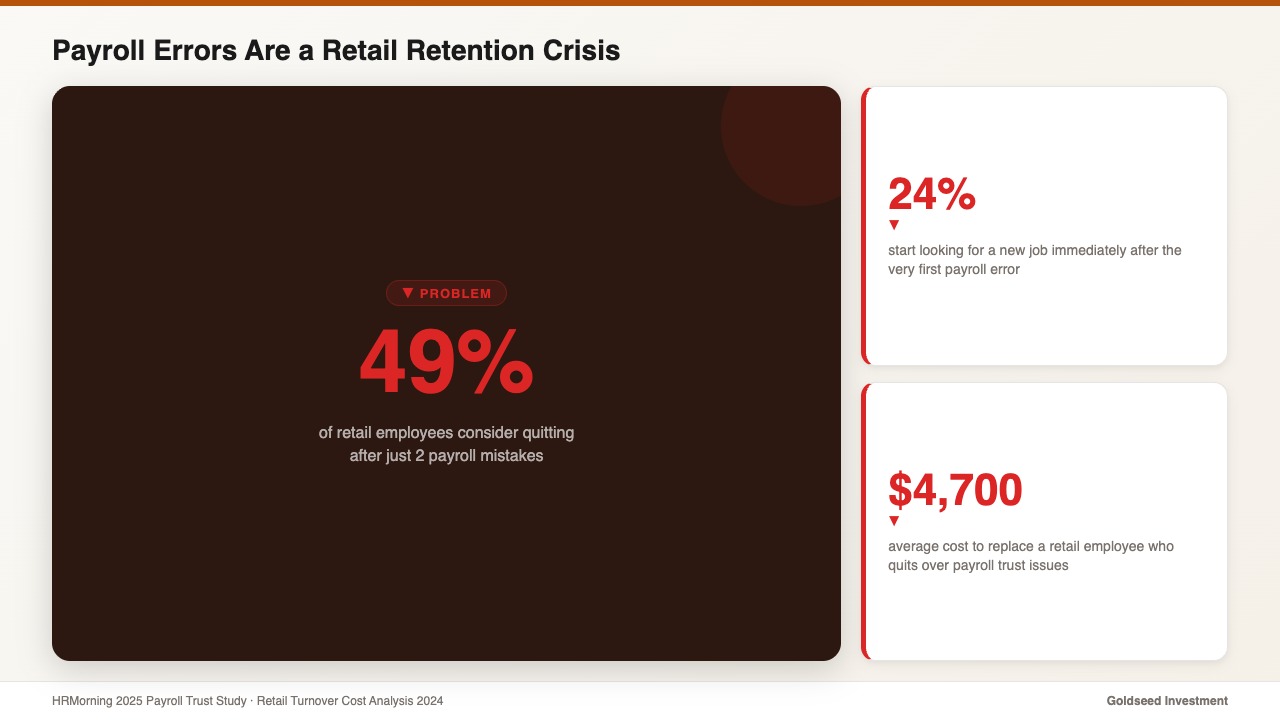
Marcus’s story is statistically representative. According to a 2025 HRMorning payroll trust study, 53% of retail employees say they’d consider leaving if payroll problems continued. Nearly half — 49% — consider quitting after just two payroll mistakes. And 24% start looking for a new job after the very first error — before they’ve said anything to management.
The cost of a single payroll error is $291 to fix on average. The cost of the employee who leaves because of repeated errors: $1,500–$4,700 in recruiting and onboarding. The ROI of payroll automation — eliminating errors at the source — is typically $5+ per $1 invested, with payback within two pay cycles for most retail operations. For more on how overtime and scheduling errors affect staff retention, see how reducing overtime impacts retail staff in 2026.
Why Retail Payroll Errors Are Costly: The 2026 Numbers
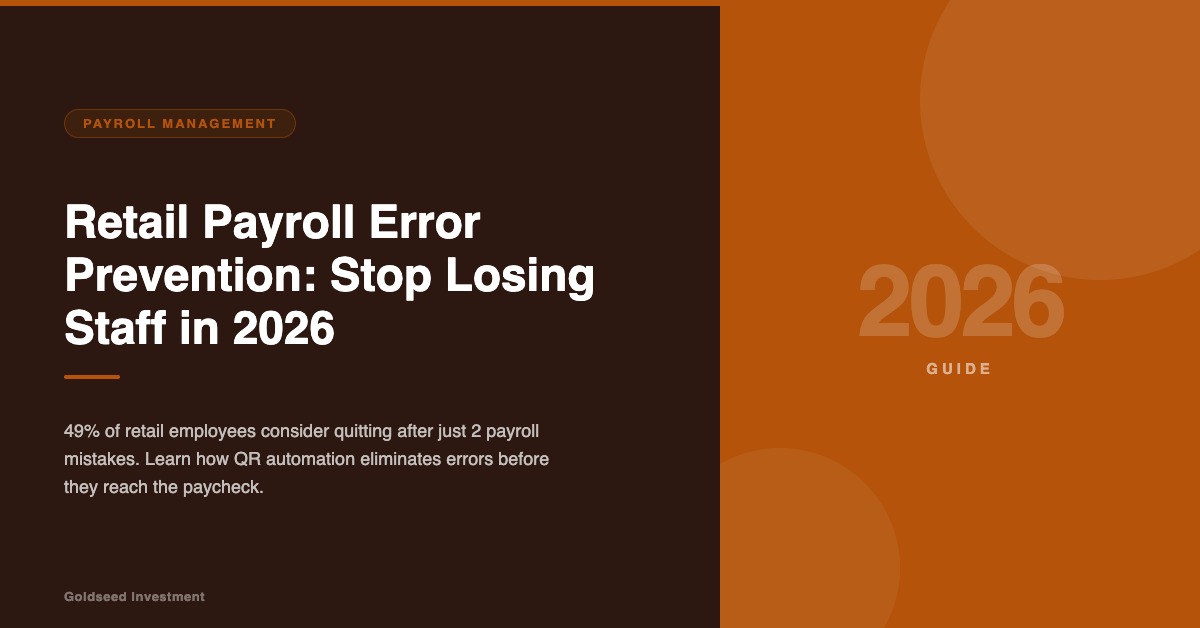
Most retail owners think of payroll errors as a correction problem — find the mistake, fix it, move on. The 2024–2026 data shows the damage runs much deeper.
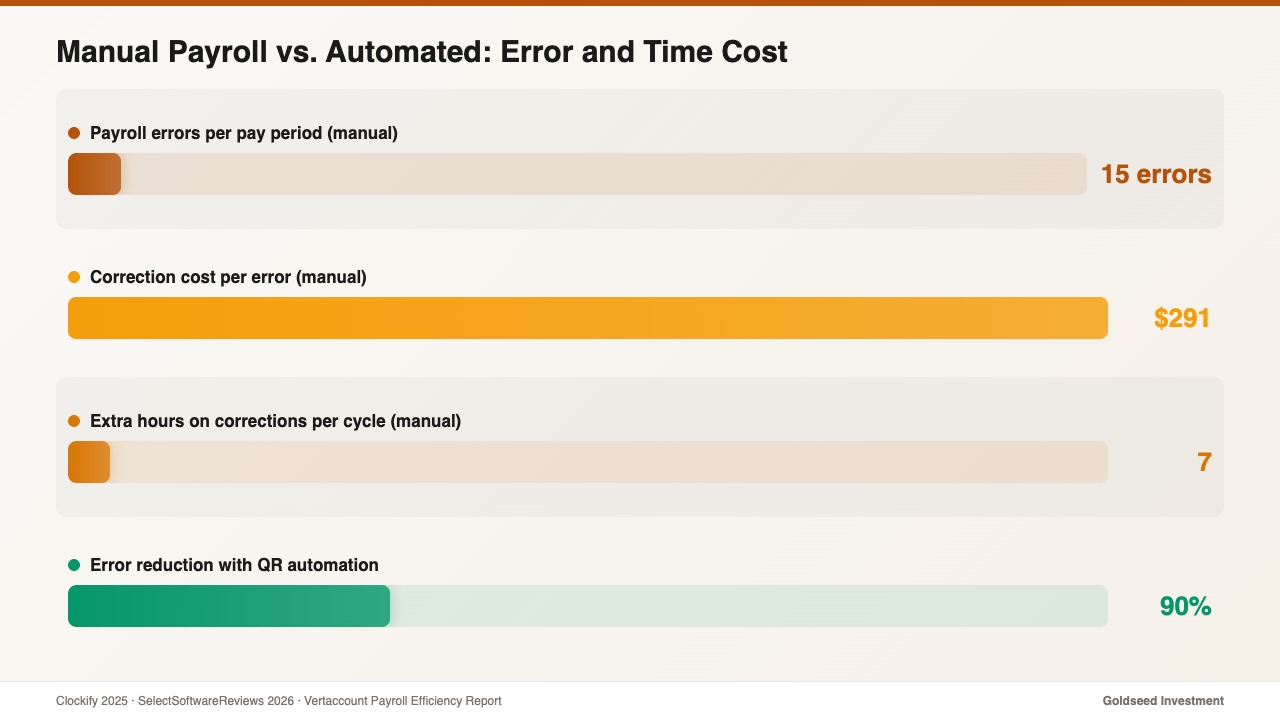
Error frequency is higher than expected. According to payroll research compiled by Clockify and SelectSoftwareReviews (2025–2026), the average company makes 15 payroll errors per pay period. For a monthly cycle, that’s 15 corrections averaging $291 each — $4,365 per month in preventable overhead.
Employee trust damage is fast and lasting. Twenty-one percent of employees say payroll issues caused them to lose trust in their employer. In retail, where payroll is often the only direct financial relationship between a worker and the business, trust damage tends to translate directly into resignation intent.
The regulatory risk is underestimated. A 2026 Patriot Software survey found 25% of small businesses are fined for payroll tax mistakes. Overtime miscalculations under FLSA may trigger back pay plus liquidated damages — often double the underpayment — plus legal fees if escalated to the Department of Labor. A payroll error that appears minor internally can become a four-figure regulatory exposure.
Turnover compound costs are significant. Research from 2024 payroll automation ROI analysis estimates total annual cost driven by payroll errors at $466,000 to $1.86 million for mid-size organizations when recruiting, onboarding, productivity loss, and continued errors are included. The U.S. Bureau of Labor Statistics consistently tracks retail as one of the highest-turnover sectors — making payroll accuracy a direct retention lever, not just a compliance requirement.
For full context on the labor cost picture in retail, see retail employee benefits cost and retention breakdown 2026.
The 5 Root Causes of Retail Payroll Errors
Preventing retail payroll errors begins with understanding exactly where they enter the process. In most retail stores, five failure points account for the majority of mistakes.
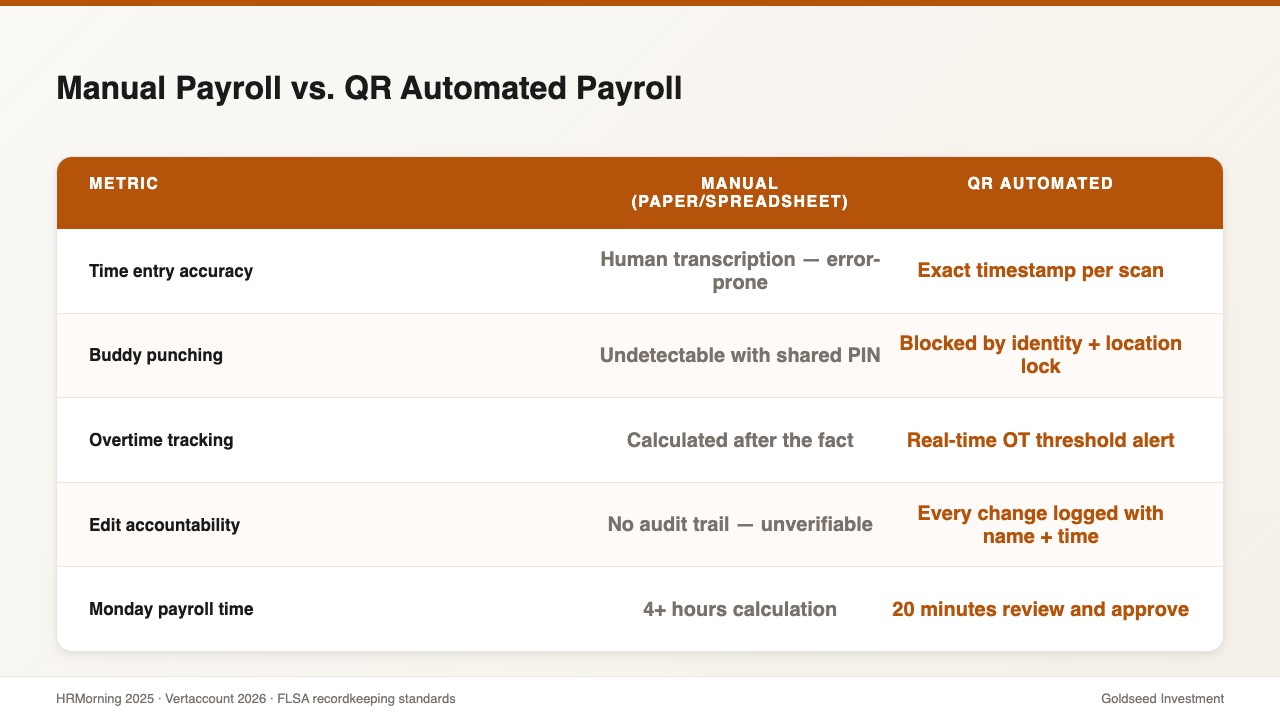
1. Manual time entry. When employees report hours on paper timesheets or managers key hours from memory into a spreadsheet, transcription errors are inevitable. A “7.5” becomes “7.” An 8-hour shift becomes 8.5 because a manager assumes the employee stayed to close. These small errors, multiplied across 15–30 employees over 24–52 pay cycles per year, create significant cumulative inaccuracy in payroll.
2. Overtime miscalculation. FLSA requires overtime for hours over 40 per workweek. Many states require daily overtime for hours over 8. Retail workers who split shifts, cover departments at different pay rates, or span month boundaries differently from the pay period create edge cases that manual calculation typically misses. Each edge case is a payroll leakage event waiting to happen.
3. Split-shift and differential pay errors. Many retail stores pay different rates for opening shifts, closing shifts, or holiday coverage. Manually applying the correct rate to the correct hours — across 20+ employees with varying schedules — is generally impossible to sustain without errors.
4. Unverified clock-in records. When employees self-report hours or use a shared PIN code, two problems arise. First, buddy punching — one employee clocking in for an absent colleague — costs U.S. businesses an estimated $400 million annually according to workforce management research. Second, informal clock-out times are rounded, inflated, or forgotten, creating hours that look legitimate but don’t match actual presence.
5. No audit trail for corrections. An employee disputes their hours. The manager reviews, agrees, and makes a mental note to adjust next cycle. The adjustment gets forgotten, or entered incorrectly. In manual payroll systems, there’s no record of what was changed, by whom, or when — turning every dispute into a memory contest with no resolution.
Prevention Strategy 1: QR Clock-In Eliminates Manual Time Entry
The single highest-impact change a retail owner can make to prevent payroll errors is eliminating manual time entry entirely. QR code clock-in is the most practical way to do this at retail scale.
Each employee gets a unique QR code tied to their identity. When they arrive, they scan at a fixed station at the store entrance. The system records the exact time, links it to their profile, and logs the location — making remote or off-site clock-ins impossible.
Before QR clock-in: Paper timesheets → manual entry to payroll → errors discovered at payday → correction costs $291+ per error → employee trust damaged After QR clock-in: Scan on arrival and departure → exact timestamps auto-logged → no manual entry → payroll calculates from verified data → clean pay cycles
Clock-in times are precise to the minute. Buddy punching is blocked because the code is tied to identity and location. Late arrivals, early departures, and missed punches are flagged for manager review — before payroll runs, not after.
For overtime prevention specifically: QR clock-in data feeds directly into cumulative hours tracking. The system alerts managers in real time when any employee approaches their OT threshold, allowing proactive shift adjustment instead of reactive correction.
Prevention Strategy 2: Automated Payroll Calculation
Collecting accurate clock-in data is step one. Error prevention is only complete when that data flows directly into payroll calculation without a human transcription step in between.
Manual transfer of clock-in records to payroll is where the most costly errors occur: hours keyed incorrectly, overtime applied with the wrong threshold, pay rate changes not applied to the correct date range.
Automated payroll calculation eliminates the transfer entirely. The system reads timestamps, applies the correct rate for each shift type, calculates overtime by the correct state rule set, and produces a payroll figure for review — not recalculation. The owner’s role changes from “calculate and verify” to “review and approve.”
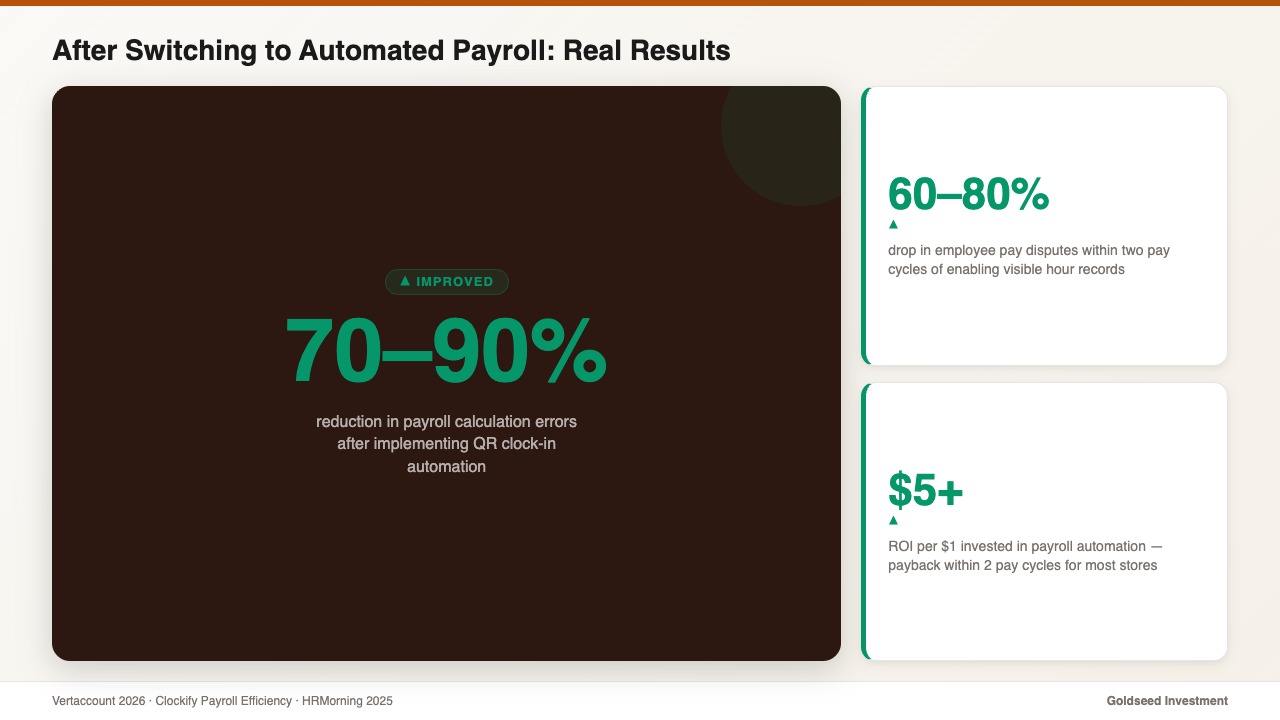
2026 payroll efficiency research (Vertaccount, Clockify): Automation delivers 70–90% error reduction, 37–64% time savings per pay cycle, and $5+ ROI per $1 invested in the first year. Payback for a small retail store typically occurs within two pay cycles.
Prevention Strategy 3: Employee-Visible Pay Records
One of the most underappreciated prevention tools is radical transparency with employees about how their pay was calculated.
When each employee can see their own recorded hours — clock-in time, clock-out time, break deductions, overtime calculation — before payday, errors surface early, when they’re easy to fix. Without transparency, the same discrepancy surfaces at payday, triggering the distrust response that starts the resignation thought process.
Stores that implement employee-visible time records usually see pay disputes drop by 60–80% within two pay cycles. Trust increases because accuracy is visible, not just claimed. Ana, who manages three convenience stores in Phoenix, reported that after enabling employee-accessible pay records in 2025, her staff disputes dropped from three per month to zero — before she’d even addressed the underlying calculation errors.
Prevention Strategy 4: Payroll Edit Log — Complete Audit Trail
Even with automated clock-in and payroll calculation, legitimate edits happen. An employee forgot to clock out. A holiday shift was added last-minute. Every one of those edits needs a logged, immutable record: who made the change, what was changed, when, and what reason was given.
In stores without edit history, a payroll dispute becomes unresolvable. In stores with complete payroll log records, the answer is in the system in 30 seconds. This satisfies both employee trust requirements and FLSA recordkeeping standards — the same records needed if a Department of Labor audit ever occurs.
The secondary effect: managers who know every edit is logged make more careful, documented changes. The discipline of logging creates better payroll hygiene across the organization.
How Storebase Prevents Retail Payroll Errors
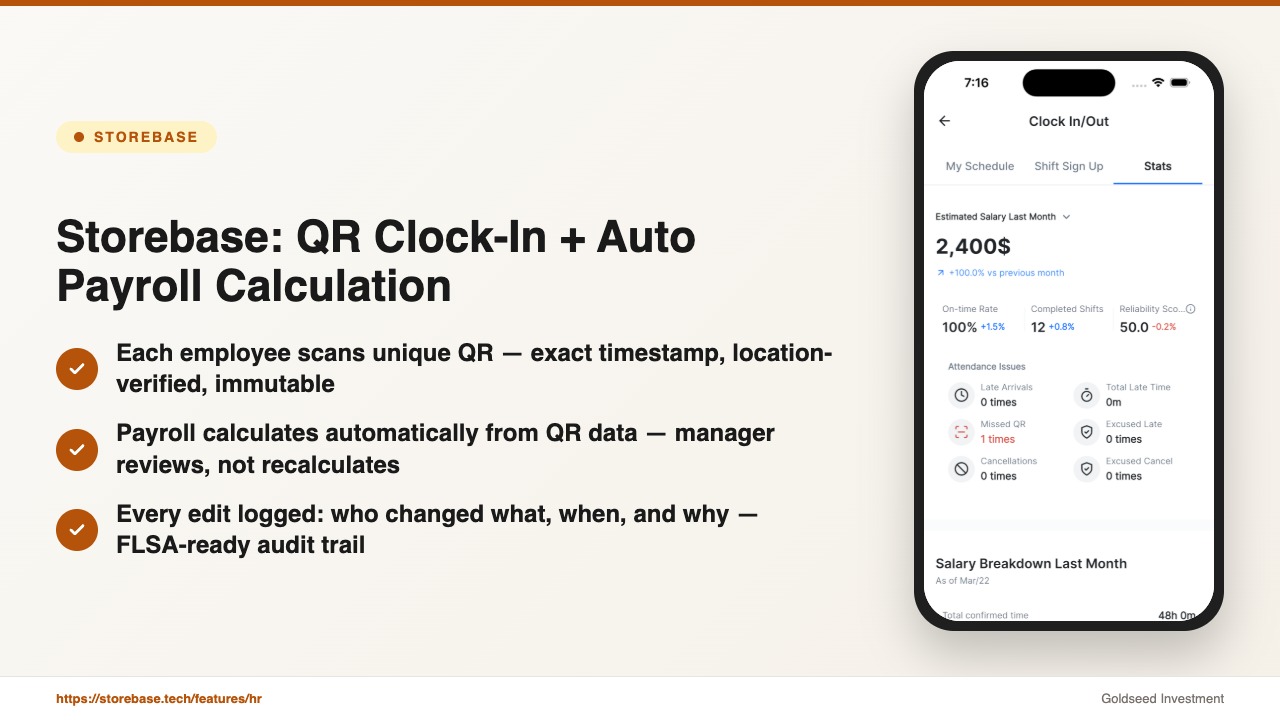
For retail stores that need these prevention strategies working together in one system, Storebase combines QR clock-in, automated payroll calculation, employee transparency, and complete edit history in a single back-office app.
QR clock-in with location lock — Every Storebase clock-in uses a unique employee QR code tied to GPS verification at the point of scan. Clock-ins from outside the store are blocked automatically. Each scan creates an immutable, timestamped attendance record that feeds directly into payroll — eliminating manual time entry entirely and preventing buddy punching.
Automated payroll calculation from QR data — Storebase calculates payroll directly from QR clock-in records: correct pay rate per shift type, overtime flag at the right OT threshold, anomaly alerts before payroll runs. No manual transfer. No transcription errors. Manager reviews the summary and approves — the calculation is already done.
Payroll transparency — employee hour log access — Every Storebase employee can view their own clock-in and clock-out record at any time, updated in real time after each shift. Discrepancies surface during the pay period — when corrections are simple — not at payday, when trust is already at risk.
Overtime tracking and payroll edit log — Every change to a time record in Storebase logs who made it, when, what it replaced, and the reason given. The payroll log is permanent and cannot be altered. This satisfies FLSA recordkeeping requirements and provides instant resolution for any pay dispute — the complete overtime tracking and edit history is always available.
Payroll anomaly alerts before the cycle runs — Storebase flags unusual patterns automatically: employees approaching their OT threshold, duplicate clock-in entries, pay amounts varying more than 20% from the prior period, missed punches after extended shifts. Each alert is a potential error caught before it reaches an employee’s paycheck.
Learn more about the Storebase Team & Payroll module at storebase.tech/features/hr. See how it connects to the full retail back-office system at storebase.tech.
Payroll Error Prevention Checklist for Retail Owners
Use this checklist to audit your current process:
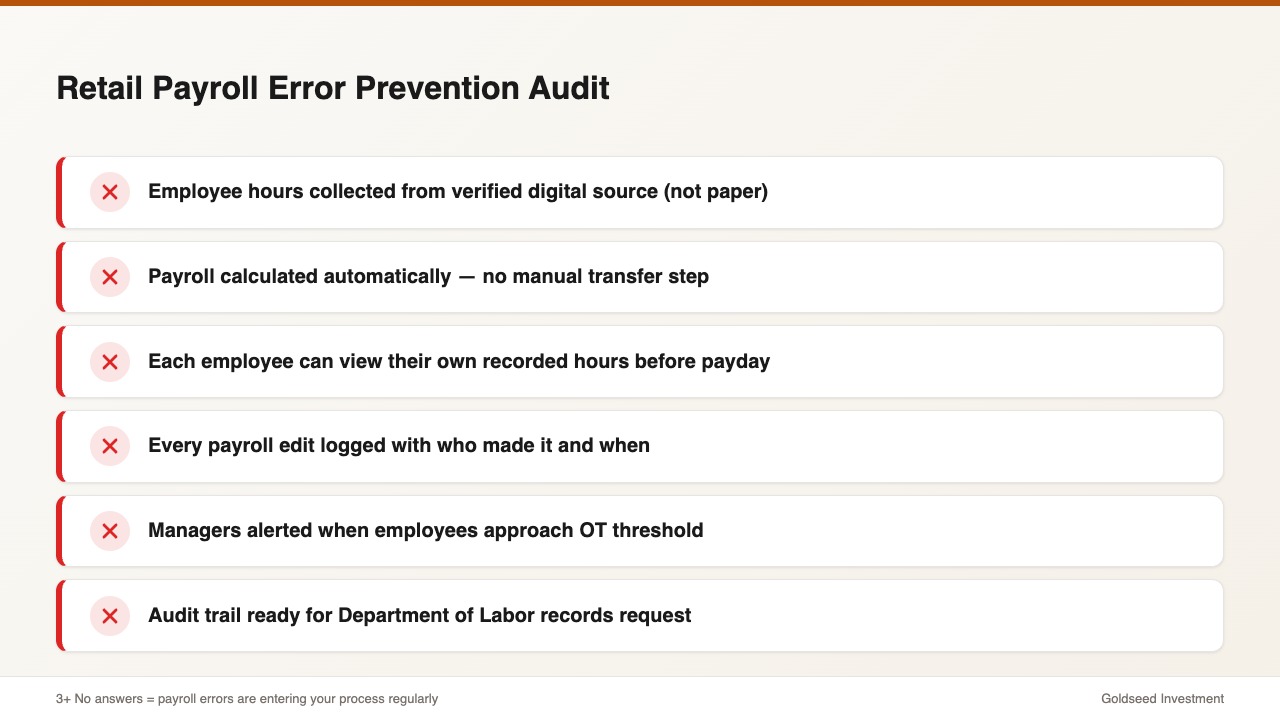
– [ ] Employee hours collected from verified digital source (not self-reported or paper) – [ ] Payroll calculated automatically from time records — no manual transfer step – [ ] Each employee can see their own recorded hours before payday – [ ] Every payroll edit is logged with who made the change and when – [ ] Managers receive alerts when employees approach OT threshold – [ ] Audit trail would satisfy a Department of Labor records request
Three or more “no” answers indicate processes where payroll errors are regularly entering. Each “no” is a specific, addressable risk.
For retail owners evaluating retail payroll management software options in 2026, this checklist also serves as a comparison framework.
Frequently Asked Questions
Q: What are the most common retail payroll errors in 2026? The most frequent are: overtime miscalculation (wrong threshold or rate), incorrect hours from manual entry, wrong pay rate applied to a shift type, missing clock-out entries, and failure to apply state-specific break deduction rules. Each is preventable with QR clock-in and automated payroll calculation.
Q: How much does a retail payroll error typically cost to fix? Direct correction cost averages $291 per error. Add downstream effects: employee trust damage increasing turnover risk, potential FLSA fines for systematic underpayment, and manager time diverted from operations. The 2024 payroll automation ROI analysis estimates $466,000–$1.86M in annual cost for organizations with chronic unaddressed payroll errors — most of which appears as seemingly unrelated turnover.
Q: At what store size does payroll automation make financial sense? At 5–8 employees with bi-monthly payroll, most automation tools pay for themselves within two pay cycles. The error correction cost alone — before any retention or compliance benefit — generally exceeds the subscription cost within the first month. The retention benefit is additional ROI that’s harder to quantify but often larger.
Q: What is QR clock-in and how does it prevent payroll errors? QR clock-in assigns each employee a unique scannable code tied to their identity and GPS location. Each scan creates an exact, immutable timestamp. Because no manual entry is involved, transcription errors are eliminated, buddy punching is blocked, and the attendance record feeds directly into payroll calculation — removing the most error-prone step in manual payroll.
Q: How do I handle payroll errors from before I had a proper system? Address them directly and generously. Investigate as far back as records allow, acknowledge what you find, and correct it with retroactive payment if owed. Employees who see their employer fix a historical error — without being asked twice — typically have their trust restored. The action matters more than the original mistake.