Retail owners using real-time dashboards catch cash discrepancies 8x faster, recover 2–3 hours a day previously lost to manual store visits, and detect inventory shortfalls before they become lost sales.
David Chen used to start every morning the same way: keys in hand, coffee in the other, driving loop across three Houston-area stores before 9 a.m.
Store one. Store two. Store three. Forty-five minutes of windshield time — just to confirm everything was running before he could focus on anything else.
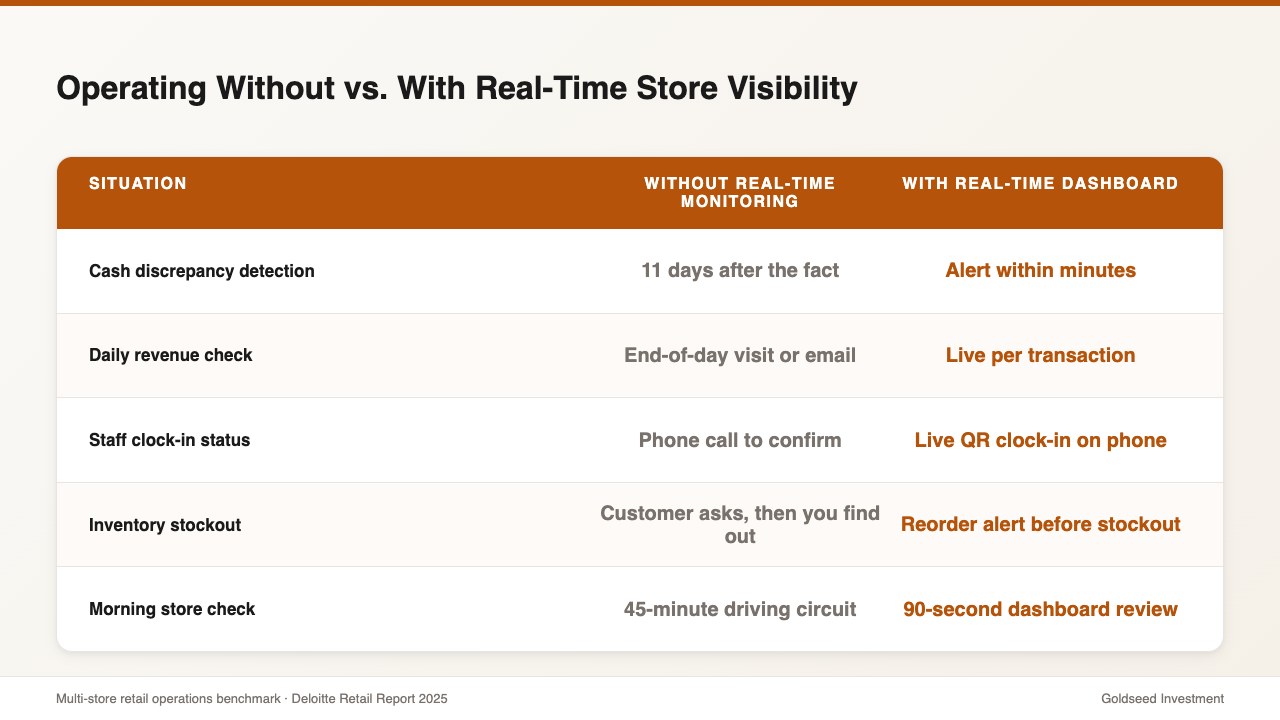
Then came a Thursday that changed everything. His bookkeeper flagged a $3,200 cash discrepancy at his second location. The gap had been accumulating for eleven days. Eleven days of drawer shortfalls that nobody caught because the reporting only surfaced at month-end.
Before Storebase:
- Morning store circuit: 45 minutes/day driving
- Cash discrepancy detection: 11 days after the fact
- Store performance visibility: monthly estimates from memory
90 days later:
- Morning circuit: 90 seconds reviewing the dashboard from his kitchen
- Cash discrepancy detection: minutes after a threshold is crossed
- Store performance: real-time P&L per location, updated with every sale
One app replaced the daily commute. One dashboard replaced the guesswork. That’s what remote retail monitoring actually looks like in 2026.
Why Do Most Multi-Store Owners Still Drive Between Locations Every Day?
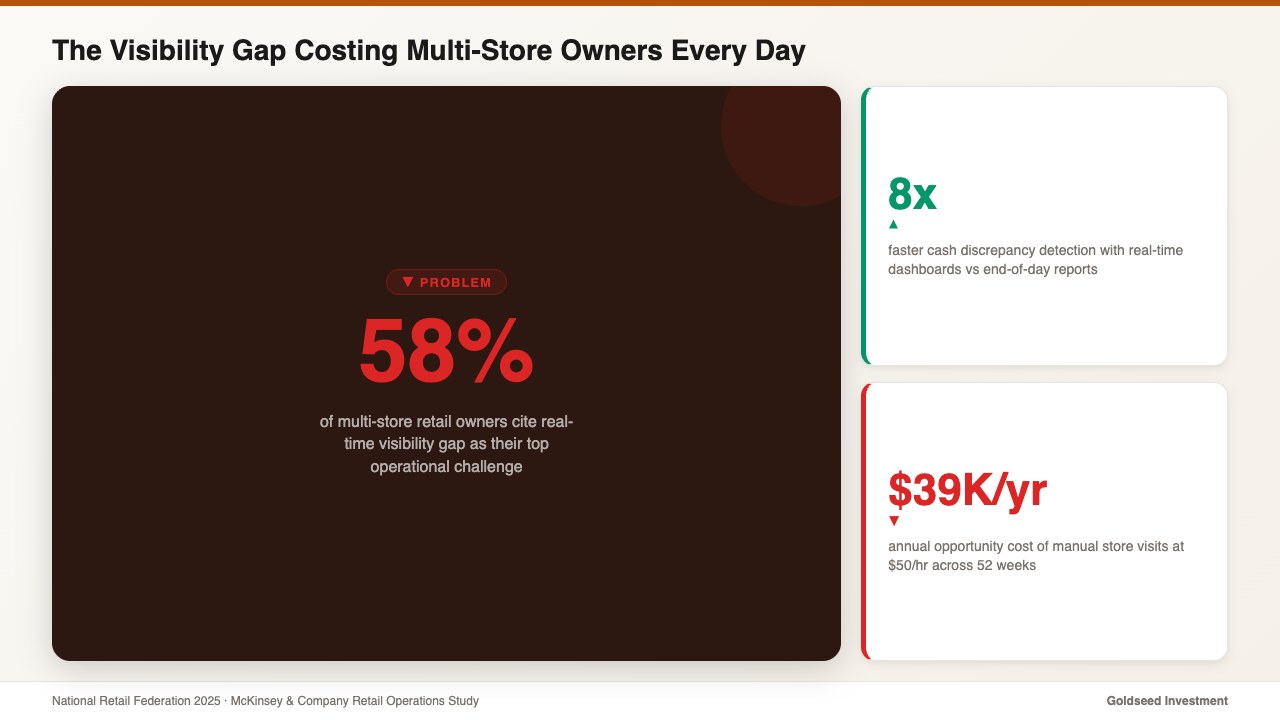
According to the National Retail Federation, 58% of retail owners with multiple locations cite lack of real-time visibility as their top operational challenge. And yet the dominant response is still a physical one: drive there, look around, ask the manager, drive back.
The Bureau of Labor Statistics reports that small retail business owners average 52 hours per week — with 20–30% of that time spent on non-value tasks like manual store visits just to get a status update.
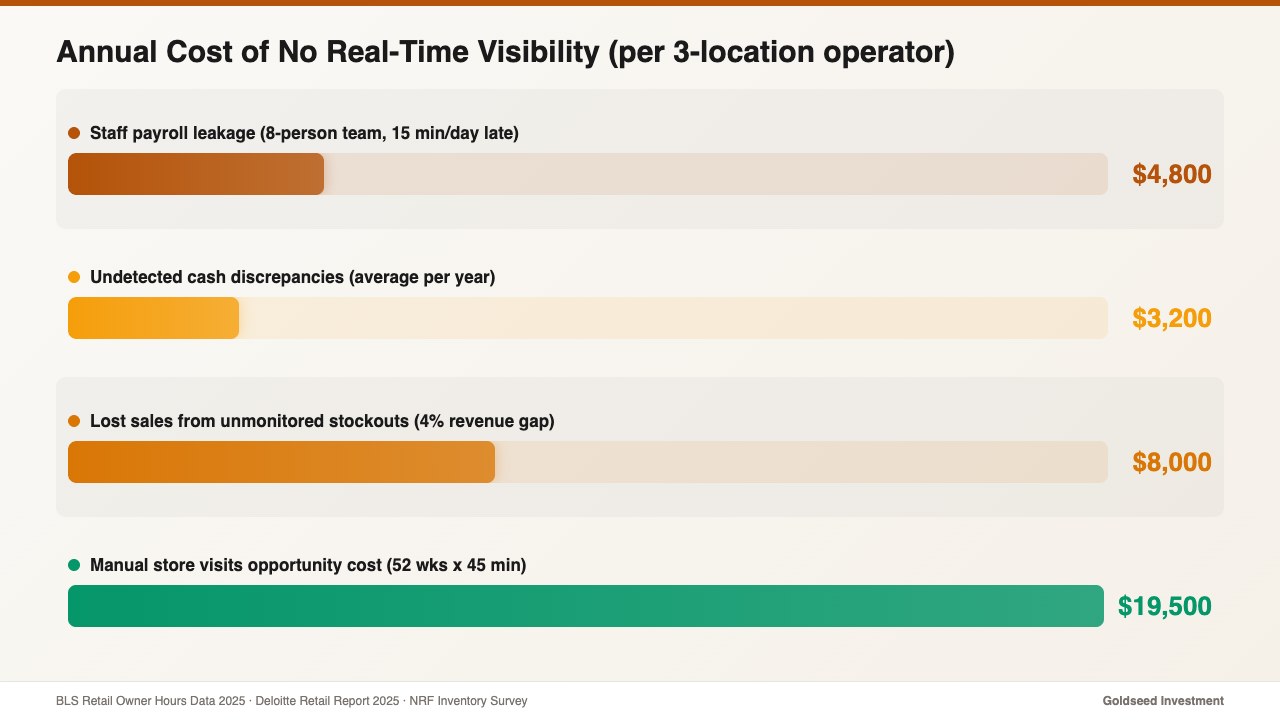
At $50/hour in opportunity cost, that’s approximately $500–$750 per week on information gathering that should be automated. Over a year, that’s $26,000–$39,000 in time a growing operator could spend on expansion planning, supplier negotiations, or simply taking a weekend off.
The problem isn’t that owners are inefficient. The problem is that most retail tools weren’t built for multi-location visibility. They were built for single stores, and ownership just added locations on top — layering in more spreadsheets, more login credentials, more end-of-day reports to reconcile.
When you manage multiple retail locations effectively, you quickly realize that the bottleneck isn’t effort — it’s the absence of a single source of truth.
What’s Really Happening in Your Store When You’re Not There?
David’s $3,200 discrepancy wasn’t caused by theft. It was caused by visibility lag.
Each evening, a closing staff member was entering drawer counts slightly off — a transposition here, a forgotten mid-shift pull there. Without a system that compared expected drawer balance to actual cash in real time, the errors stacked. By day eleven, the gap was significant enough to trigger a bookkeeper review. By then, the nightly record was cold.
This scenario plays out thousands of times a day across independent retail. McKinsey & Company found that retailers with real-time dashboards detect cash discrepancies 8x faster than those relying on end-of-day or weekly reports.
Three things accumulate invisibly when you’re not physically present:
Cash discrepancies — drawer miscounts and undocumented cash pulls go unnoticed shift by shift. By the time end-of-week reconciliation catches them, the trail is cold and accountability is nearly impossible.
Staff performance drift — without real-time clock-in data, late arrivals normalize. A staff member who regularly clocks in 12–15 minutes late costs roughly 1 hour per week in paid time for work not performed. Across a team of eight, that’s $200–$400 per month in silent payroll leakage.
Inventory stockouts — popular SKUs reach zero while a reorder is sitting in someone’s mental to-do list. The Deloitte Retail Report 2025 found that multi-store retailers using unified management platforms cut administrative overhead by 35–40%, largely by eliminating reactive fire-fighting from stockout and discrepancy events.
The cost of not knowing isn’t just financial. It’s the weight of running a business where you can’t trust the numbers unless you were physically there to count them. For practical frameworks on remote retail operations best practices, the core principle is always the same: visibility has to be systematic, not situational.
How Do Successful Multi-Store Operators Monitor Remotely?
The operators who successfully break the daily-visit habit share a common approach: they don’t try to monitor everything — they monitor the four numbers that matter.
1. Real-time cash position — current balance in each drawer and vault, updated with every transaction. 2. Daily revenue by location — not yesterday’s sales, but today’s, hour by hour. 3. Staff clock-in status — who’s in, who’s late, who hasn’t arrived for their scheduled shift. 4. Inventory alerts — which SKUs have dropped below reorder threshold since last check.
The challenge is that most mainstream tools deliver pieces of this, not the whole picture. Here’s how the major platforms compare for multi-store remote monitoring:
| Feature | Storebase | Square for Retail | Homebase |
|---|---|---|---|
| Real-time cash tracking with per-shift attribution | ✅ Built-in | ❌ Sales only | ❌ Not included |
| Multi-store unified dashboard (single login) | ✅ All modules | ⚠️ Separate per-location | ⚠️ Scheduling only |
| Income Statement per location | ✅ Auto-generated | ❌ Manual export | ❌ Not available |
| Instant cash discrepancy alert | ✅ Alert within minutes | ❌ End-of-day only | ❌ Not available |
| Inventory + staff + cash in one view | ✅ Unified | ⚠️ Inventory module only | ⚠️ Staff only |
| Monthly cost (per location) | $49/location | $60+/location | $40/location (staff only) |
Square handles sales data well, but cash management and inventory are separate modules requiring additional integration. Homebase excels at scheduling but has no financial visibility. Neither delivers the unified operational picture a multi-location owner actually needs for true remote monitoring.
How David Uses Storebase to Monitor 3 Houston Stores from His Phone
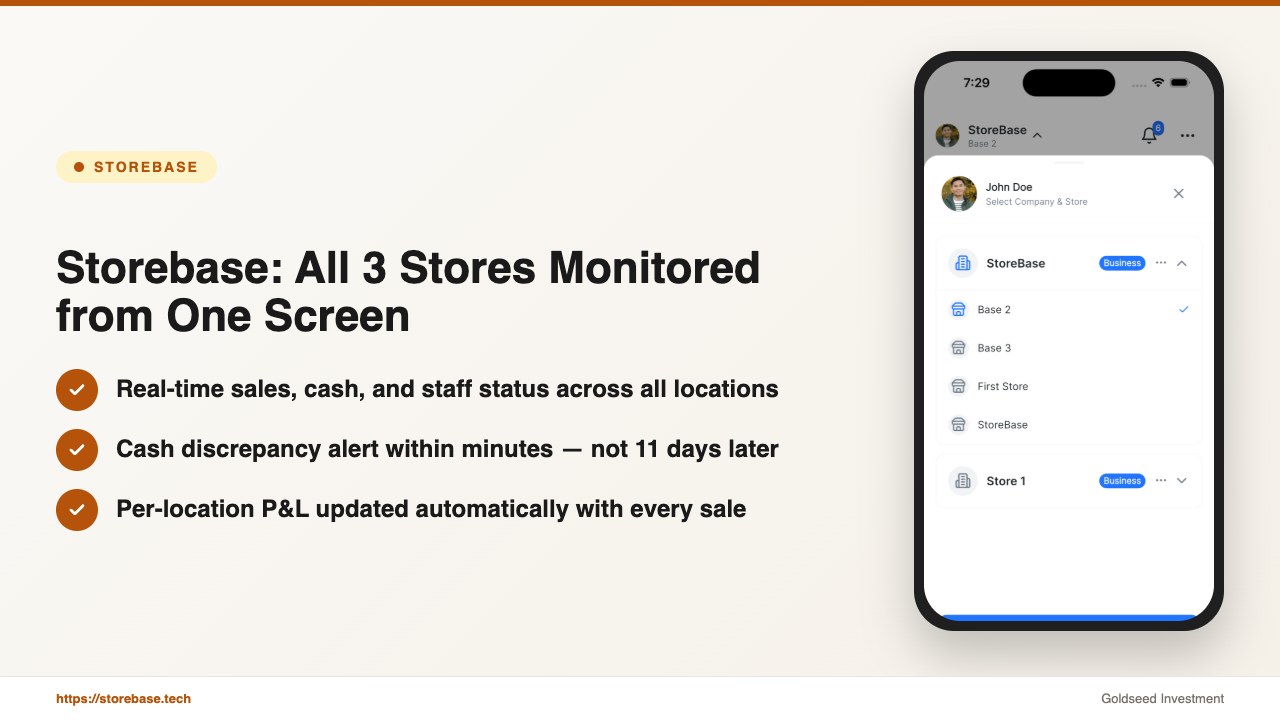
David’s setup is straightforward: one login, one dashboard, three stores visible simultaneously.
Feature 1: All stores in one login — real-time sales, cash, staff, and inventory
The moment any store opens, the platform begins tracking. David sees live sales figures per location, updated continuously. Staff clock-ins appear the moment a QR check-in is recorded — including GPS-stamped location. Cash balances update with every drawer transaction.
Before the switch, David spent 45 minutes each morning driving the circuit. Now that same information is available in under 90 seconds, from anywhere. Storebase’s Multi-Store Dashboard was built specifically for operators managing 2–10 locations — not retrofitted from a single-store tool.
Feature 2: Cash discrepancy alert — from 11-day lag to minutes
Storebase Cash Management logs every cash transaction with staff ID, timestamp, and expected vs. actual drawer balance. When a discrepancy exceeds the configured threshold, David receives an alert immediately — not at month-end.
The system logs who handled each shift, at what time, and what the drawer balance was at hand-off. The accountability is built into the workflow, not added after the fact. What previously took eleven days to surface now surfaces within the same shift.
Feature 3: Store-by-store Income Statement — knowing which location is actually profitable
This is the feature David credits most for changing how he thinks about his business. Storebase’s Sales & Finance module generates a per-location P&L automatically. Revenue and expenses are tracked in real time; the Income Statement refreshes with every transaction.
Before, David estimated which location performed best based on gut feel and end-of-month reconciliation. Now he sees, by 10 a.m. each day, which store’s margin is running below target and why. Last quarter, that visibility revealed that his largest-volume location was also his lowest-margin one — a cost structure problem he would have missed for another six months under the old system.
Feature 4: Remote approval and operational control
When a staff member submits a schedule change or a manager flags a supply issue, the request surfaces in David’s dashboard. He approves, adjusts, or escalates — all remotely. No phone calls. No waiting until the next visit.
If you’re still driving a daily store circuit to collect information you should be reading on your phone, Storebase is built for exactly this. Most operators complete the Multi-Store Dashboard setup in under 10 minutes and achieve full remote visibility across all locations by the end of day one — no credit card required. Start monitoring all your stores remotely →
What to Look for in a Remote Retail Monitoring System?
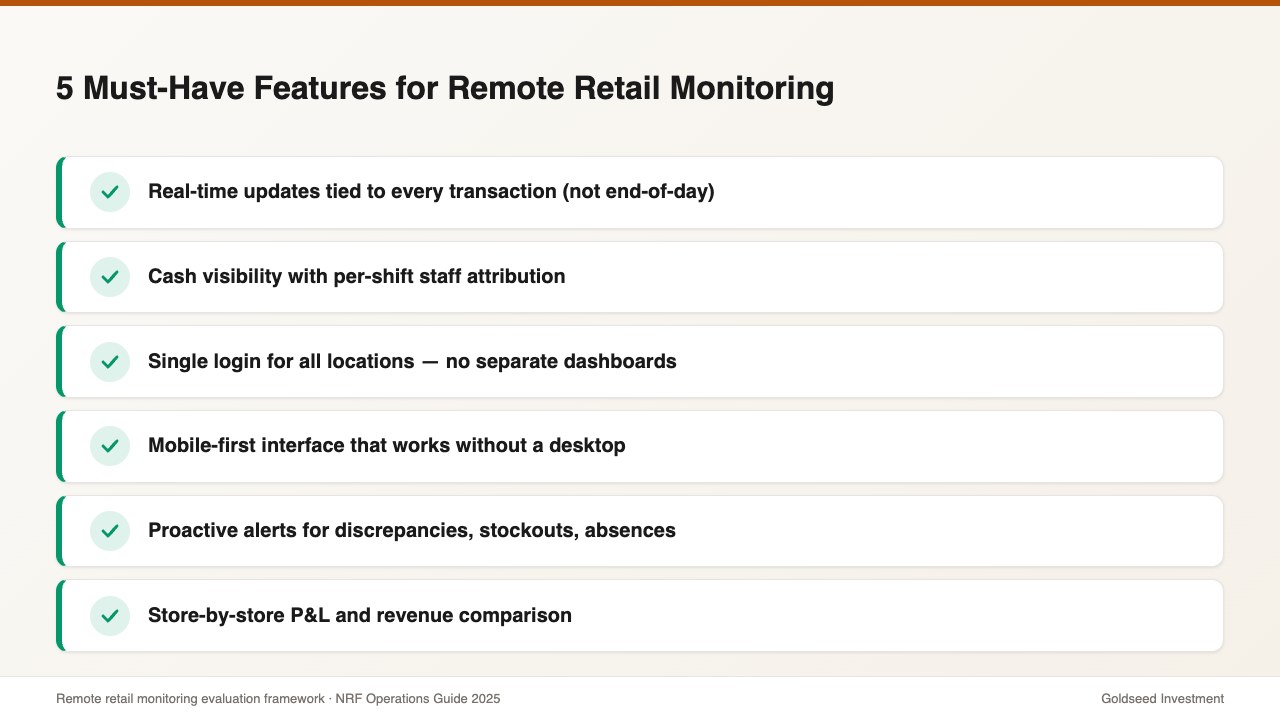
Not all monitoring tools are built equal. Before committing to a platform, evaluate it against these five must-have criteria:
1. Real-time, not delayed — If the dashboard shows yesterday’s data, it’s a reporting tool, not a monitoring tool. Look for live updates tied to actual transactions.
2. Cash visibility with shift attribution — Any platform can show you total daily sales. Fewer can tell you which staff member’s shift produced a $47 drawer discrepancy at 3 p.m. on Tuesday.
3. Single login for all locations — Multi-store owners who need to log in separately per location are still running the same fragmented operation, just digitally. True remote monitoring means a unified view.
4. Mobile-first interface — If you need to be at a desktop to access your data, you haven’t solved the problem. The dashboard needs to function fully on a phone.
5. Alert logic, not just reports — Proactive notification of anomalies (low inventory, cash discrepancy, absent staff) is what separates monitoring from passive reporting. You want the system to find the problem before you have to go looking.
Red flags to avoid: manual data entry requirements, delayed syncing between POS and back-office, no mobile access, or reporting that only surfaces at end-of-day or week.
FAQ
Q: Can I monitor my retail store remotely for free? A: Most platforms offer limited free tiers — typically basic sales reporting with no cash or inventory visibility. For meaningful remote monitoring (real-time cash alerts, multi-store dashboards, staff tracking), expect to pay $40–$70 per location per month. Storebase starts at $49/location with all monitoring modules included.
Q: What’s the best app to monitor a retail store remotely? A: The best app depends on what you need to monitor. For multi-location owners who need unified cash, sales, staff, and inventory visibility in one login, Storebase is purpose-built for that use case. For single-store owners who only need basic sales data, Square or Shopify POS cover the basics.
Q: How do I know if my cashier is performing below standard? A: The most reliable method is QR-based clock-in with drawer reconciliation tied to each staff shift. When every drawer count is attributed to a specific employee and shift, patterns emerge within days — without requiring CCTV review or confrontation based on suspicion. Systems with built-in cash attribution log every transaction to the staff member on shift, creating a transparent record for both the owner and the team.
Q: How many stores can I monitor with a remote management system? A: Most modern platforms handle 2–20 locations without performance issues. The key question is whether the system was designed for multi-location from the ground up, or whether it’s a single-store tool with a multi-location workaround.
If remote monitoring is a priority for your next stage of growth, Explore Storebase free → — setup takes under 10 minutes and no credit card is required to get started.