Retailers using Storebase’s financial reporting module cut monthly close time from 12 hours to under 10 minutes and generate balance sheets automatically — no accounting degree required.
Elena Torres runs three convenience stores in Houston. Today, she pulls up her consolidated balance sheet on her phone between store visits — assets, liabilities, equity, all current as of this morning. She knows exactly how much cash is tied up in inventory across all three locations, what she owes vendors, and what her net equity position looks like heading into Q2.
Fourteen months ago, none of that existed. Elena had no balance sheet. She had spreadsheets — five of them, updated manually every weekend, always slightly wrong, always slightly late. When she applied for an SBA loan to open her third store, the lender asked for formal financial statements. She spent three weekends building them from scratch in Excel. The bank flagged $23,000 in untracked liabilities she hadn’t accounted for.
That experience pushed her to find a better system. She found Storebase, set up the Sales & Finance module in one afternoon, and hasn’t opened a financial spreadsheet since.
This article breaks down why most small retail operators still lack a balance sheet, what that gap actually costs, and how automated balance sheet apps are closing it in 2026.
Why Do 71% of Retail Store Owners Still Have No Balance Sheet?
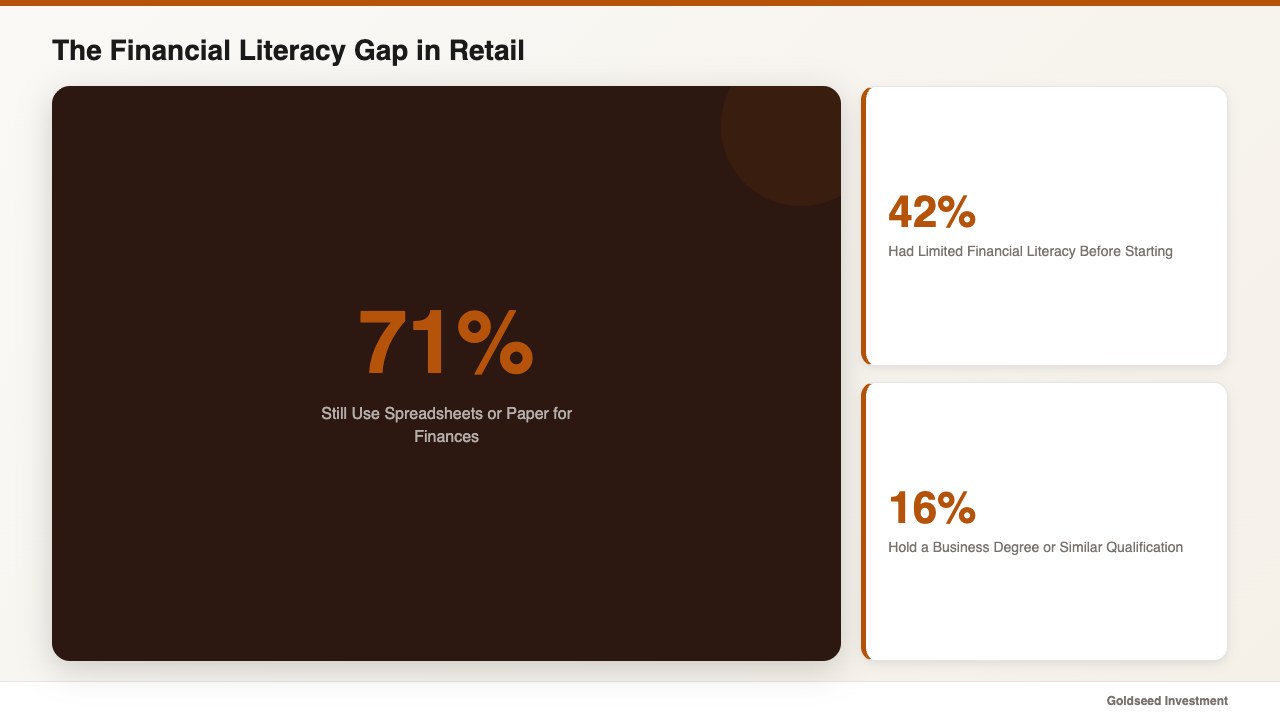
A 2024 Xero survey found that 50% of small businesses face direct fiscal challenges due to insufficient financial literacy. The QuickBooks Financial Literacy Report puts it more starkly: 42% of small business owners had limited or no financial literacy before launching their companies. Only 16% hold a business degree or similar qualification.
The result is predictable. According to CPA Practice Advisor, 71% of small businesses still manage some aspect of their finances with pen, paper, or spreadsheets. For retailers specifically, the problem compounds because inventory valuation methods, seasonal fluctuations, and high transaction volume create layers of complexity that spreadsheets were never designed to handle.
A balance sheet requires tracking every asset (cash, inventory, equipment, deposits), every liability (vendor payables, loan balances, lease obligations, accrued expenses), and reconciling equity continuously. Most POS systems track sales. They do not track liabilities. They do not depreciate fixed assets. They do not reconcile owner equity. That leaves a gap that, for the majority of independent retailers, simply goes unfilled.
The problem is structural, not personal. No spreadsheet template was ever designed to maintain a real-time balance sheet for a retail operation processing hundreds of daily transactions. The owners who lack formal financial statements are not careless — they never had a tool that made it feasible.
What Does a Missing Balance Sheet Actually Cost Your Store?
The QuickBooks Financial Literacy Report estimates that limited financial literacy costs small business owners an average of $118,121 in lost profit over the life of the business. While that number spans all industries, retailers face a unique concentration of risk because inventory — typically the largest current asset on a retail balance sheet — fluctuates daily.
Without a balance sheet, three things become impossible to manage accurately.
Loan applications stall. Lenders require formal financial statements. Elena Torres discovered this firsthand when her SBA loan application surfaced $23,000 in untracked liabilities — vendor invoices she had paid but never recorded as settled, and a lease deposit she had classified as an expense rather than an asset. The loan was delayed six weeks while she reconstructed the records.
Tax preparation becomes expensive guesswork. Small businesses spend an average of 10 to 15 hours per month on bookkeeping, according to CSI Accounting research. During tax season, that number spikes. Without a running balance sheet, every asset and liability must be reconstructed from bank statements, invoices, and POS data — a process that commonly takes two to three full weekends or $300 to $1,000 per month in outsourced bookkeeping fees.
Profitability decisions rely on gut instinct. One multi-store operator reported that revenue looked strong across all locations, but the actual cash position was consistently tight. The issue was invisible without a balance sheet: inventory at one location had ballooned to 140% of target because slow-moving products were never flagged for markdown. That cash — roughly $34,000 worth of merchandise — was trapped on shelves, not available for rent, payroll, or expansion. A balance sheet would have shown the asset imbalance weeks earlier.
These are not edge cases. They represent the financial reality of operating a retail business without the accounting fundamentals that larger chains take for granted.
How Are Smart Retailers Automating Financial Statements in 2026?
The market for retail financial automation has matured considerably. Store owners now have several categories of tools available, each with different strengths and trade-offs.
Traditional accounting software like QuickBooks Online ($30–$200/month) and Xero ($15–$78/month) offer robust balance sheet generation. However, they require manual data entry or third-party integrations for POS data, inventory valuation, and payroll — meaning the store owner still assembles the inputs. For a single-store operator with basic needs, they work well. For multi-location retailers who need real-time consolidation, the setup cost and integration overhead become significant.
Enterprise retail platforms like NetSuite and Brightpearl provide end-to-end financial automation, including automated balance sheets. The trade-off is cost ($999+/month for NetSuite) and implementation complexity — typically 3 to 6 months of setup with a dedicated consultant. These platforms target retailers with $5M+ in annual revenue.
All-in-one retail management apps occupy the middle ground: they combine POS back-office functions (scheduling, payroll, inventory) with built-in financial reporting. The advantage is that the data feeding the balance sheet — inventory levels, payroll liabilities, cash transactions — already lives in the same system. No integration required.
| Feature | Storebase | QuickBooks Online | Xero | Excel |
|---|---|---|---|---|
| Auto balance sheet | ✅ Built-in | ✅ Native | ✅ Native | ❌ Manual formula |
| Real-time inventory valuation | ✅ Integrated | ⚠️ Requires POS sync | ⚠️ Requires add-on | ❌ Manual |
| Payroll liability tracking | ✅ Built-in | ⚠️ Payroll add-on | ⚠️ Gusto/Deel integration | ❌ Manual |
| Multi-store consolidation | ✅ Single dashboard | ⚠️ Per-entity only | ⚠️ Per-entity only | ❌ Separate files |
| Receipt AI verification | ✅ Screenshot scan | ❌ Manual upload | ❌ Manual upload | ❌ No |
| Monthly cost (1 store) | $18/mo Starter | $30+/mo | $15+/mo | Free (10-15 hrs labor) |
| Monthly cost (up to 5 stores) | $48/mo Growth | $150+/mo multi-entity | $78+/mo per org | Free (50+ hrs labor) |
The critical differentiator for retailers is whether the financial data already exists in the system. If inventory, payroll, and cash data must be imported from separate tools, the balance sheet is only as current as the last import. If those data sources are native to the platform, the balance sheet updates continuously.
How Elena Uses Storebase to Generate Her Balance Sheet in 3 Clicks
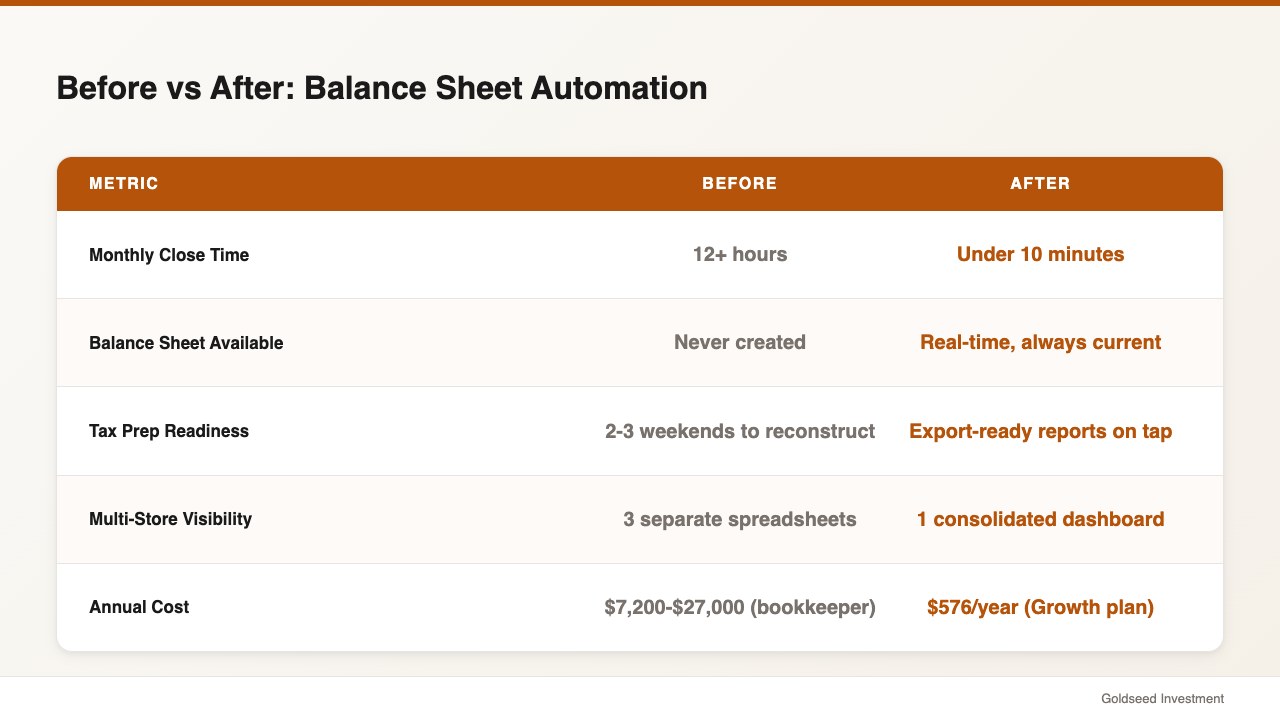
Elena’s three Houston convenience stores process roughly 400 transactions per day combined. Before the switch, she had no consolidated view of her financial position. Each store had its own spreadsheet. Month-end reconciliation took 12 hours minimum — and the result was still an income statement only. She had never produced a formal balance sheet.
Here is what changed after she set up the Sales & Finance module:
Automated double-entry bookkeeping. Every transaction — sale, expense, vendor payment, payroll disbursement — is recorded with both a debit and credit entry automatically. Elena’s staff snap receipt photos; the app’s AI reads and verifies the amounts against the corresponding entries. The ledger stays balanced without anyone needing to understand debits and credits. This directly addresses the core problem one store operator described: revenue felt real, but the cash was not there when it was needed because deposits, equipment depreciation, and inventory ties were never tracked on a proper balance sheet.
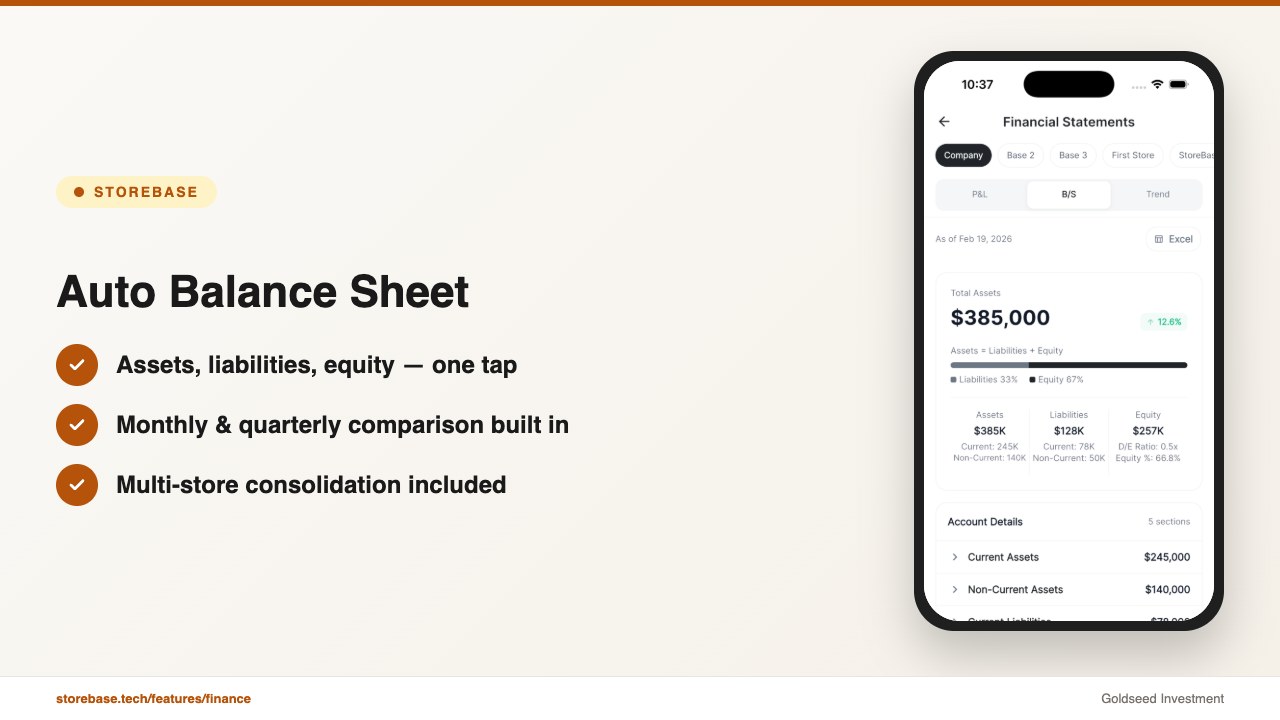
Real-time balance sheet generation. Elena taps three times: Reports → Balance Sheet → Current Period. Assets (cash across three registers, three bank accounts, total inventory value, lease deposits, equipment minus depreciation), liabilities (vendor payables, accrued payroll, loan balance), and equity (retained earnings plus current-period net income) — all populated automatically. Monthly, quarterly, and annual comparison views are available without additional setup.
Multi-store consolidation. Instead of reconciling three separate spreadsheets, Elena sees one consolidated balance sheet and can drill into each store individually. When inventory at Store 2 exceeded target by 40%, it showed up immediately as an outsized current asset on the balance sheet — prompting her to run a markdown cycle before cash flow tightened. With a spreadsheet, she would have discovered this at month-end, two weeks too late.
Income statement integration. The balance sheet does not exist in isolation. The platform generates both the income statement (P&L) and balance sheet from the same data set. Net income flows directly into retained earnings on the balance sheet. Revenue, COGS, and operating expenses update in real time, giving Elena a complete financial picture — not just sales data from the POS.
What previously took Elena 12 hours per month now happens automatically in the background. Her tax preparer receives export-ready reports. Her SBA lender gets quarterly updates without a single weekend of manual work.
If your monthly close still involves wrestling with spreadsheets and you have never produced a formal balance sheet, Storebase is built for exactly this. Most store owners complete the Sales & Finance setup in under 10 minutes and see their first auto-generated balance sheet the same day — no credit card required. Start with Sales & Finance → or Download on the App Store →
The Real Cost: Bookkeeper vs Automated Balance Sheet App
The financial math clarifies the decision quickly.
A freelance bookkeeper charges $20 to $50 per hour. At 10 to 15 hours per month, that translates to $200 to $750 monthly — and the balance sheet is only as current as the last update. A part-time in-house bookkeeper costs $3,000 to $5,000 per month including benefits, which is out of reach for most independent retailers.
QuickBooks Online Plus, the most common retail accounting choice, starts at $30 per month for a single entity but rises to $150+ when you add payroll, multi-entity management, and inventory tracking integrations.
The Starter plan covers one store for $18 per month — including automated balance sheet, income statement, inventory tracking, payroll calculations, cash management, and scheduling. The Growth plan at $48 per month covers up to 5 stores with full financial consolidation, which translates to $9.60 per store per month. For context, that is less than the cost of one hour of bookkeeper time.
For a three-store operation like Elena’s, the annual comparison is stark:
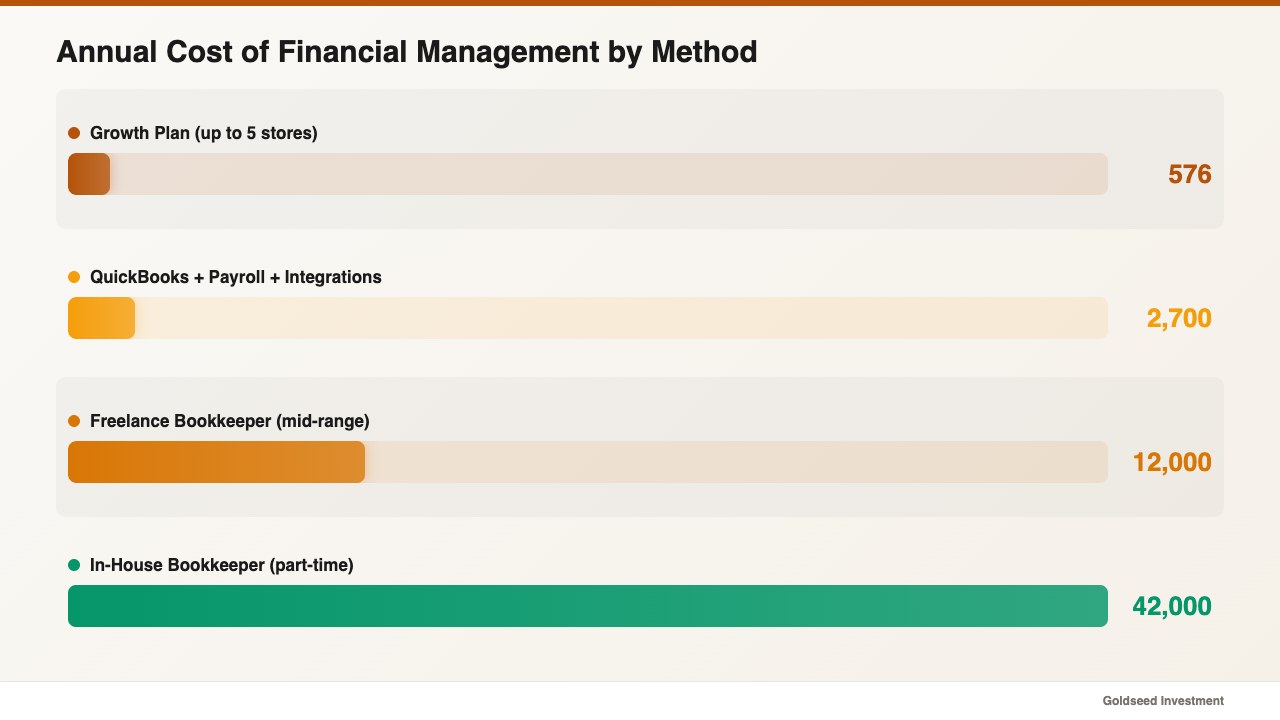
- Freelance bookkeeper: $600–$2,250/month → $7,200–$27,000/year
- QuickBooks + payroll + integrations: $150–$300/month → $1,800–$3,600/year
- Growth plan: $48/month → $576/year
The savings are not just monetary. Elena recovered 12 hours per month — 144 hours per year — of time she now spends on vendor negotiations and store expansion planning instead of spreadsheet reconciliation.
For owners considering whether the retail store balance sheet template approach is sufficient, the template works as a learning tool. But once transaction volume exceeds a few dozen per day, manual balance sheet maintenance breaks down. The jump to automation becomes a matter of when, not if.
Understanding how to analyze retail store profitability also gets significantly easier when the financial statements generating the data are automated rather than reconstructed monthly from disparate sources. The same applies to building a convenience store P&L — the income statement and balance sheet share the same underlying data, and automating one without the other leaves half the picture incomplete.
FAQ
Q: Can a balance sheet app replace my accountant entirely? A: For day-to-day financial statement generation, yes. An automated balance sheet app handles the ongoing recording, categorization, and report generation that consumes most bookkeeping time. However, for tax filing strategy, audit representation, and complex regulatory questions, a CPA remains valuable. The difference is that your accountant receives clean, organized data instead of a box of receipts — which often reduces their billable hours by 40% to 60%.
Q: How often should a retail store update its balance sheet? A: Ideally, continuously. A balance sheet that updates only at month-end misses the daily cash flow fluctuations that drive retail decisions — inventory purchases, vendor payments, payroll cycles. Real-time balance sheet apps update as transactions occur, which means the financial position you see at 2 PM on a Tuesday is accurate as of that moment, not as of last month’s close.
Q: What is the minimum data I need to start generating an automated balance sheet? A: At minimum, you need opening balances for your bank accounts, an inventory valuation (even an estimate), and a list of outstanding liabilities (loans, vendor payables, lease obligations). Most apps walk you through this initial setup in 10 to 20 minutes. After that, ongoing transactions populate the balance sheet automatically as they occur.
Q: Do I need to understand double-entry bookkeeping to use a balance sheet app? A: No. Modern retail finance apps handle the debit-credit mechanics behind the scenes. When you record a sale, the app automatically debits cash and credits revenue. When you pay a vendor, it debits the payable and credits cash. You see the result — a balanced, accurate financial statement — without needing to understand the underlying accounting logic. As one operator noted, the system does the math and you just make the decisions. If you are ready to try it, Storebase offers a free start with no credit card required.