Retailers replacing Lightspeed with Storebase cut software costs from $447/mo to $186/mo across three stores — 58% lower — while keeping their existing POS and gaining a full inventory and cash audit trail.
Eighteen months ago, Maya Chen was paying Lightspeed $447 a month to run three women’s boutiques across Texas — and she still kept payroll, schedules, and end-of-day cash reconciliation in a stack of Google Sheets. Today she runs the same three stores from her phone, sees who clocked in late before her first coffee, and pulls a monthly P&L in three clicks. The total software bill for the back office? $48/mo flat — under Storebase’s Growth plan, which covers up to five locations.
She didn’t switch her POS. She kept Square at the counter. What changed was the layer behind it. Storebase replaced the parts of Lightspeed she actually used — inventory tracking, financial reporting, multi-store dashboard, payroll math — and threw in the things Lightspeed never gave her, like a cash discrepancy log that shows who entered what and when.
If you’re searching for a Lightspeed alternative, you probably already feel the same friction Maya felt. This guide walks through why per-location POS pricing breaks at three stores, what the real “alternative” looks like (it isn’t always another POS), and how Storebase, paired with whatever counter system you already have, ends up costing 60–80% less while doing more of the work your spreadsheet still handles.
Why Are Small Retailers Looking for a Lightspeed Alternative in 2026?
Lightspeed Retail is a capable platform — that’s not the question. The question store owners are quietly asking in 2026 is whether they’re paying for a retail operating system when what they really need is a better back office. The two are not the same thing, and the price difference between them is enormous.
Three things are pushing small operators to look at alternatives this year. First, per-location pricing has compounded. Lightspeed’s mid-tier plans sit in the $89–$269/month range per location, and most independent retailers running 2–5 storefronts now spend more on POS software than on their lease for cardboard supplies. Second, retailers have noticed that the modules they actually log into daily — inventory counts, daily sales summary, cash drawer audit — are a small slice of what they’re being billed for. Third, the rise of POS-agnostic back-office apps means you no longer have to switch your checkout system to get better operational tools.
The 2025 NRF Retail Technology Report noted that independent retailers now spend roughly 4.3% of revenue on technology, up from 2.8% in 2020. For a $1.2M/year store, that’s $51,600 a year — and software-buying decisions made out of habit are quietly eating into 2–4% net margins.
How Expensive Is Per-Location POS Pricing in 2026?
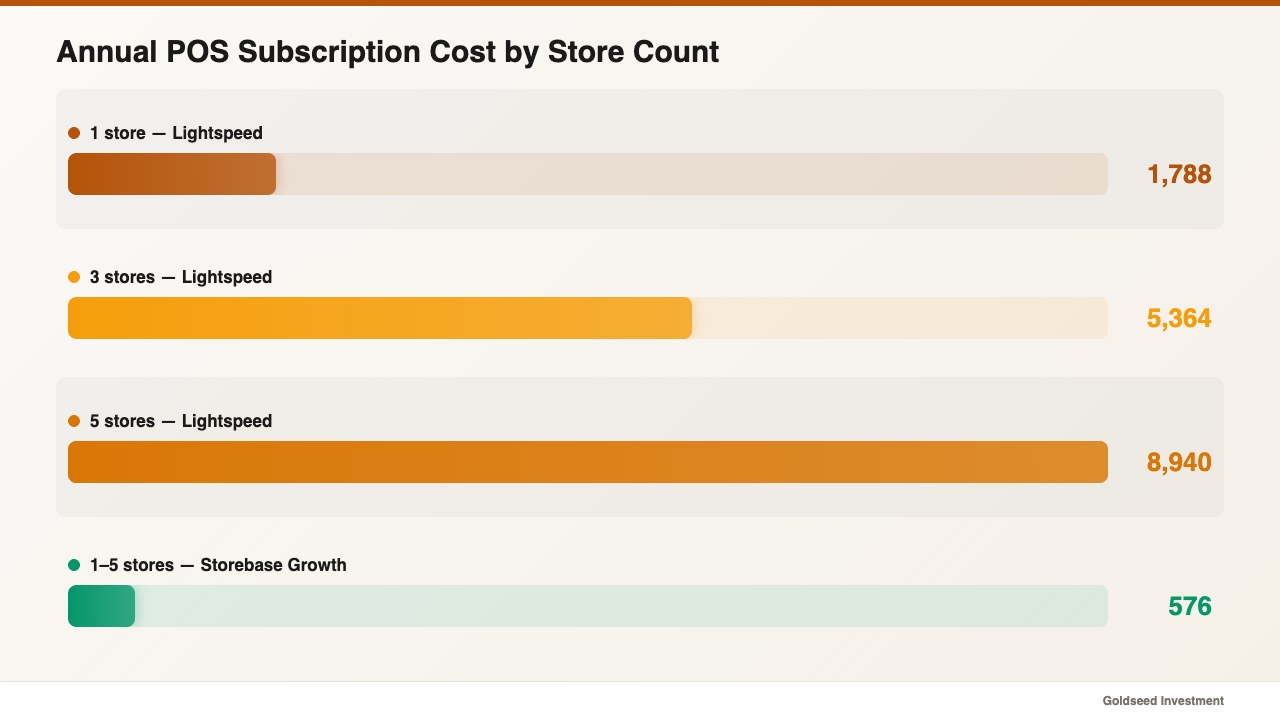
Here’s the math nobody puts in the sales deck. A three-store operator on Lightspeed Retail’s Standard plan ($149/month per location) pays $5,364 a year just for the POS subscription. Add payments processing fees on top, and the all-in cost climbs higher. For a five-store operator, that line item alone passes $8,940/year — before you’ve sold a single t-shirt.
Compare that to what a back-office layer costs at the same store count. Storebase Growth is $48/month flat for up to five stores — $576/year total, regardless of how many locations you add (up to 5). That’s roughly $9.60 per store per month, or about 6.4% of what Lightspeed’s per-location pricing would cost you for the same back-office functionality.
The other hidden cost is the spreadsheet tax. Most Lightspeed users still keep a separate scheduling sheet, a separate payroll worksheet, and a manual cash-count log. A 2025 Capterra survey put the average mid-market retailer at 6.4 separate software tools for store operations. Each tool is a login, a billing line, and a data silo. The real Lightspeed alternative isn’t necessarily another POS — it’s a consolidated back office that talks to whatever POS you keep.
What Do Retailers Actually Need (vs What POS Suites Sell)?
Walk into a small retail back room at 9pm on a Sunday and watch what the owner is actually doing. They are not ringing up sales. They are reconciling a cash drawer that’s $43 short, figuring out who owes overtime, and trying to remember if last month’s inventory shrink was 1.2% or 2.4%. None of those tasks happen at the POS. They happen in a separate back-office layer — except for most owners, that layer is a Google Sheet that breaks every time staff turn over.
The needs are surprisingly consistent across single-store boutiques and ten-store chains:
- Real-time visibility into who’s working, what sold, and where cash is — without phoning each store
- Audit trails for inventory adjustments, cash drawer entries, and schedule changes (the “who touched this?” question)
- Automated payroll math that pulls actual clock-in data, not a manager’s memory
- Income statements and balance sheets generated automatically from operational data — not exported to an accountant once a quarter
- Multi-store comparison on one screen — performance, shrink, labor cost as a % of revenue
POS suites sell some of this. Lightspeed bundles inventory and reporting into its higher tiers. But the moment you have more than one store, or staff who handle cash, the gaps show up: no employee accountability log, no native payroll, no balance sheet — those become add-ons or third-party integrations, each one another monthly bill.
The shift in 2026 is recognizing that the POS layer (sale processing, receipt, payment) and the back-office layer (everything after the sale) are now best handled by different specialized tools that communicate. That’s the architectural insight behind why Storebase exists and why looking for a “Lightspeed alternative” often leads people to a back-office app rather than another POS.
How Do Top Operators Solve This — and Where Does Storebase Fit?
In our research across retail store management software comparisons, the operators getting the best cost-to-value ratios in 2026 share three patterns:
- They picked a stable, low-friction POS they trust (Square, Clover, Toast, or Lightspeed itself) and stopped chasing the “best” POS every two years.
- They moved the back office to a POS-agnostic mobile app so it works regardless of which counter system any individual store runs.
- They eliminated at least three single-purpose tools — usually a scheduling app, a payroll spreadsheet, and a separate inventory list — by consolidating into one back-office platform.
This is exactly the seam Storebase fills. It’s not a POS and doesn’t pretend to be. It sits on top of whatever you use to ring up sales and handles the parts your POS either does poorly or doesn’t do at all: payroll math from actual clock-in data, cash drawer accountability with a staff-by-staff log, multi-store inventory with audit trails, and automated income statements and balance sheets pulled from your real operating data.
Here’s how Storebase compares to a few common stacks store owners look at when leaving Lightspeed:
| Feature | Storebase | Lightspeed Retail | Square + QuickBooks | Excel + Manual |
|---|---|---|---|---|
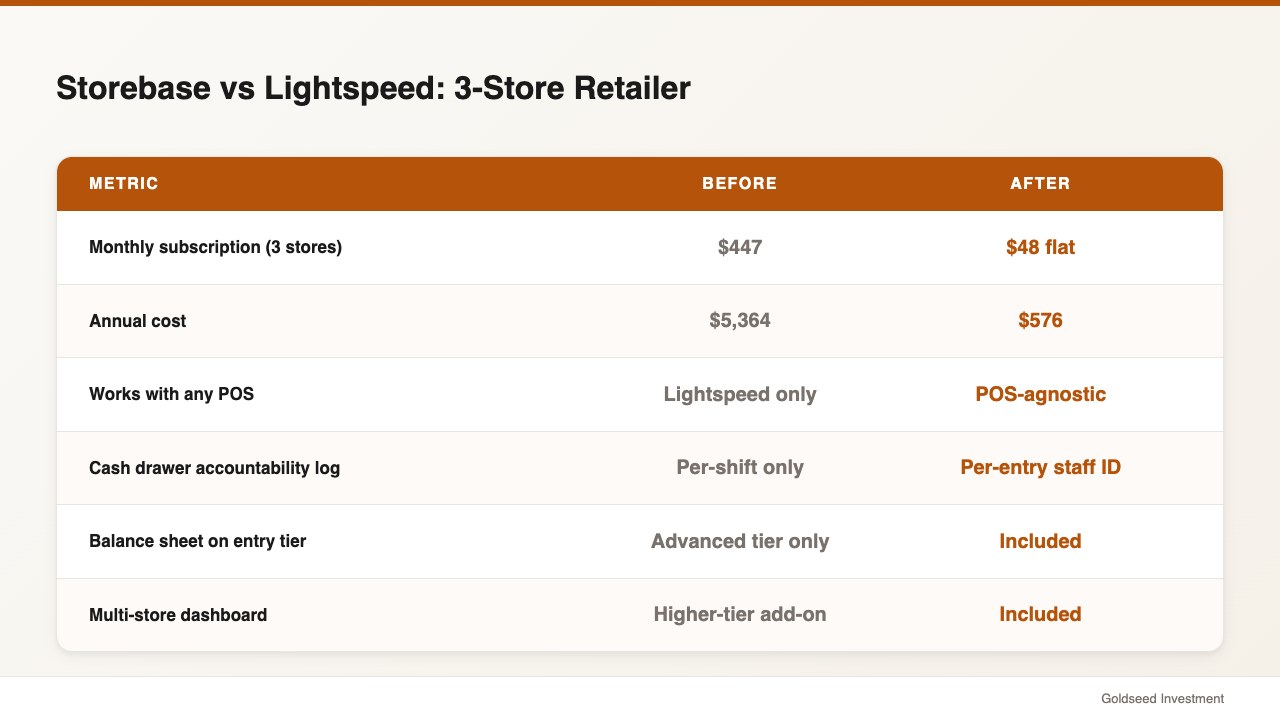
| Monthly cost (3 stores) | $48 (Growth, up to 5 stores) | ~$447 ($149 × 3) | ~$0 + $80 QB = $80 | Free (20+ hrs/mo labor) |
| Works with any POS | ✅ POS-agnostic | ❌ Lightspeed only | ⚠️ Square only | ✅ |
| Inventory audit trail (who/when) | ✅ Built-in log | ⚠️ Limited | ⚠️ Add-ons needed | ❌ |
| Cash drawer accountability | ✅ Per-entry staff ID + timestamp | ⚠️ Per-shift only | ❌ | ❌ |
| Native payroll math (QR clock-in) | ✅ Auto-calculated | ❌ Third-party | ⚠️ Add-on (Square Payroll) | ❌ |
| Auto P&L + Balance Sheet | ✅ Built-in | ⚠️ Advanced tier only | ⚠️ QB separate | ❌ |
| Multi-store dashboard | ✅ Included | ⚠️ Higher-tier add-on | ❌ | ❌ |
| Mobile-first (phone-only ops) | ✅ iOS + cloud | ⚠️ Tablet POS | ⚠️ Square only | ❌ |
This isn’t to argue Lightspeed is the wrong choice for every store. It’s to argue that for the majority of independent retailers running 1–10 stores who already have a working POS, the cheaper and faster move is to keep the POS and replace only the back office. That’s what Storebase is for.
How Did Maya Replace Lightspeed with Storebase Across Three Stores?
Maya Chen runs three women’s apparel stores in Austin, San Antonio, and Houston under a single brand. Total staff: 14, including two store managers. Before, she was on Lightspeed Retail Standard at $149/month × 3 locations = $447/month, plus a $80/month QuickBooks Online subscription, plus a Sling subscription at $7 per user per month for scheduling.
What broke her wasn’t the price. It was the day in March when she realized her San Antonio manager had been adjusting cash drawer totals at close — for an estimated six months — and there was no log of which adjustments were his vs the staff’s. Lightspeed showed her the discrepancy. It didn’t show her the responsible party.
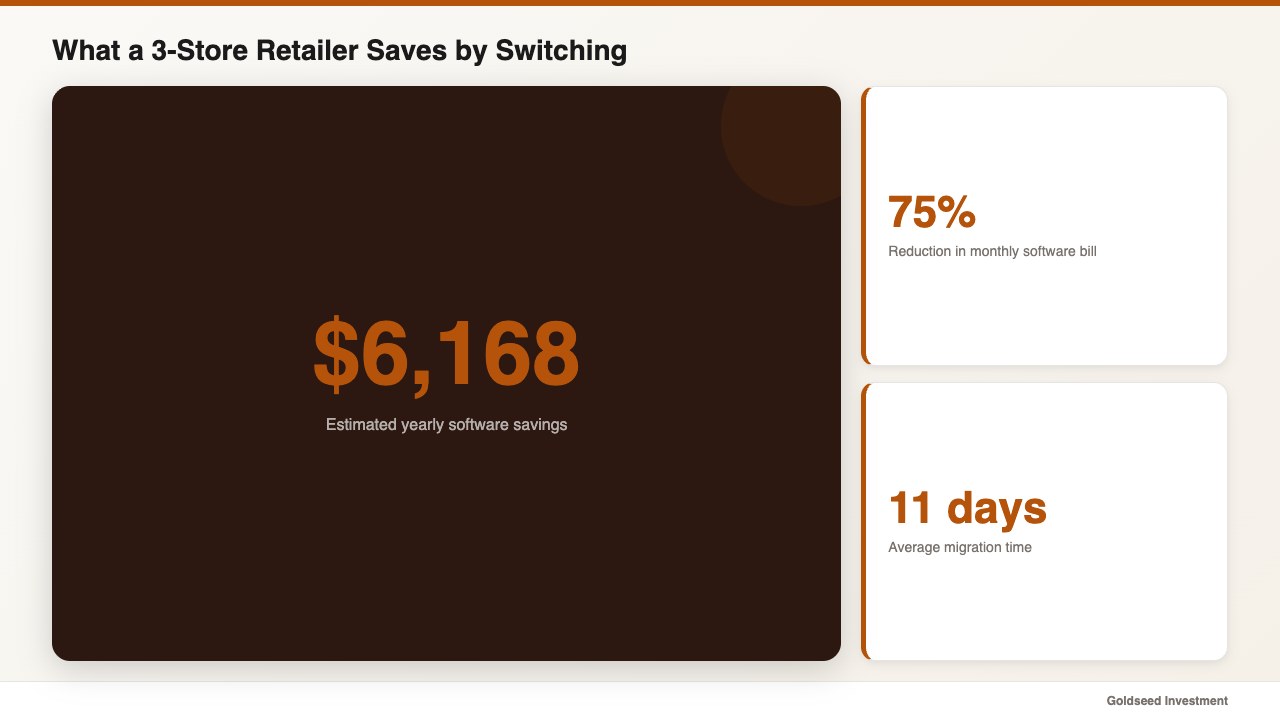
She moved to Storebase Growth ($48/month flat for all three stores) and kept Square at the counter. The transition took 11 days. Here’s what changed, mapped to specific Storebase modules:
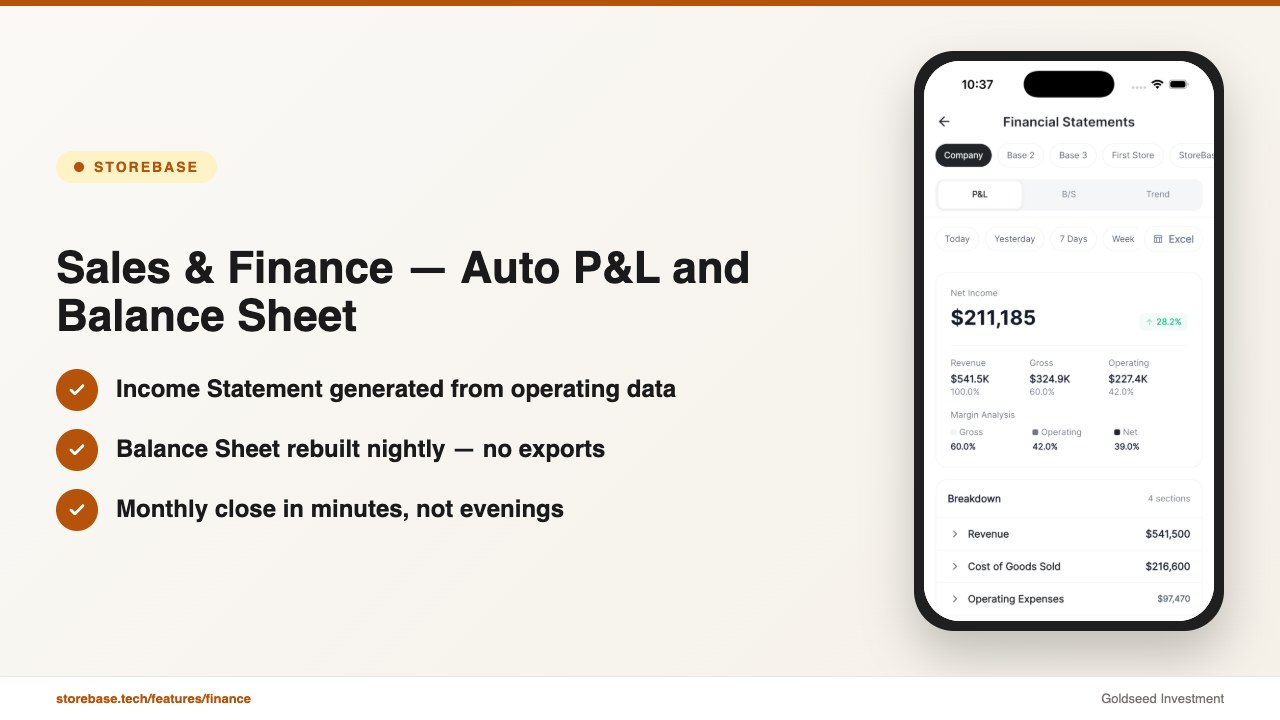
Storebase’s Sales & Finance module replaced her QuickBooks + Lightspeed reporting combo. Income Statement and Balance Sheet now auto-generate from her actual operational data — receipts captured by staff phones, vendor invoices logged on entry, payroll calculated from QR clock-ins. The monthly close that used to mean two evenings with her bookkeeper is now a 6-minute review.
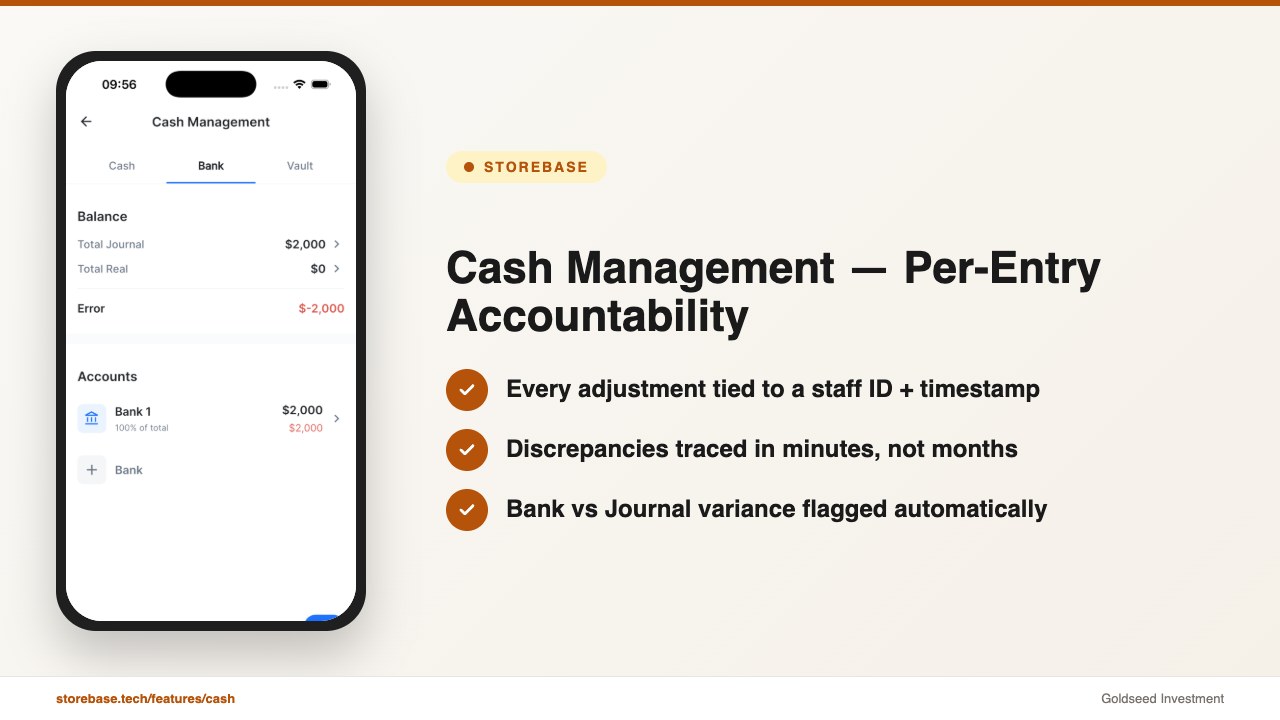
Storebase’s Cash Management module closed the accountability gap that triggered the whole switch. Every cash drawer adjustment now logs which staff member made it, the exact timestamp, and the running balance before and after. When a $43 discrepancy showed up at the Houston store in May, Maya traced it to a specific 4:18pm transaction within ten minutes — not six months.
Storebase’s Inventory module replaced the rolling Google Sheet her assistant manager maintained for inter-store transfers. When the Austin store sends 12 dresses to Houston, it’s a one-tap action on a phone — auto-deducts from Austin, auto-adds to Houston, with a transfer record tied to the staff member who initiated it.
Storebase’s Team & Payroll module cut Maya’s Monday morning from four hours to twenty-five minutes. Staff QR-scan in and out, the app computes the hours, applies overtime rules, and surfaces the totals for approval. No spreadsheets, no disputes over what time someone clocked out.
She still uses Square to ring up sales. Square exports daily totals into Storebase, and the back-office layer takes it from there. Total monthly software bill: $48 (Storebase) + $0 (Square base) + $98 (estimated Square payments processing) = $146 effective software cost, down from $586/month previously — a 75% reduction that pays for itself before lunch on day one.
The deeper change, Maya said, is that she’s no longer working inside the stores to know what’s happening. She works on the business — a distinction every multi-store operator knows the cost of, even if they can’t quite name it. If your back office is still living in spreadsheets and you’re paying per-location POS fees on top of it, Storebase is built for exactly this. Most owners complete the Sales & Finance setup in under 10 minutes and see their first auto-generated P&L by day two — no credit card required. Start with Sales & Finance →
Storebase vs Lightspeed: Which Wins on What?
To be honest about the comparison: Lightspeed is the stronger product on the POS side. If you need fast tableside ordering for a restaurant, embedded payments at the register, or a complex inventory matrix with variants and serial numbers tracked at the SKU level, Lightspeed (especially Retail X-Series and Restaurant L-Series) is purpose-built for that. Storebase is not trying to compete there.
Where Storebase wins is in three specific dimensions:
Price-per-store at scale. Lightspeed’s per-location pricing punishes growth. Going from 1 → 5 stores roughly 5× your subscription. Storebase Growth is $48/month flat for up to 5 stores, and the Business plan at $149/month covers up to 10 stores. A 7-store retailer pays roughly $1,250/month on Lightspeed Standard vs $149/month on Storebase Business — a $13,200/year delta.
Back-office depth on the standard tier. Lightspeed gates its strongest back-office features (advanced reporting, accounting integrations) behind the Advanced tier. Storebase puts the full back office — audit trails, balance sheet, multi-store dashboard — in the entry tier.
POS flexibility. You can run Storebase with Square, Clover, Toast, or Lightspeed itself. If you ever want to switch POS again, you don’t lose your back-office data, payroll history, or financial statements. With Lightspeed, the back office and the POS are welded together.
For deeper benchmarks across small retail tooling, the retail POS system buyer’s guide and how to choose a POS system for small business both walk through specific scenarios where each option wins.
When Does Lightspeed Still Make More Sense?
A fair guide names the cases where the alternative isn’t the right move:
- Single high-volume location with embedded payments needs: Lightspeed Payments at the register can simplify your stack if you don’t already have a stable POS. The all-in-one experience justifies the per-location fee at scale.
- Restaurant L-Series customers: Lightspeed’s restaurant flow (tableside, course timing, kitchen display) doesn’t have a direct equivalent in Storebase, which is a retail back-office platform.
- Stores with complex matrix inventory (apparel with size × color × variant SKUs into the thousands at one location): Lightspeed’s matrix tools are stronger than Storebase’s current inventory features for very deep variant trees.
Outside those cases, the calculus tilts toward the alternative. Most independent retailers with 1–10 locations and a back-office workflow that still touches spreadsheets are paying for POS features they barely use and missing back-office features they need every day. The single biggest cost reduction available to small retail in 2026 is not switching POS — it’s adding a back-office layer that lets you keep the POS you already trust.
How Much Would You Save by Year-End?
A back-of-the-envelope estimate for a three-store retailer migrating from Lightspeed Standard + QuickBooks to Square + Storebase:
| Line Item | Before (Lightspeed Stack) | After (Storebase Stack) |
|---|---|---|
| POS subscription | $447/mo ($149 × 3) | $0 (Square base) |
| Accounting software | $80/mo (QuickBooks) | $0 (included in Storebase) |
| Scheduling app | $35/mo (Sling, ~5 users) | $0 (included) |
| Storebase back office | — | $48/mo (Growth, up to 5 stores) |
| Monthly total | $562/mo | $48/mo + payments fees |
| Annual | $6,744 | $576 |
| Savings | — | ~$6,168/year |
That’s not a marketing claim — it’s the actual subscription delta, which any operator can verify against their current invoices. Payments processing varies by provider and volume, so we’ve left it out of both columns for an apples-to-apples comparison.
FAQ
Q: Is Storebase a direct Lightspeed replacement? A: No — and that’s the point. Lightspeed is a POS plus back-office bundle. Storebase is a back-office app that works alongside any POS, including Lightspeed itself. Most retailers switching from Lightspeed pair Storebase with Square or Clover at the register, keeping payment processing simple while gaining a deeper back office at lower cost.
Q: How much cheaper is Storebase than Lightspeed for a three-store operator? A: Approximately 90% cheaper on the subscription line. Lightspeed Standard runs about $447/month for three locations ($149 × 3). Storebase Growth is $48/month flat for up to five stores. Annualized, that’s roughly $5,400 vs $576 — a $4,800+ delta before any other savings.
Q: Can I keep my current POS and just add Storebase? A: Yes. Storebase is POS-agnostic. It integrates with Square, Clover, Toast, and Lightspeed, and works in parallel for any POS via daily totals import. You don’t need to change your register hardware or retrain staff on a new checkout flow.
Q: What does Storebase do that Lightspeed doesn’t? A: Three things stand out: a full cash drawer accountability log (every entry tied to a specific staff ID and timestamp), an auto-generated balance sheet on the entry tier, and QR-based clock-in with native payroll math built in. Lightspeed offers some of these via third-party integrations or its Advanced tier — Storebase includes them by default.
Q: How long does the migration take? A: Most three-store operators are fully migrated in 7–14 days. Initial setup (connecting stores, importing staff, configuring pay rates) takes under 30 minutes. Inventory import, depending on SKU count, runs in parallel over the first week. You can run both systems in parallel for the first cycle if you prefer to verify the numbers match before fully retiring the old back office.
Q: Does Storebase have a free trial? A: Yes — Storebase offers a free trial with no credit card required. Most owners use the first week to import data and run the previous month in parallel before committing.
The Bottom Line
If you’re searching for a Lightspeed alternative because the per-location pricing has compounded past what feels reasonable, the move that saves the most money — and adds the most operational depth — is usually not switching to another POS. It’s keeping your current POS and dropping a focused back-office layer on top. That’s the architectural shift Storebase represents, and it’s why three-store operators like Maya are running their entire back office for less than what a single Lightspeed seat used to cost.
If your back office is still living in spreadsheets while you pay per-location POS fees, Storebase is built for exactly this. Most owners go from “I have no idea what last month’s profit was” to “here’s my auto-generated P&L” by day three — no credit card required. Start with Sales & Finance → or Download on the App Store →
For deeper context on the broader POS landscape, see the retail POS system buyer’s guide for 2026, our breakdown of inventory management software for small business, and the multi-store retail management software comparison for operators running multiple locations.