Stores that pick a POS system using a written feature checklist instead of a sales pitch report 22% lower switching costs in the first three years.
Marisol Tan opened her second boutique in early 2024 and signed the first POS contract a sales rep pushed across the table. Three years later, she still pays $79 a month for terminals she barely uses, locked into a 36-month processor agreement that does not transfer to her newer location. Her story is common — and avoidable. The right way to choose a POS system for small business starts with a written checklist, not a demo, and the cost of getting that wrong tends to follow you for years.
This guide walks through the 2026 small-business POS landscape: what these systems actually do, what they should cost, which features matter most for retail, and the contract traps that catch new owners every quarter. Use it as a buyer’s framework before you sit down with any vendor.
Why Does the Right POS System Matter So Much for Small Stores?
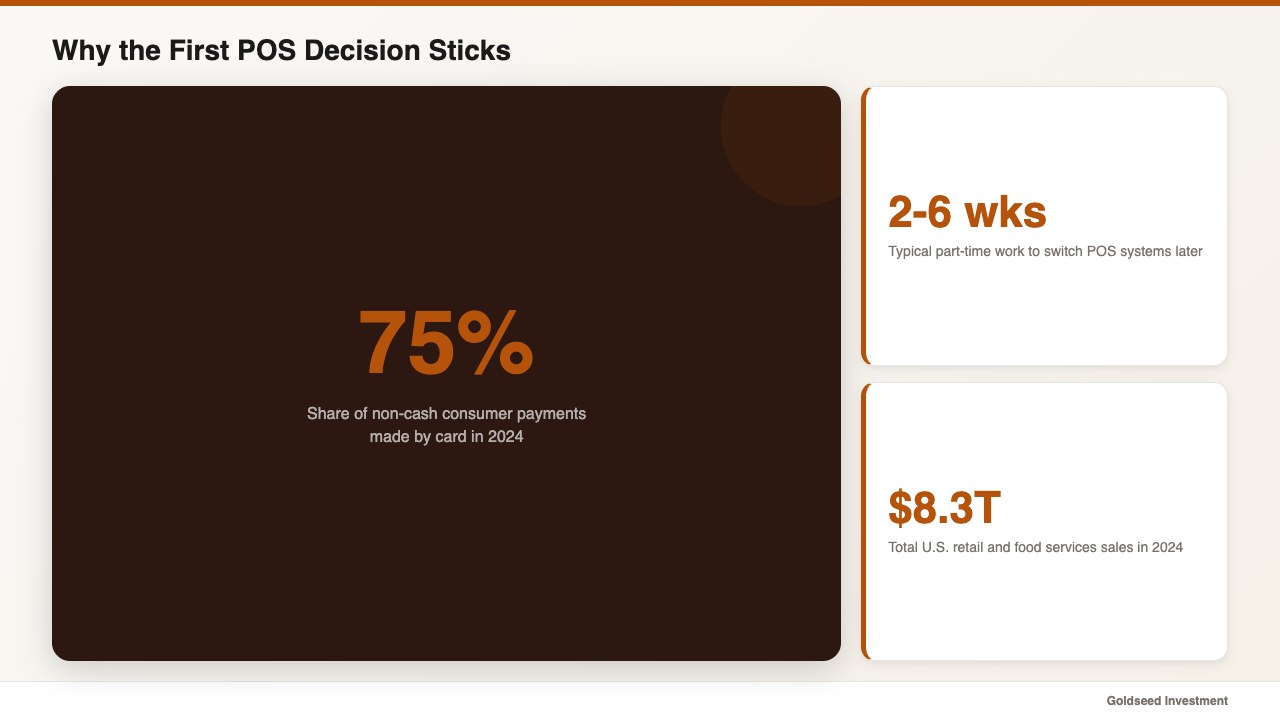
Card payments accounted for roughly 75% of non-cash consumer payments in 2024, according to the Federal Reserve Payments Study. That means the device sitting on your counter touches three out of every four dollars that flow through your business. A POS choice is not a cosmetic one — it is the second most important operational decision after your lease.
Switching POS systems later is painful in a way most owners underestimate. Data migration, retraining staff, reprinting price labels, and reissuing employee logins often takes two to six weeks of part-time work. One operator who managed multiple boutique locations put it plainly:
> “We picked a system in a hurry the first time. Three years and a thousand SKUs later, the contract we signed in 20 minutes cost us six weeks of nights and weekends to unwind.”
That kind of switching cost is why getting the first decision right tends to pay back for years. The good news: the buyer-side framework has gotten clearer since 2024, and the field of small-business POS systems has matured to the point where most major needs are commoditized.
What Should a POS System Actually Do in 2026?
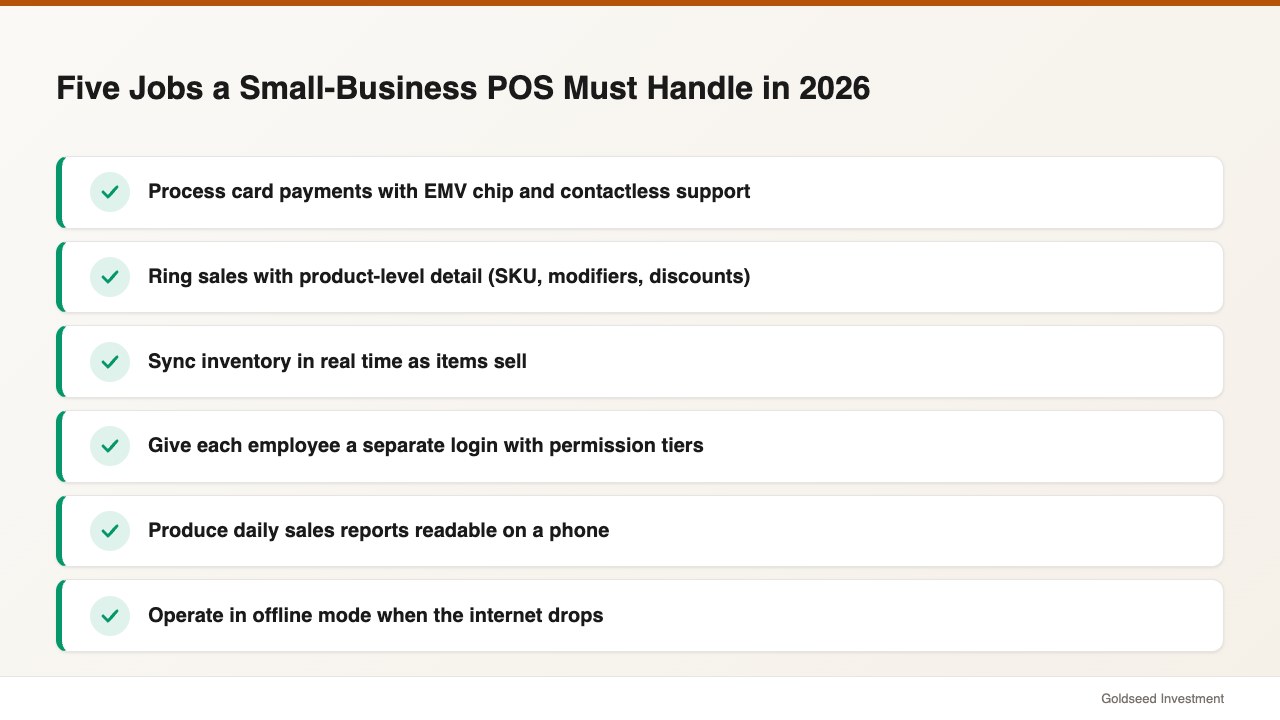
At minimum, a modern small-business POS handles five jobs: process card payments, ring up sales with product-level detail, sync inventory in real time, give each employee a separate login, and produce daily sales reports you can read on a phone. Anything less and you are buying a glorified cash register.
The categories worth knowing in 2026:
- Cloud-based mobile POS. Tablet or phone, monthly subscription, no on-site server. Square, Shopify POS, Clover, and Toast all fall here. Easiest setup, smallest hardware bill.
- Hybrid POS. A countertop terminal that syncs to the cloud but keeps a local copy of inventory and sales for offline use. Lightspeed and Heartland sit in this category.
- Legacy on-premise POS. Server in the back office, perpetual license. Used to be the norm; in 2026 it survives mainly in liquor stores, pharmacies, and chains with strict compliance needs.
For most small retailers — single store, one to three registers, under $1.5 million annual sales — a cloud or hybrid POS is almost always the right starting point. The U.S. Census Bureau reported total retail and food services sales of $8.3 trillion in 2024, and the bulk of small-store transactions on that figure ran through cloud platforms.
Pull a sample week of your current sales receipts before you talk to any vendor. Count the transactions, average ticket size, and how many have returns or split tenders. Those four numbers drive every other decision in this guide.
How Much Does a Small-Business POS System Actually Cost?
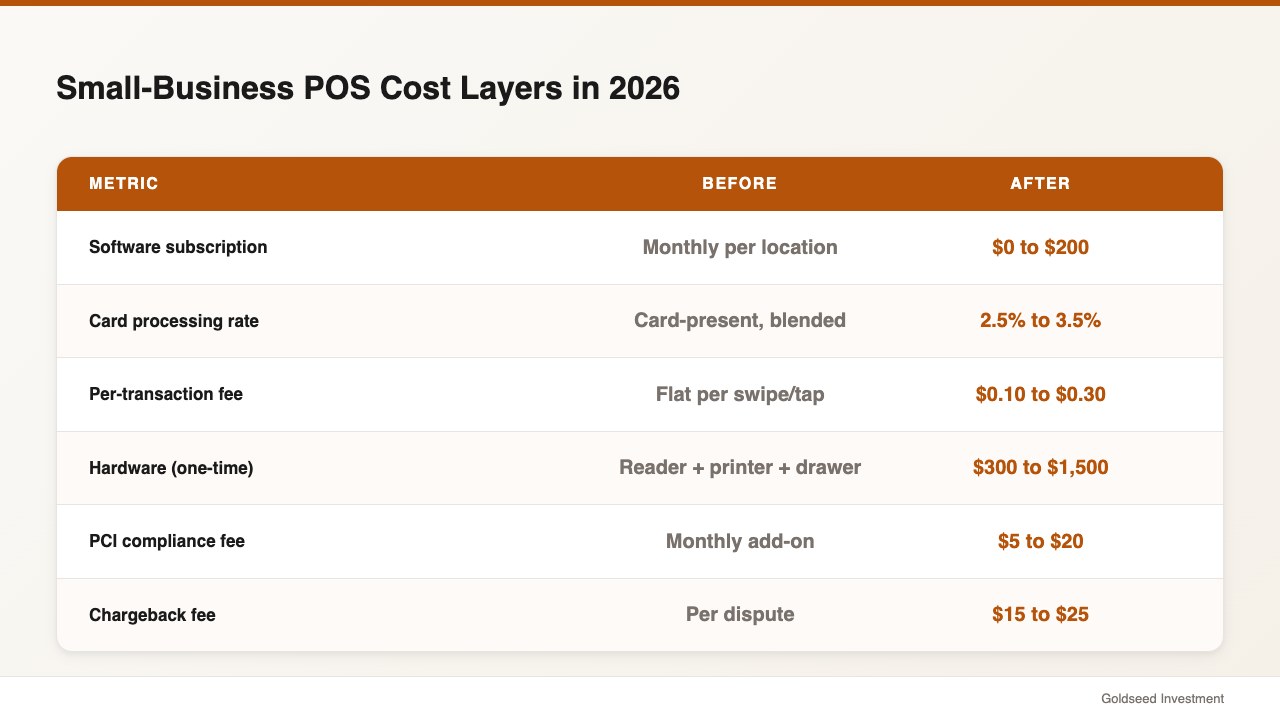
POS pricing has three layers, and vendors love to quote only the first one. Build your budget on all three.
Layer 1: Software subscription. Most small-business POS plans in 2026 run between $0 and $200 per month per location, per NerdWallet’s 2025 POS reviews. Free tiers exist (Square has one) but cap features like inventory depth, employee count, or report exports.
Layer 2: Transaction fees. This is where the real money is. Card-present rates for small businesses typically fall in a 2.5%–3.5% range, plus a per-transaction fee of about $0.10–$0.30. A store doing $40,000 a month in card volume at a 2.9% rate pays $1,160 in processing fees alone — more than 12 times the typical software subscription.
Layer 3: Hardware and setup. Card readers, receipt printers, cash drawers, barcode scanners, and tablet stands. Plan on $300 to $1,500 in one-time hardware for a basic register, more if you need a kitchen printer or self-service kiosk. Avoid equipment leasing — it tends to cost two to four times the purchase price over a 48-month term.
A quick rule of thumb: if a vendor offers free hardware, the processing rate is almost certainly higher to recover the cost. Always ask for the effective rate calculation in writing.
| Cost layer | Typical 2026 small-store range | Notes |
|---|---|---|
| Software subscription | $0 – $200 / month | Per location; free tiers usually limit reporting |
| Card processing | 2.5% – 3.5% + $0.10–$0.30 | Largest expense for most stores |
| Hardware (one-time) | $300 – $1,500 | Buy outright; avoid leases |
| PCI compliance fee | $5 – $20 / month | Often hidden on processor statements |
| Chargeback fee | $15 – $25 per dispute | Add up fast in apparel and electronics |
Source: NerdWallet POS Reviews 2025; Federal Reserve Payments Study 2024.
Which Features Are Non-Negotiable for Small Retail?
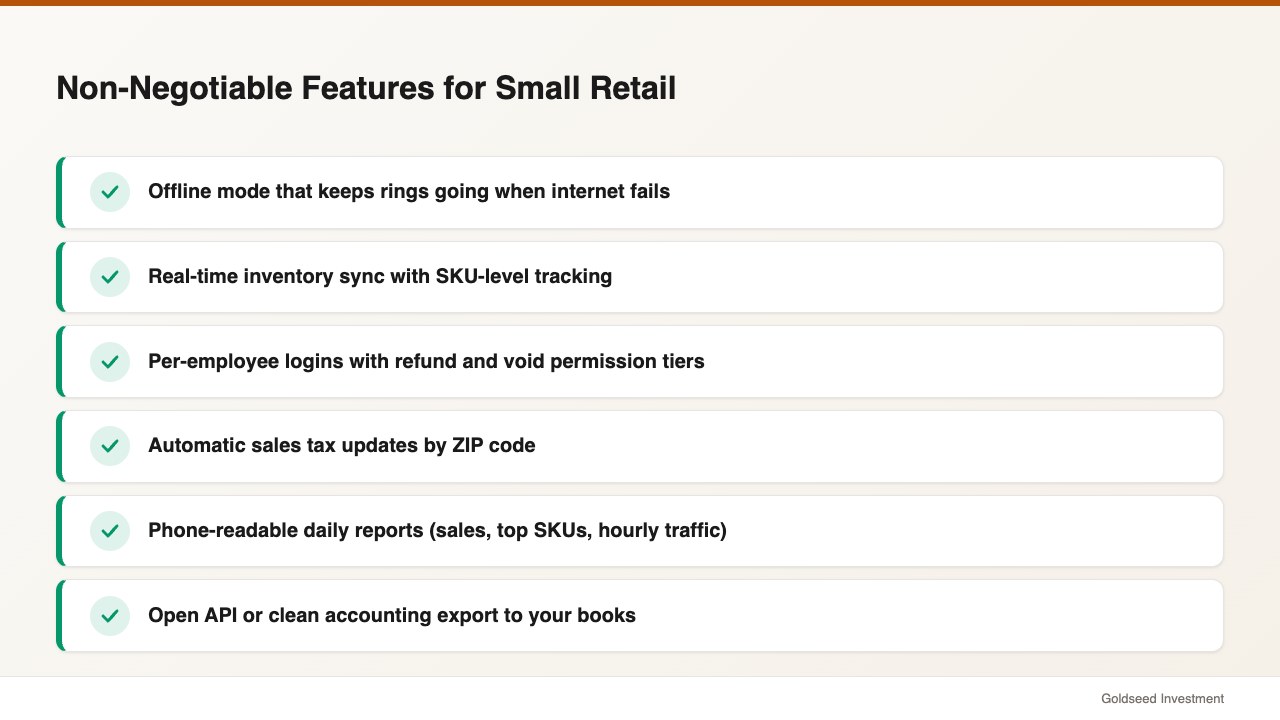
Vendors will pitch you 60 features. Most are filler. The short list below tends to separate a usable system from a regrettable one.
- Offline mode. Your internet will fail. A system that cannot ring sales without a connection will lose you a Saturday afternoon at least once a year.
- Real-time inventory sync with SKU support. If you sell physical goods, the POS must track inventory by SKU and update it as items sell. Anything else creates a manual reconciliation chore.
- Per-employee logins with permission tiers. Cashiers should not be able to issue refunds without manager approval. Audit logs on void and refund actions are the single best fraud deterrent for a small store.
- Sales tax automation by ZIP code. Sales tax rules change often. A POS that does not handle local rate updates pushes that work onto you or your bookkeeper.
- Integrated reporting on phone. Daily sales, top SKUs, hour-by-hour traffic. If you cannot pull these from your phone in 30 seconds, you will stop looking at them.
- Open API or accounting export. Your POS does not replace your books. It needs to hand sales data cleanly to whatever bookkeeping tool you use, ideally in real time.
For a broader breakdown of what well-run small retailers tend to track week over week, see our retail profit margin benchmarks for 2026.
This is not a knowledge problem most owners face — it is a tools problem. Many vendors deliberately bury offline mode and permission tiers behind higher tiers because they know most buyers do not ask.
How Do You Match the POS to Your Store Type and Sales Volume?
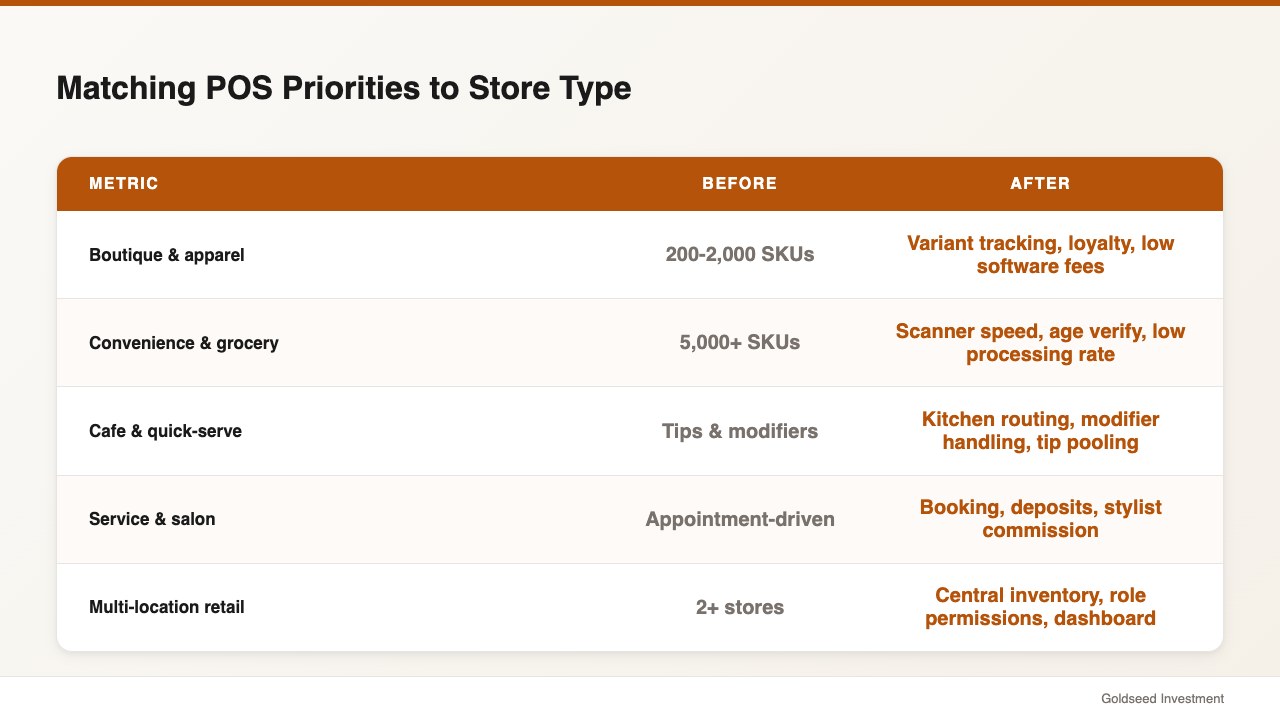
Different store types stress different POS features. A 600-SKU boutique has almost nothing in common with a 12,000-SKU liquor store, even though both ring up customers from a counter.
- Boutique and apparel (200–2,000 SKUs): Prioritize variant tracking (size/color), barcode scanning, and a customer loyalty layer. Modest transaction volume; software fees matter more than processing rate.
- Convenience and grocery (5,000+ SKUs): Prioritize scanner speed, age-verification prompts, and lottery/tobacco categories. High transaction count, low ticket — squeeze every basis point off the processing rate.
- Cafe and quick-serve: Prioritize kitchen printer routing, modifier handling, and a tipping flow that does not annoy customers. Tip-pooling reports save your manager an hour a week.
- Service and salon: Prioritize appointment integration, deposit holds, and stylist commission tracking. Payment volume is often lower; appointment-side features matter more than card rate.
- Multi-location anything: Prioritize centralized inventory, location-level permissions, and a single dashboard. Without this, a second store doubles your bookkeeping work instead of leveraging your first.
The volume math also matters. Below roughly $20,000 in monthly card volume, a flat-rate processor (Square, Stripe) is usually cheapest. Above $40,000, an interchange-plus pricing model from a regional processor often saves $400–$1,200 per month. Run both quotes before you sign anything.
> “Revenue felt real. The cash wasn’t always there when we needed it.” That gap usually comes from inventory and fees that the POS reports do not surface clearly. A POS that hides effective rates makes it worse.
What Hidden Costs and Contract Traps Should You Avoid?
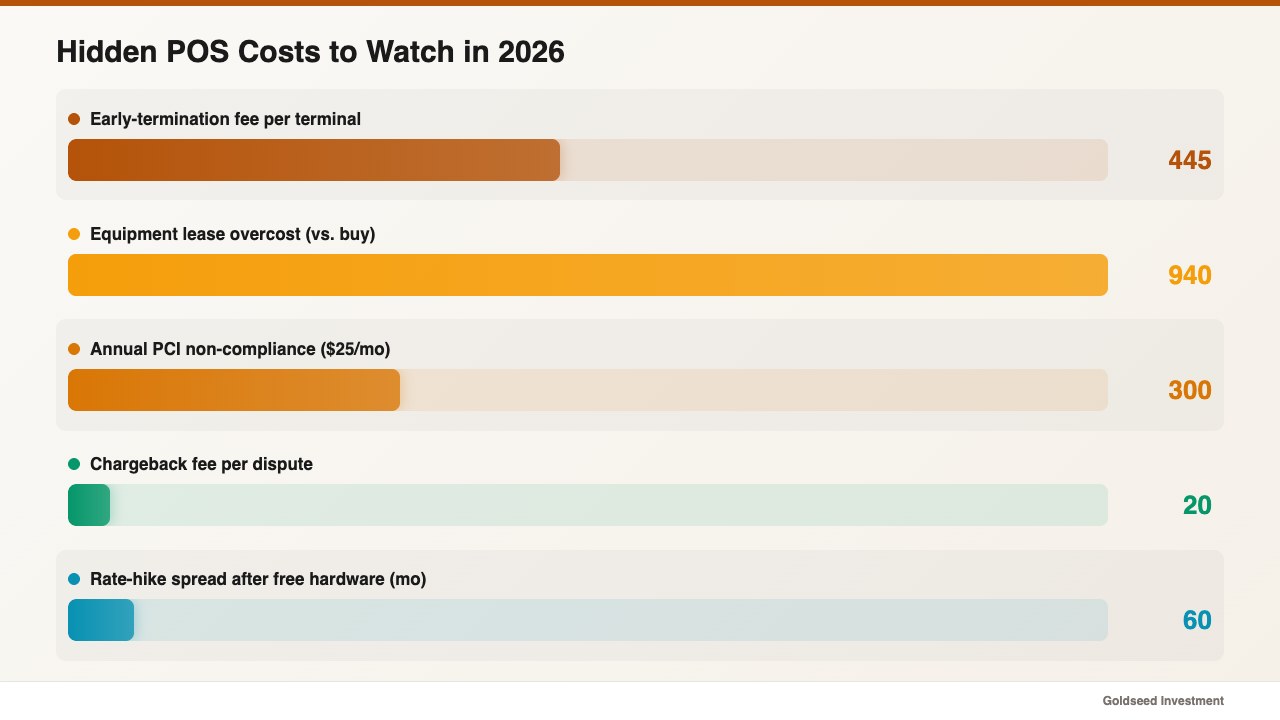
The biggest mistakes are not about price — they are about what is in the fine print. Watch for these in 2026:
- Long processor contracts with early-termination fees. Three-year processing contracts often carry $295–$595 cancellation penalties per terminal. Never sign a contract longer than 12 months on your first POS.
- Equipment leases. A $500 card reader leased for $30 a month over 48 months costs $1,440. Buy hardware outright every time.
- PCI non-compliance fees. Processors often charge $15–$30 per month if you do not complete an annual PCI questionnaire. Set a calendar reminder so this fee never hits.
- Bundled rate hikes. “Free hardware” deals often come with the right to raise your rate after six months. The contract clause is usually called “pricing review” or “interchange adjustment.”
- Required POS-side payment processing. Some POS vendors will not let you bring your own processor. That removes your ability to negotiate later. Confirm the system is “processor-agnostic” before signing.
The National Retail Federation reported retail shrink stayed near 1.6% of sales in 2024 — and a quietly inflated processing rate can quickly cost more than shrink. Treat hidden POS fees with the same seriousness you treat theft.
How Should Your POS Connect to the Rest of Your Back Office?
A POS is a sales-side tool. It tells you what sold, who sold it, and at what price. It is not a bookkeeping system, a payroll system, or a labor scheduling tool. Owners who try to make their POS do all four often end up with weak versions of each.
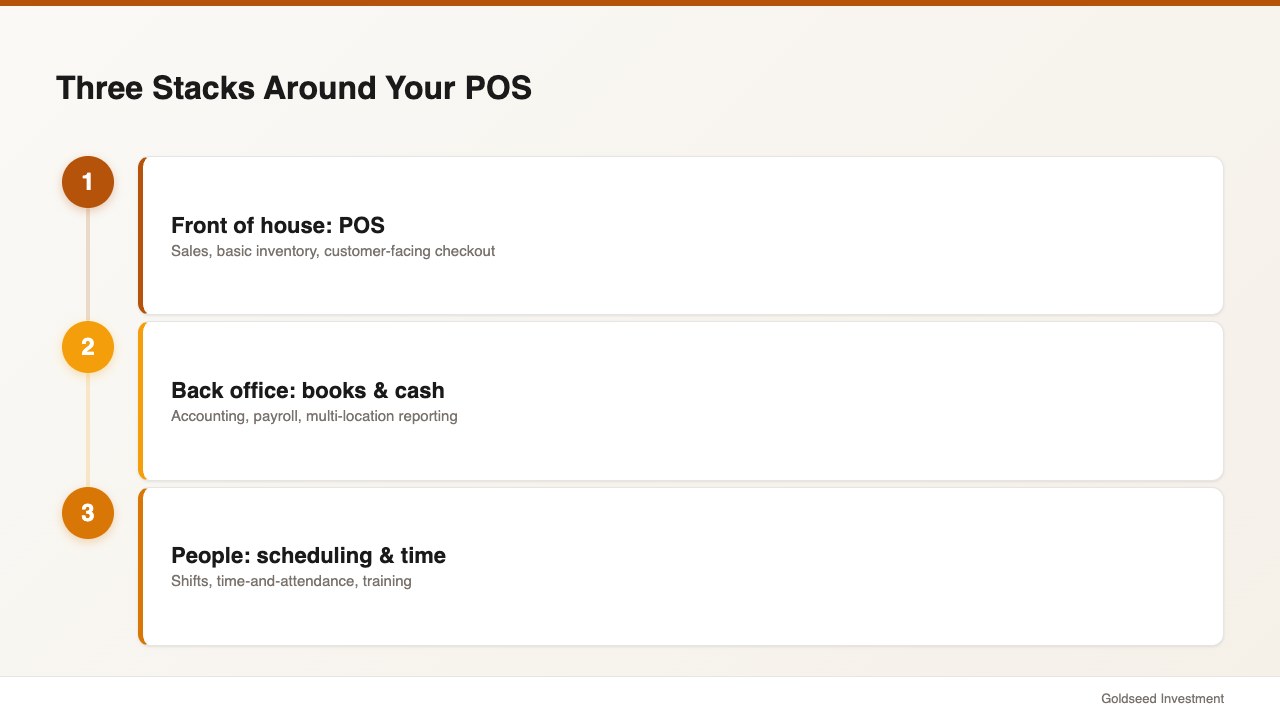
In 2024 there were roughly 15.4 million retail workers in the United States according to the BLS, and the payroll math for those workers rarely lives cleanly inside POS software. Plan from day one for three separate stacks:
- Front of house: the POS (sales, basic inventory, customer-facing).
- Back office: accounting/bookkeeping, separate payroll, and ideally a back-office app that consolidates cash and reporting across locations.
- People: scheduling, time-and-attendance, training. Some POS systems include lightweight versions; most small retailers tend to outgrow them by year two.
For multi-store operators especially, see our breakdown of retail POS systems that handle multiple locations and how to choose a POS system for retail stores at scale. The connecting question is always: where does the data flow next, and who keeps it accurate?
A Step-by-Step Framework to Pick the Right POS in 30 Days
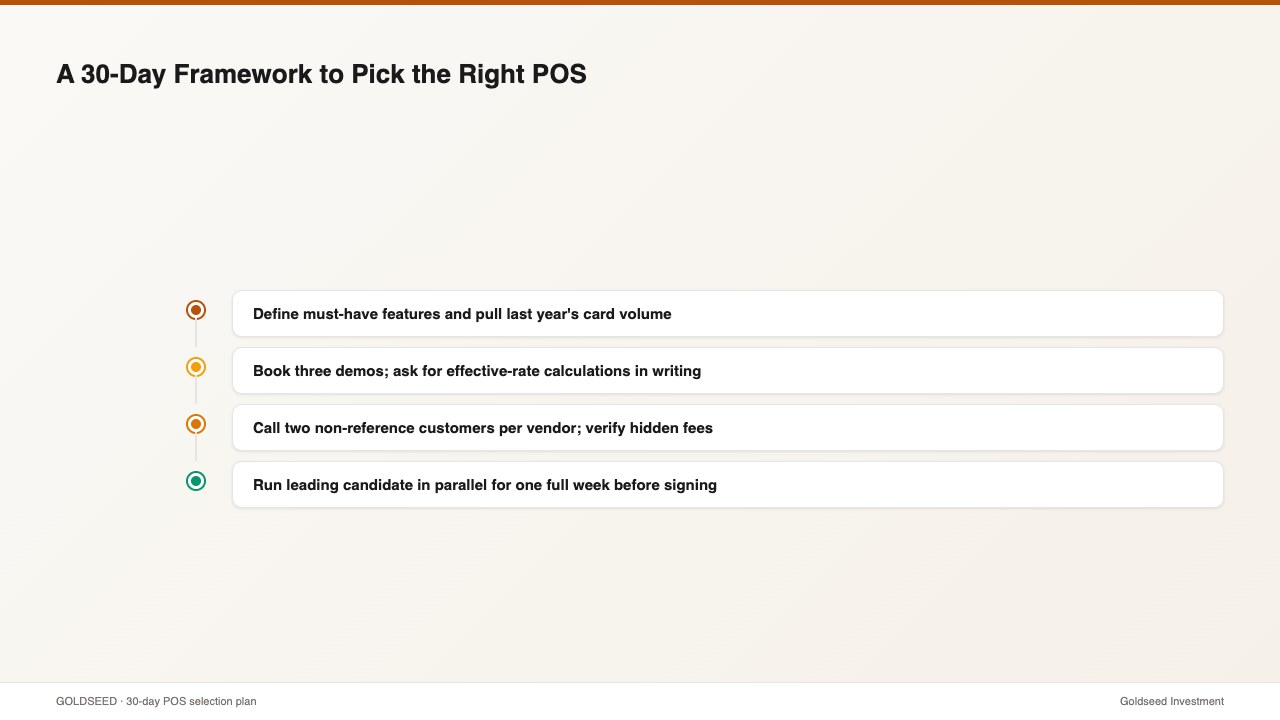
Use this sequence. It works for first-time buyers and for owners switching systems.
Week 1 — Define. Write your must-have feature list (use the six items above as a baseline). Pull last year’s monthly card volume and average ticket. Decide whether you want flat-rate or interchange-plus processing math.
Week 2 — Demo. Book three demos. Ask each vendor for the effective rate calculation on your actual volume. Ask explicitly: “What is the early termination fee, and can I bring my own processor later?” Record every answer in writing.
Week 3 — Verify. Call two existing customers from each vendor — not the references the sales team hands you. Ask the same five questions: hidden fees, support response time, downtime in the last 12 months, contract length, and one thing they wish they had known.
Week 4 — Test. Run the leading candidate in parallel with your current setup for at least one full week. If you are opening a new store, run a single quiet day end-to-end before opening to the public.
Calculate your total first-year cost on paper before signing — software + estimated processing + hardware + setup + any compliance fees. Owners who do this math tend to pick a different system than the one their demo “felt best” with about 40% of the time.
FAQ
Q: What is the cheapest POS system for a brand-new small business in 2026? A: Square’s free plan and Shopify POS Lite are the most common zero-monthly-fee starting points for small retailers. They make money on processing (typically 2.6%–2.9% plus $0.10 per card-present transaction), so the “free” label only holds at low transaction volume. Above roughly $25,000 in monthly card sales, a paid plan from the same vendor or a different processor often costs less. Compare options in our 2026 best POS picks for small business.
Q: How long should a POS contract be? A: Keep your first contract month-to-month or 12 months maximum. Three-year processor contracts often carry $295–$595 early-termination fees per terminal, and the technology landscape changes too quickly to lock in for 36 months. If a vendor will not offer a 12-month term, that is a signal to walk.
Q: Does a POS system replace accounting software? A: No. POS systems track sales and basic inventory; accounting software tracks the full set of credits and debits — rent, payroll, depreciation, owner draws, and tax categories. The two should hand data to each other through an export or API, but you need both. Stores that try to run their books out of the POS alone tend to discover missing categories at tax time.
Q: Can I switch POS systems later if I pick the wrong one? A: Yes, but it takes two to six weeks of part-time work and you may lose granular historical data (you usually keep totals, not line items). Switching is also the moment hidden contract fees show up. The practical answer is to choose carefully the first time using a checklist — not under sales pressure — and to keep your contract terms short so the door stays open.
Q: How important is offline mode on a POS in 2026? A: Critical for any store with foot traffic. Even cloud-based POS systems should let you continue ringing card sales when your internet drops. Some vendors gate offline mode behind higher tiers; many do not advertise it at all. Confirm in writing before signing.