Specialty retailers pairing Storebase with their POS cut quarterly P&L assembly from 9 hours → under 10 minutes, traced cash discrepancies in under 60 seconds, and closed monthly books 30% faster — without replacing their existing Square, Clover, or Toast setup.
The first store ran on luck and late nights. Marcus Whitaker, who owns a specialty grocery in Austin, picked Square as his POS in year one because the hardware was cheap and the swipe was fast. It worked at the counter. Where it stopped working was the second Tuesday of every month, when his bookkeeper showed up and the two of them spent 9 hours stitching together POS exports, a shoebox of expense receipts, and a spreadsheet of payroll runs into something that vaguely resembled an income statement. By the time the report was done, the data was three weeks stale and the decisions it should have informed had already been made on instinct.
That changed when he layered Storebase on top of his existing Square setup as his accounting back office. Within 60 days the quarterly P&L assembly dropped from 9 hours → under 10 minutes, the $1,200 cash discrepancy he couldn’t trace earlier in the year was resolved within a week, and his bookkeeper’s role shifted from data entry to actual review. Marcus did not change a single thing at the counter. He changed everything behind it.
This guide is for the version of you who is still on a POS that does not feed a real general ledger. We will compare the leading accounting software with POS integration in 2026 — QuickBooks Online, Xero, Storebase, and the built-in reports inside Square and Shopify — and then walk through what \”integration\” really means at the line-item level. Because a POS that captures the sale is half the system. The other half decides whether you actually know your margins.
Why Does Accounting Software With POS Integration Matter So Much in 2026?
A POS exists to do one thing exceptionally well: capture a sale. Card swipe, item scan, receipt, done. What it generally does not do is post that sale to revenue, post the cost-of-goods-sold against inventory, separate sales tax payable into a liability, and produce an income statement and balance sheet that a lender or accountant will accept.
That gap is where bookkeeping hours go.
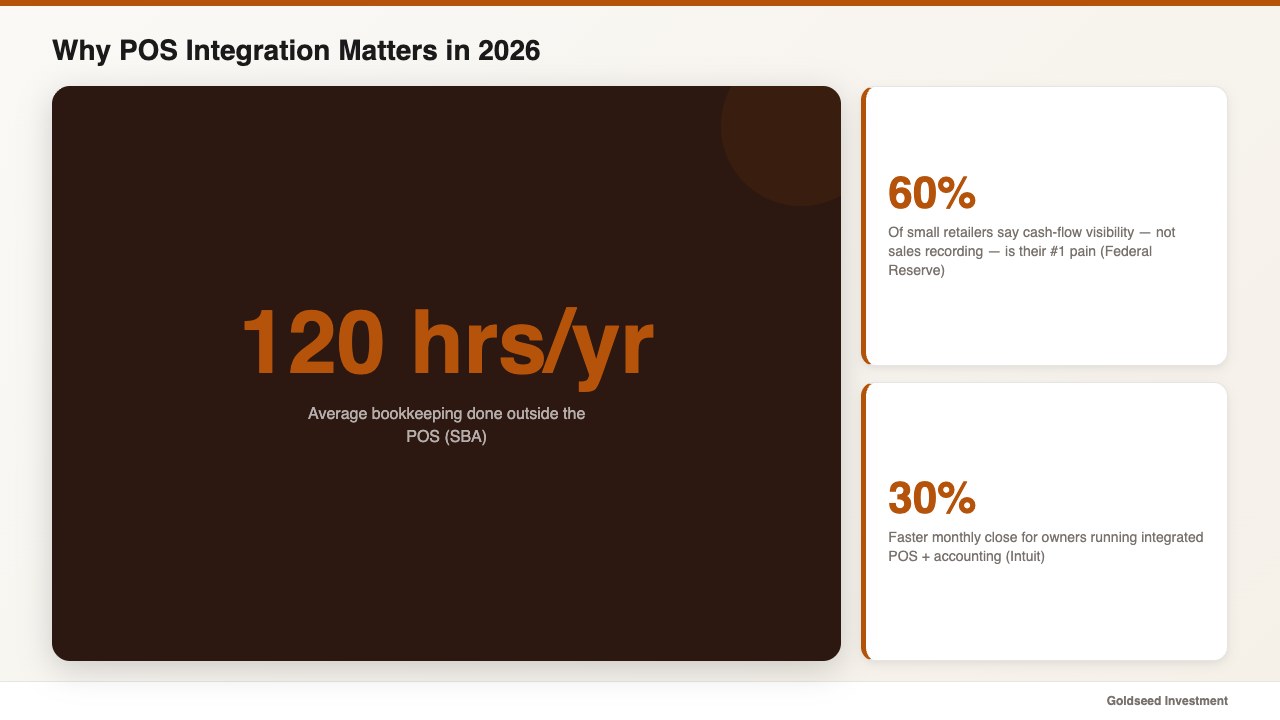
According to the U.S. Small Business Administration, small business owners spend an average of 120 hours a year on bookkeeping that lives outside their POS. The Federal Reserve’s Small Business Credit Survey reports that roughly 60% of small retailers say cash flow visibility — not sales recording — is their top operational pain. Intuit’s own small business research notes that owners running integrated accounting and POS data close their monthly books about 30% faster than peers stitching it together by hand.
In other words: the part of running a small retail store that swallows your time and obscures your real margin tends to be the part the POS does not handle. It begins the second the customer walks out and lasts until the next month-end close.
Modern accounting software with POS integration tries to close that gap in two different ways. The first approach is the traditional general-ledger route — QuickBooks Online or Xero — where a connector pulls POS data in as a daily journal entry and the owner (or their bookkeeper) manages the chart of accounts, bank reconciliation, and statements. The second approach is a retail back-office app that treats the POS as one of several data sources and builds the financial statements directly from the operating data it sees — sales, expenses, payroll, cash counts.
Both can produce a real income statement and balance sheet. Where they tend to differ is who does the work, how much of the cash side is covered, and how badly things break the day you open a second location.
What Actually Breaks When Your POS and Accounting Don’t Talk?
It is easy to assume that any modern POS report is, in some loose sense, your accounting. Owners often discover the opposite the first time the numbers need to leave the POS — for a tax filing, a loan, or a partner conversation.
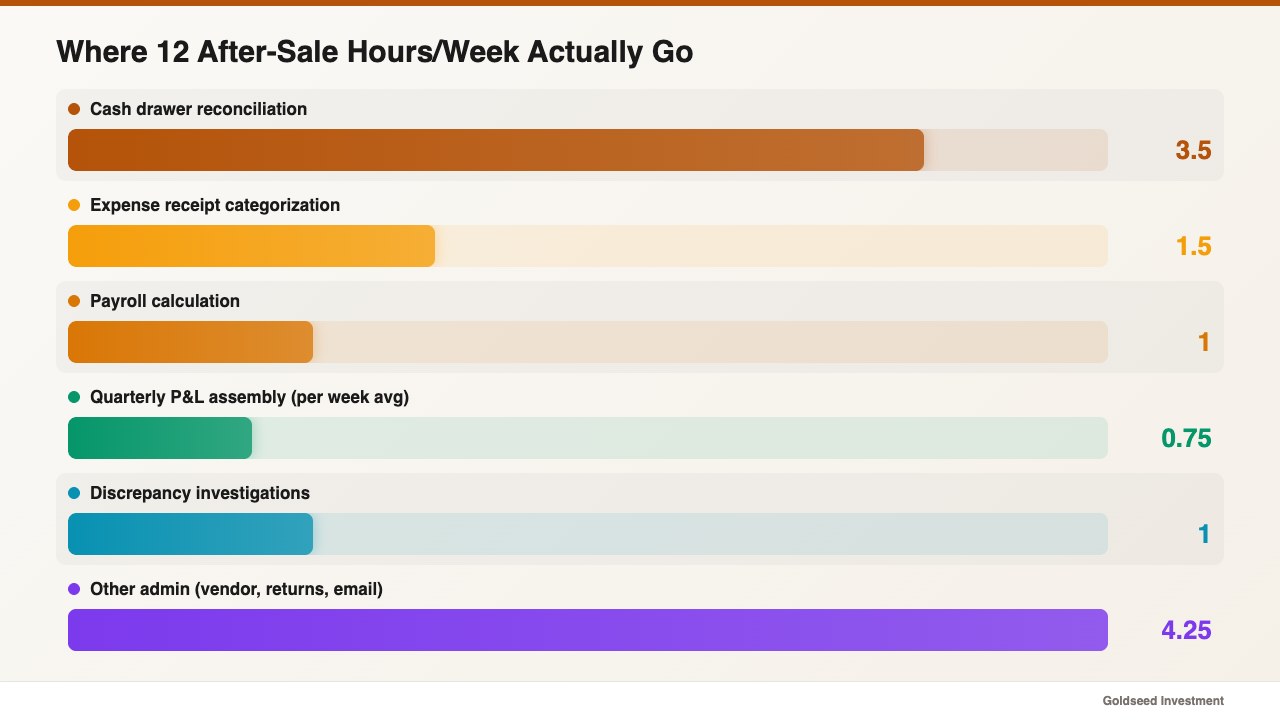
Marcus’s pre-Storebase numbers are typical of small retailers who picked a strong POS and still struggled at the books. In his first 18 months on Square, the time his store spent on after-sale financial work looked like this:
- Daily cash drawer count vs. POS report (two stores combined): 3.5 hours/week
- Expense receipts categorized into the chart of accounts: 6 hours/month
- Payroll calculated from raw hours, then re-entered for tax: 2 hours, twice a month
- Quarterly P&L assembly from POS exports + spreadsheets + receipts: 9 hours per quarter
- \”Where did this discrepancy come from\” investigations: untrackable
Roughly 12 hours a week of after-sale admin, almost none of which his POS could automate even though it captured the underlying transactions. The numbers were technically there. They were trapped in three different formats with no chart of accounts behind them.
The cost of those 12 hours is not just labor. It is decision velocity. Operators who cannot see real cash flow until the 15th of the next month tend to make slower purchasing decisions, slower hiring decisions, and slower expansion decisions. The first store generally cannot become the second store while the operator is still hand-stitching last quarter’s numbers.
There is also a sales-tax landmine. POS exports often combine merchandise revenue, tip lines, gift card liabilities, sales tax collected, and refunds into a single daily total. Posting that as one number to revenue inflates income and understates a tax liability. An accounting integration worth using maps each line correctly: revenue, COGS, sales tax payable, tips payable, gift card liability, and refunds — separately, every day.
The deepest problem is accountability around cash. A POS records what sold. It does not record who counted the drawer, who logged the deposit, who marked a damaged item as written off, or which shift handoff is responsible for a $40 short-day that keeps recurring. Those are back-office data problems, and even the best POS systems on the market do not pretend to solve them. As one operator put it: \”I finally figured out the cash wasn’t missing from the POS. It was missing from the gap between the POS and the bank deposit. The POS couldn’t tell me anything about that gap because the gap wasn’t inside it.\”
If the back office is where your real financial picture lives, the back office is where your accounting integration has to do its work — not just at the counter.
How Do the Top Accounting Tools With POS Integration Compare?
Four credible options come up when small retailers search for accounting software with POS integration in 2026: QuickBooks Online, Xero, Storebase as a back-office layer, and the built-in financial summary inside Square or Shopify. Here is an honest read on each — what they connect to, what they cost, and what they actually produce.
QuickBooks Online is the default general-ledger tool for U.S. small businesses. Plans range from roughly $35 to $235/mo. Native or partner connectors exist for Square, Clover, Shopify POS, and Lightspeed; some require a third-party sync app. Best for: owners who already have a CPA workflow and want a true double-entry ledger. Trade-off: integrations vary in fidelity (some post one daily journal entry rather than line-item detail), payroll is a separate paid module, and cash drawer accountability lives outside the system entirely.
Xero is the closest direct competitor, popular in commonwealth markets and growing in the U.S. Plans run from about $20 to $80/mo. POS connectors exist for Square and Shopify, with third-party bridges for Clover and Lightspeed. Best for: cleaner UI fans, multi-currency operators, and bookkeepers who prefer Xero’s reconciliation flow. Trade-off: same boundary as QuickBooks — sales come in, payroll and cash accountability still live somewhere else.
Storebase is not a general-ledger replacement; it is a retail back-office app that builds the income statement and balance sheet directly from POS sales, staff-tagged expenses, payroll runs, and cash counts. It pairs with whichever POS you already use. Best for: operators who want one app behind the counter — accounting, cash log, payroll, inventory accountability — instead of a stack of integrations. Trade-off: not a CPA-style chart-of-accounts editor; if your accountant insists on QuickBooks for tax filing, Storebase exports to it rather than replacing it.
Square / Shopify built-in reports can be tempting because they are free with the POS. They are useful operationally — daily sales summary, gross sales, simple category breakdowns — but they generally are not financial statements. There is no balance sheet, no proper COGS accounting, no sales tax liability separation. Most retailers outgrow them within a year.
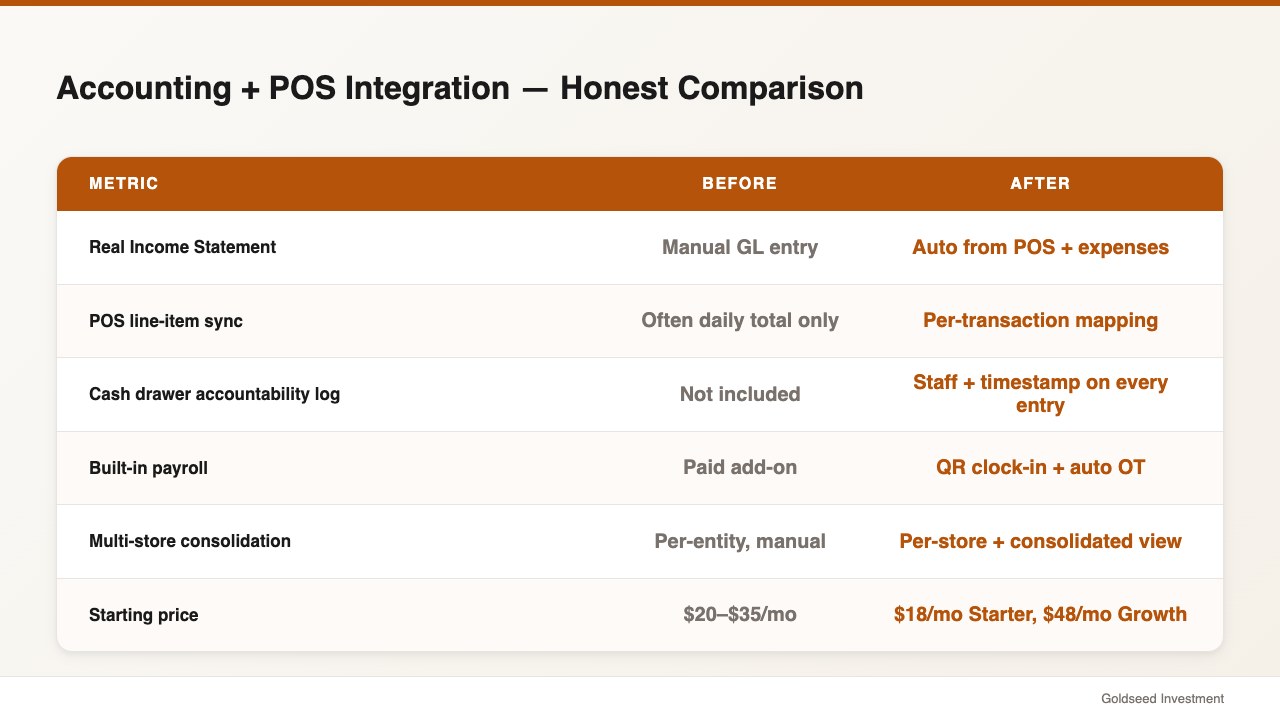
Accounting Software With POS Integration — Honest Comparison Table
| Feature | QuickBooks Online | Xero | Storebase (back office) | Square / Shopify built-in |
|---|---|---|---|---|
| Built for | Any small business | Any small business | Retail-specific back office | POS reporting only |
| Software starting price | ~$35/mo | ~$20/mo | $18/mo Starter, $48/mo Growth, $149/mo Business | Free with POS |
| Real Income Statement | ✅ Manual GL | ✅ Manual GL | ✅ Auto from POS + expenses | ❌ Sales only |
| Real Balance Sheet | ✅ | ✅ | ✅ Auto | ❌ |
| POS line-item sync | ⚠️ Often daily total only | ⚠️ Often daily total only | ✅ Per transaction | N/A — same system |
| Cash drawer accountability log | ❌ | ❌ | ✅ Staff + timestamp on every entry | ❌ |
| Built-in payroll | ⚠️ Paid add-on | ⚠️ Paid add-on | ✅ QR clock-in + auto OT | ❌ |
| Multi-store consolidation | ⚠️ Per-entity, manual | ⚠️ Per-entity | ✅ Per-store + consolidated | ⚠️ Paid tier |
| Replaces your POS? | ❌ No — pairs | ❌ No — pairs | ❌ No — pairs with any POS | — same system — |
Two honest notes on this table. First, none of the four is universally \”best.\” QuickBooks and Xero remain the right answer if your accountant requires a familiar chart-of-accounts file. Storebase tends to win when the daily operating gaps — cash, payroll, inventory accountability — matter as much as the financial statements. The built-in POS reports are rarely the long-term answer for a serious retail operator.
Second, the table assumes you are keeping your POS. None of these tools require switching the front counter, and the cheapest insurance against a future POS migration is to keep the financial record independent of the hardware at the register.
For a deeper look at the broader category, the small business accounting software guide walks through the full short-list, and the retail financial management software for income statements covers the income-statement workflow specifically. If you are still pre-POS, the how to choose a POS system for small business guide covers the front-counter decision before the back office one.
How Marcus Connected Storebase to His POS for Automatic P&L and Cash Accountability
Marcus did not switch his POS. He kept Square at the counter — his staff already knew it, the hardware was paid for, and the card-present fees were fine for his average basket. What he changed was the layer behind it.
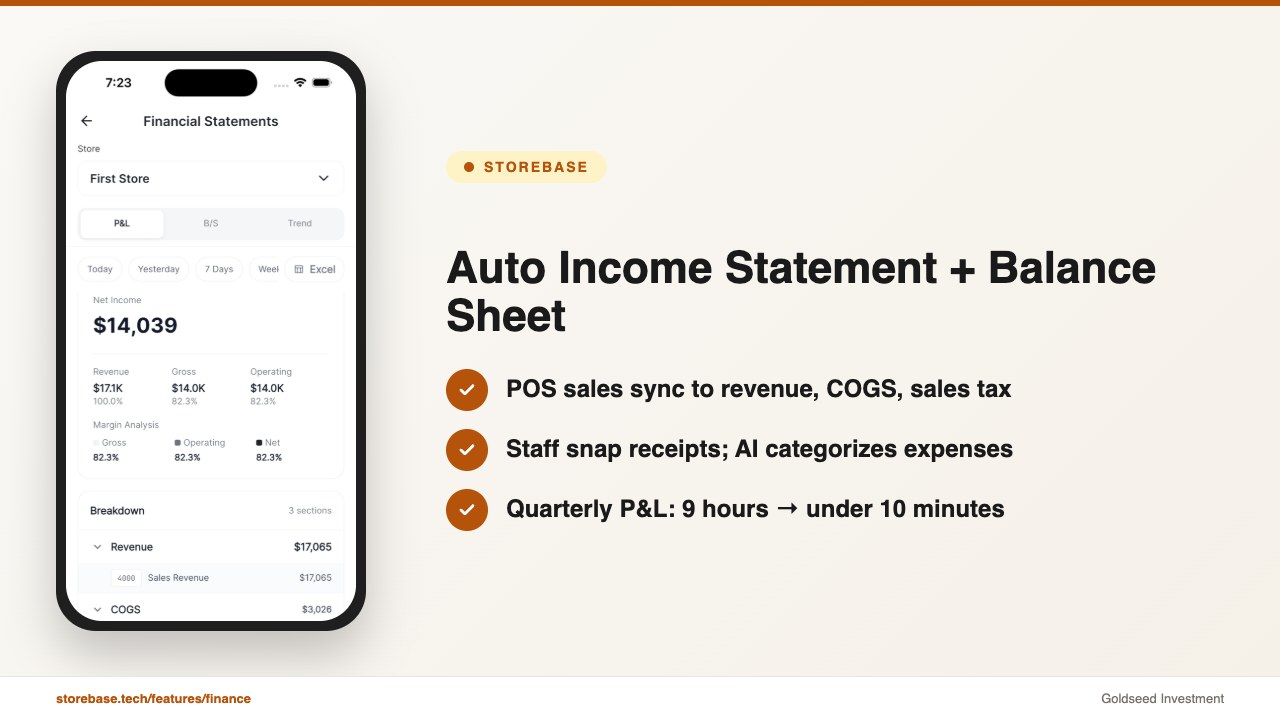
Storebase is a retail back-office app built to sit on top of whichever POS you already use. It pulls in the POS sales feed, lets staff log expenses by photo, captures payroll from a QR clock-in, and reconciles the cash drawer against the bank deposit — and it produces a real Income Statement and Balance Sheet directly from that operating data. Marcus’s setup ran on three core modules.
1. Sales & Finance — automatic Income Statement and Balance Sheet from the POS feed. The 9-hour quarterly P&L assembly was the headline pain. With the Sales & Finance module, Square sales flow in automatically and map cleanly to revenue, COGS, sales tax payable, tips, and refund categories — no daily-total shortcut. Staff snap photos of expense receipts at the moment of purchase; the AI reads the merchant, the amount, and the suggested account, and posts it into the right line. An Income Statement and Balance Sheet are generated continuously rather than at month-end. Quarterly P&L assembly went from 9 hours → under 10 minutes. Tax-season prep dropped from three weeks → three clicks for the bookkeeper to review.
2. Cash Management — every drawer movement, logged with a name. This was the $1,200 problem. Square told Marcus sales were fine; the drawer told him cash was short; nothing connected the two. With Cash Management, every deposit, withdrawal, change-fund top-up, and till count is tagged with the staff member who entered it and the exact timestamp. The system compares book balance to actual count automatically. In the first month, Marcus traced a recurring $40 short-day to one specific shift handoff that had never been formally counted; cash variance went from \”untraceable\” → resolved within a week and the integration into the income statement was clean for the first time in 18 months.
3. Inventory — COGS that actually ties to what sold. A POS knows what sold. It generally does not know what was received from a vendor, what was written off as damaged, or what walked out the back door. With the Inventory module, every change — receiving, transfer, write-off, sale — is logged with a staff ID. That inventory log feeds directly into COGS on the Income Statement, so margin per category stops being a quarterly guess and starts being a weekly read. Marcus discovered two slow-moving SKUs were eating shelf space he could not afford in the second store before he finished the lease conversation.
A fourth module he hadn’t expected to use right away — the consolidated Multi-Store Dashboard — became the lever that let him open store number two with confidence. Because his back-office accounting runs on the same app regardless of which POS each store uses, the second location did not require a parallel ledger.
The pricing logic is straightforward: Starter is $18/mo for a single store with up to 5 employees, Growth is $48/mo for up to 5 stores with up to 30 employees, and Business is $149/mo for up to 10 stores. Compared with stacking a separate accounting subscription ($35+/mo), a separate payroll app ($40+/mo), and a separate scheduling app, most retailers report the combined back-office cost dropping rather than rising — even before counting the hours saved each week.
Closing CTA — Try Storebase Free. If your POS still tells you only what sold, and your accounting still requires a weekend with a shoebox of receipts, the back-office layer was built for exactly this. Most owners complete setup in under 10 minutes, see quarterly P&L go from 9 hours → under 10 minutes by the second cycle, and pay no credit card to start. Start Free with Sales & Finance → or Download on the App Store →.
What Should You Verify Before Picking an Accounting + POS Integration?
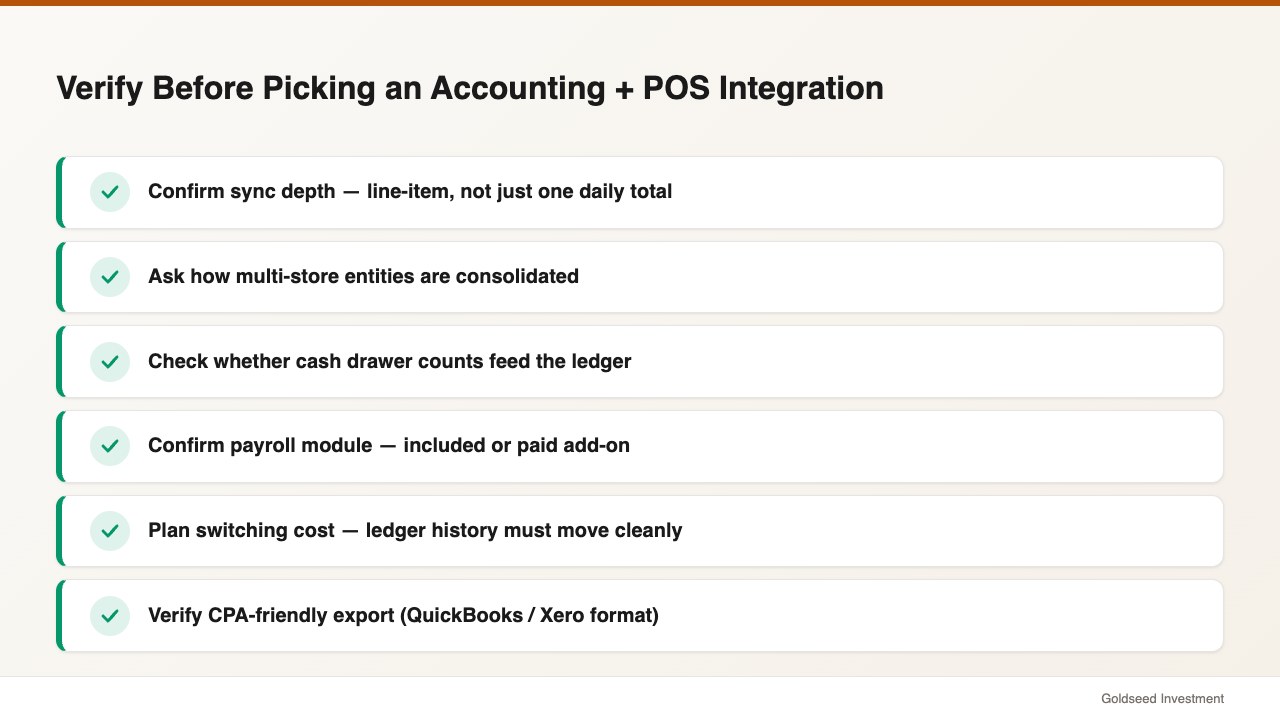
The integration listed on a vendor’s marketing page is not always the integration you actually get. Before committing, verify these five points with whoever is selling you the connector.
First, sync depth. Does the integration post each sale as a line-item journal entry, or does it post a single daily total? Daily totals are easier to set up but they collapse revenue, sales tax, tips, and refunds into one number, which is the most common source of misstated income that auditors flag. Line-item or category-level sync is the version worth paying for.
Second, multi-store handling. If you have or plan to open a second location, confirm whether the connector treats each store as a separate entity (which often means duplicate subscriptions and consolidation work in Excel), as a class or location tag inside one ledger, or natively in the back-office app. Multi-store ROI is where most accounting + POS stacks either earn their price or stop making sense.
Third, cash and payroll coverage. A POS-to-accounting connector typically does not move cash drawer counts or payroll into the ledger. If your stack stops at sales sync, plan in advance for who logs cash variance and who keys payroll — and what that costs in time per week.
Fourth, switching cost. Switching POS systems mid-life is brutal: hardware replacement, retraining, lost loyalty data, downtime. Switching accounting platforms is worse — historical financials, tax-relevant audit trail, and account mappings all have to migrate. The cheapest insurance is to keep your back office (where the historical financial record actually lives) independent of the POS, so a future POS swap does not amputate your ledger.
Fifth, accountant compatibility. Ask your CPA which formats they accept for year-end review. Most modern back-office apps export cleanly to QuickBooks or Xero for tax filing even if the day-to-day operating data lives elsewhere. The export should be a reconciliation step, not a manual data-entry job.
What Does Accounting Software With POS Integration Actually Save You?
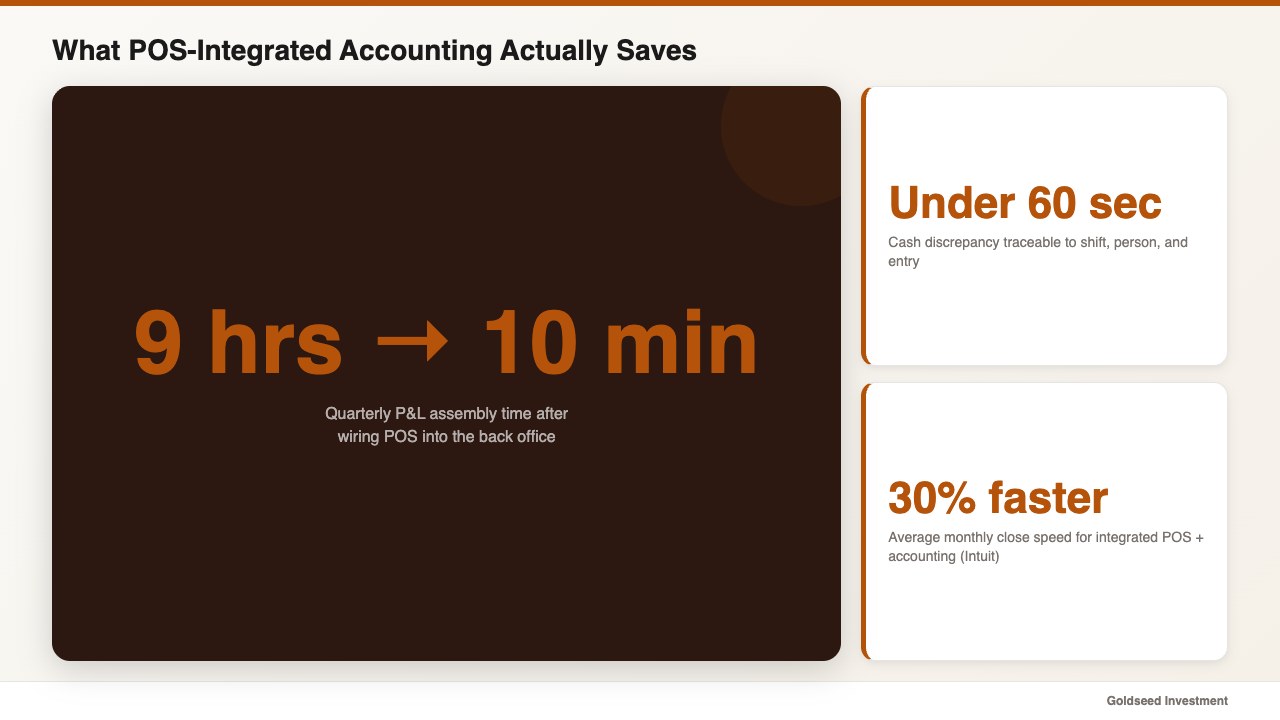
The honest answer to \”is it worth it?\” lives in three numbers small retailers report consistently after wiring a POS into a real back-office accounting flow.
- Quarterly P&L assembly: 9 hours → under 10 minutes once POS sales, expenses, payroll, and cash all flow into one income statement.
- Cash discrepancy traceability: from \”I have no idea\” → \”I know the shift, the person, and the entry within 60 seconds.\”
- Monthly close speed: roughly 30% faster on average per Intuit’s small business data, and more for retailers who replace a daily-total connector with line-item sync.
There is a fourth, less-quantified outcome that operators mention more often than any single number: knowing margin in time to act on it. POS data tells you what sold yesterday. Accounting integrated to the POS tells you whether yesterday made you any money — at the SKU, the category, and the store level — while there is still time to reorder, reprice, or cut a slow line. That is the real return on getting the integration right.
FAQ
Q: What is the best accounting software with POS integration for a small retail store in 2026? A: It depends on what you need. QuickBooks Online or Xero are the right answer if you have a CPA who insists on a traditional general ledger and you mainly need POS sales pulled in as journal entries. A retail back-office app like Storebase is the better fit if you also need cash drawer accountability, payroll, and inventory feeding the same income statement — without bolting on three separate subscriptions.
Q: Does QuickBooks integrate directly with Square, Clover, and Toast? A: Square has a native QuickBooks Online connector. Clover and Toast generally connect through partner sync apps (Commerce Sync, Connect to Square’s competitor, etc.). Verify the depth before subscribing — many of these post daily totals rather than line items, which collapses your sales tax and tip detail.
Q: How is a back-office app like Storebase different from QuickBooks? A: QuickBooks is a general-ledger accounting platform built for any small business; you (or your bookkeeper) manage the chart of accounts and reconcile bank lines. Storebase is a retail-specific back-office app that produces an income statement and balance sheet automatically from POS sales, staff-tagged expenses, payroll, and cash counts. It pairs with QuickBooks for tax filing if your accountant prefers it — it is not a replacement for the year-end CPA workflow.
Q: Will I have to switch my POS to get accounting integration? A: No. Both general-ledger tools (QuickBooks, Xero) and retail back-office apps like Storebase pair with whichever POS you already use — Square, Clover, Toast, Lightspeed, or Shopify POS. The accounting work happens behind the counter; the front counter stays where it is.
Q: How long does it actually take to set up accounting software with POS integration? A: A POS-to-QuickBooks connector typically takes a couple of hours plus several days of mapping with your bookkeeper to get the chart of accounts right. A retail back-office app like Storebase is usually live in under 10 minutes for the basic POS sync; categorizing the historical receipts takes longer if you want a full year of clean history. Most operators run a single full month before judging the time savings — that gives you one close, one payroll cycle, and one round of cash reconciliation to compare.
Q: Can I keep my accountant if I switch to a back-office app? A: Yes. Most accountants are comfortable as long as they receive a clean income statement, balance sheet, and exportable transaction file at quarter-end. Storebase exports to standard formats and to QuickBooks if your CPA prefers to do the final review there. Try Storebase free at storebase.tech →
Sources
- U.S. Small Business Administration — Manage your finances
- Federal Reserve — Small Business Credit Survey
- U.S. Bureau of Labor Statistics — Retail Salespersons occupational data
- National Retail Federation — National Retail Security Survey
- Intuit QuickBooks — Small Business Data Insights