Cafe owners pairing a modern POS with Storebase report nightly close that went from 2 hours to 18 minutes, payroll prep that dropped from 3 hours to 12 minutes a week, and saved roughly $1,800/year per cafe in drawer variance recovery.
By 7:42 p.m., Sofia Marin has already locked both of her Austin cafes for the night. Eight months ago that same task ran past 9:30 p.m. — and most of the second hour was spent in front of a spreadsheet, not a customer. Her nightly close went from 2 hours to 18 minutes. Weekly payroll prep dropped from 3 hours to 12 minutes. Quarterly bookkeeper time fell from 8 hours to 1 hour. The difference wasn’t a new POS. She kept her existing one. What changed was the layer underneath — a back-office app called Storebase — that handles the parts her cafe POS system was never designed for.
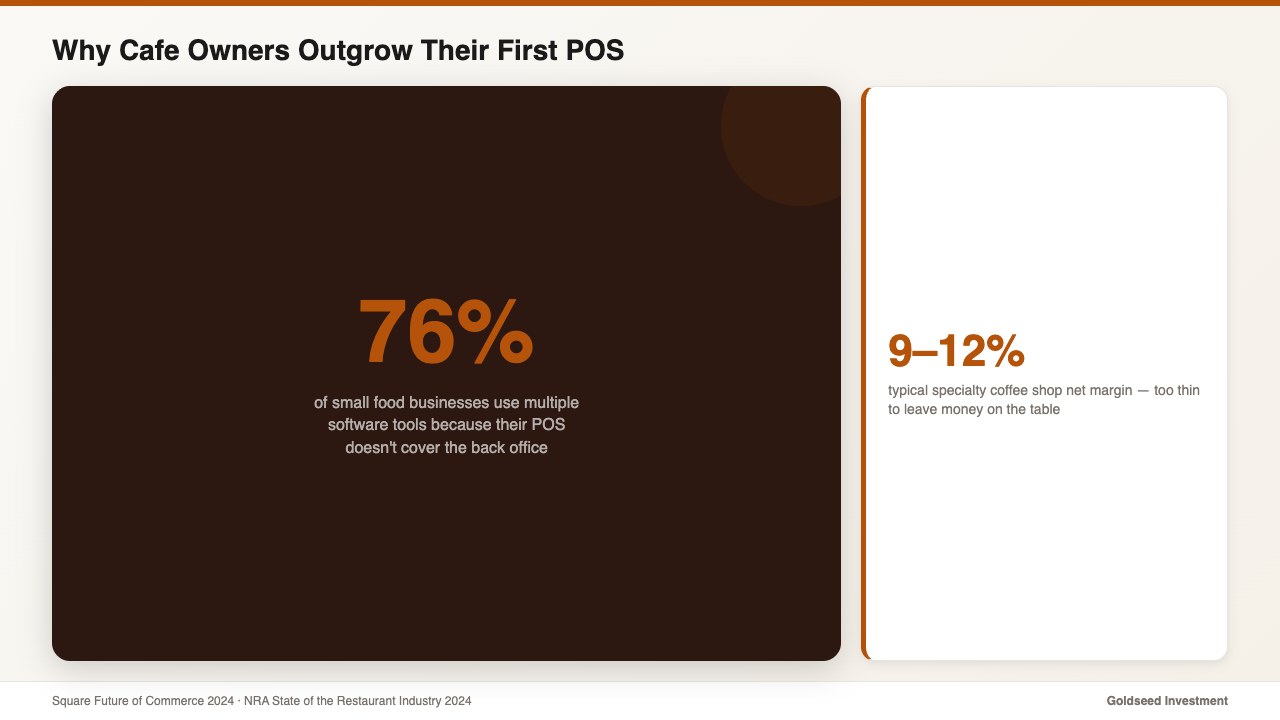
That same gap shows up in almost every cafe POS conversation. Owners pick a POS for the bar — speed at peak, modifier-heavy menus, tip handling, kitchen tickets — and then discover six months later that the POS doesn’t do the rest of the job. A 2024 Square Future of Commerce report found 76% of small food businesses end up using multiple software tools because their POS doesn’t cover the back office. This guide walks through what a cafe POS system should do, where it stops, and how to stack the layer that does the rest.
Why Do So Many Cafe Owners Outgrow Their First POS in Six Months?
The honest answer: most cafe owners don’t outgrow the POS. They outgrow the assumption that a POS will run the whole business.
Cafe POS systems — Square for Restaurants, Toast, Clover, Lightspeed — are built around one core job: process the sale fast, with the right modifiers, and route the right ticket to the right station. That’s a hard problem, and modern POS platforms generally do it well. But ringing a 12-oz oat-milk latte with an extra shot is a separate job from:
- Calculating Tuesday’s pooled tip split across three baristas with overlapping shifts.
- Confirming the morning shift’s drawer count matches the cash that’s actually in it.
- Generating a real P&L that includes rent, milk, payroll, COGS, and equipment depreciation — not just gross sales.
- Comparing this week’s labor cost percentage across two cafes side by side.
Specialty coffee shops typically run a 9–12% net margin with labor at 32–36% of revenue, according to the National Restaurant Association’s 2024 State of the Restaurant Industry report. When green coffee jumped roughly 38% in 2024 per the Specialty Coffee Association’s price tracker, that thin margin got thinner. Owners who rely on POS sales reports alone often don’t see the margin compress until quarter-end — sometimes later. The POS isn’t broken. It just isn’t pointed at that problem.
> “I thought my POS was my back office for two years,” one Austin cafe operator said. “Then payroll season hit and I found out it wasn’t.”
That’s the pattern. Not a bad POS — a misaligned expectation.
What Should a Cafe POS System Actually Do?
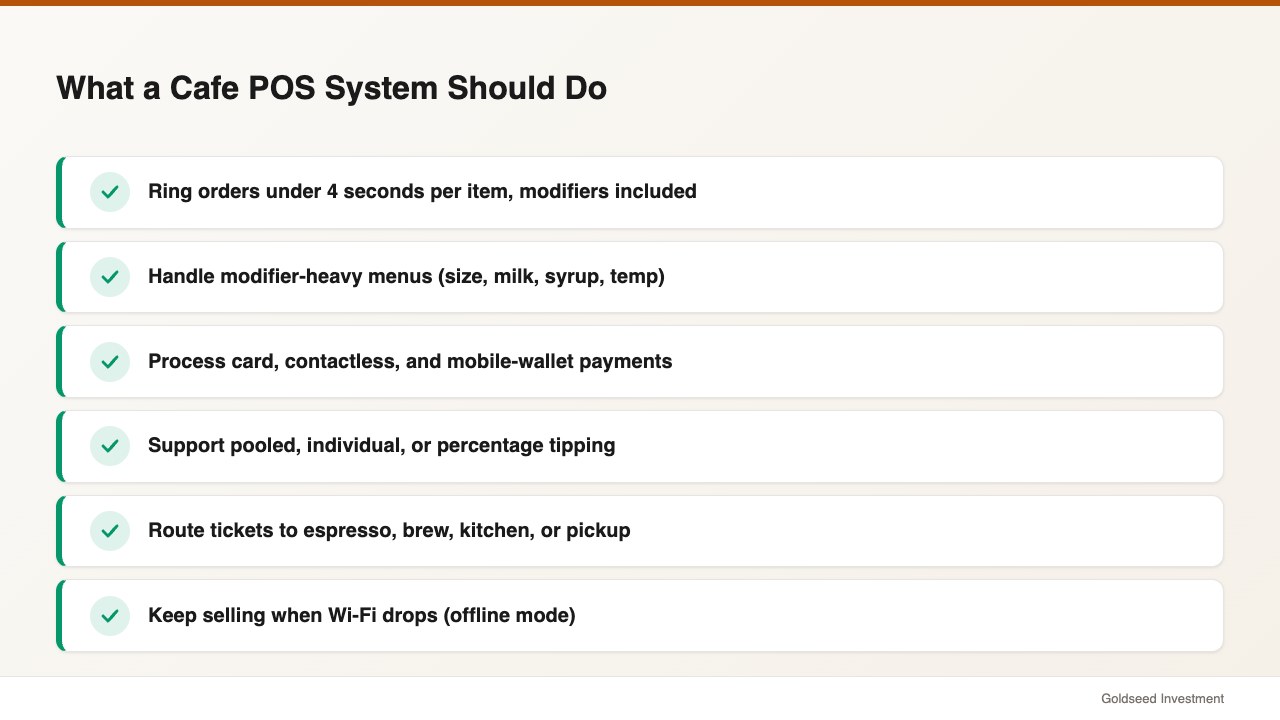
A solid cafe POS system in 2026 should reliably handle the front-of-house transaction layer. Use this list as the floor when you evaluate any cafe POS — not the ceiling.
- Ring orders fast at peak (under 4 seconds per item, including modifiers).
- Handle modifier-heavy menus (size, milk, syrup, temperature, extra shots).
- Process card, contactless, and mobile-wallet payments with EMV.
- Support tipping flows that fit your business model (pooled, individual, percentage, fixed).
- Route tickets to the espresso bar, brew bar, kitchen, or pickup screen.
- Keep selling when Wi-Fi drops (offline mode with later sync).
- Deduct ingredients per drink recipe (one latte = one shot, 8 oz milk, etc.).
- Export sales data through an API or scheduled report — so back-office tools can read it.
That last bullet is what separates a POS you can grow with from a POS that will trap you. If the data only lives inside the POS dashboard, you’ll likely be re-typing it into a spreadsheet by month two. If the POS exports cleanly, you can layer the back-office work on top without ripping out the sale layer.
What a cafe POS system is not designed to do: full payroll, drawer accountability, cross-location P&L, financial statements, or a true audit trail of who touched what cash. Those are back-office jobs. Owners who try to force their POS into doing them often end up with workarounds — a separate payroll app, a notebook by the drawer, a quarterly date with a bookkeeper — and the workarounds quietly cost more than the POS itself.
5 Cafe POS Features Most Small Owners Underestimate
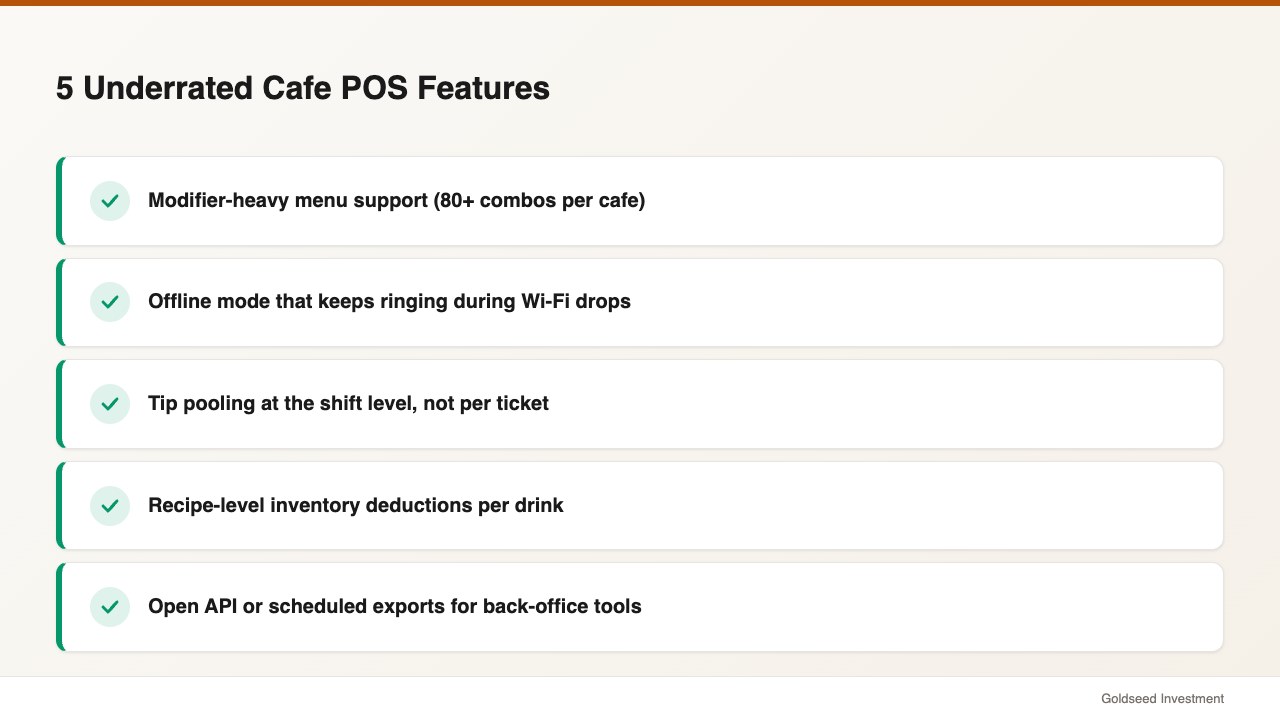
Most cafe owners shopping their first POS focus on price and card-processing rates. Those matter. But these five features tend to hurt the most when they’re missing, and they rarely show up on the front of a sales page.
- Modifier-heavy menu support. A standard cafe menu may have 6–10 base drinks but 80+ ordered combinations once you factor size, milk, syrup, and temperature. POS systems that treat modifiers as second-class citizens make baristas re-tap the same option for every customer.
- Offline mode that actually works. Coffee shops lose Wi-Fi. When the cafe in front of your store starts streaming, your POS shouldn’t stop selling. Confirm the POS can ring, print, and sync later — not just freeze with an error.
- Tip pooling at the shift level. If your baristas pool tips, your POS should typically split them by hours worked, not by ticket. Owners who skip this often end up doing it in Excel every Friday.
- Recipe-level inventory deductions. A cafe POS that only tracks “lattes sold” can’t tell you you’re 40 lbs short on espresso beans. Recipe-level deductions matter more for cafes than for restaurants because portion sizes are tighter.
- Open API or scheduled exports. The most overlooked feature. If you can’t get clean transaction data out of the POS automatically, every back-office tool you add will likely be slower, more manual, and more error-prone. This is where most “the POS does everything” promises tend to break down.
If you’re also evaluating front-of-house systems for a sit-down concept, our restaurant POS system for small business guide covers ticketing, course-firing, and table-side flows that cafes typically don’t need.
Cafe POS vs Back-Office Software — What’s the Difference?
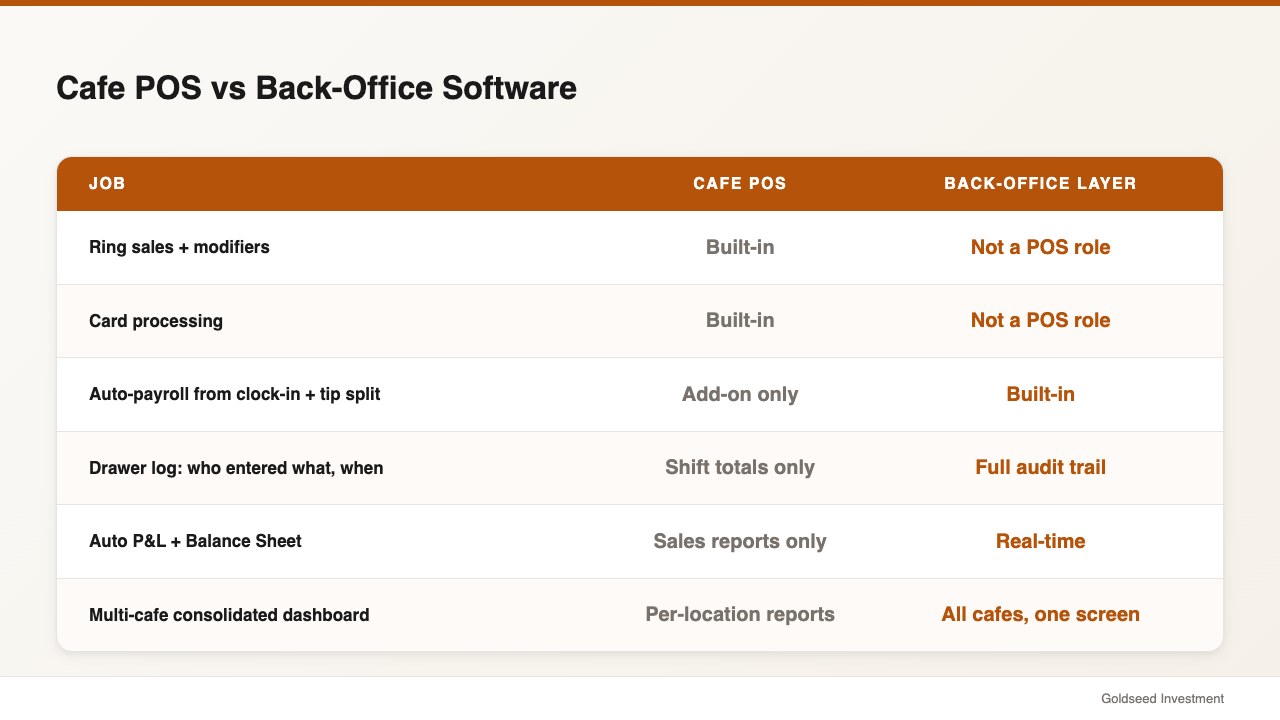
This is arguably the single most useful distinction for any cafe owner shopping for software in 2026. Once you see the split clearly, your stack tends to get cheaper and faster to operate.
Your POS handles the sale. Your back-office software handles everything after it. They are complementary, not competing. The leading cafe POS platforms — Square for Restaurants, Toast, Clover, Lightspeed Restaurant — are all good at the sale. None of them are built to be your full back office. That’s not a flaw; it’s a scoping decision.
Here’s how the responsibilities split, and how a back-office layer fits with whatever cafe POS you choose:
| Feature | Storebase (back office) | Square for Restaurants | Toast | Clover |
|---|---|---|---|---|
| Ring sales + modifiers | Not a POS role | ✅ Built-in | ✅ Built-in | ✅ Built-in |
| Card processing | Not a POS role | ✅ Built-in | ✅ Built-in | ✅ Built-in |
| QR clock-in with location + timestamp | ✅ Built-in | ⚠️ Limited via Team add-on | ⚠️ Limited via Payroll add-on | ⚠️ Limited |
| Auto-payroll from clock-in + tip split | ✅ Built-in | ⚠️ Add-on subscription | ⚠️ Add-on subscription | ⚠️ Add-on |
| Drawer log (who entered what, when) | ✅ Built-in audit trail | ⚠️ Shift totals only | ⚠️ Shift totals only | ⚠️ Basic |
| Auto P&L + Balance Sheet | ✅ Built-in, real-time | ⚠️ Sales reports only | ⚠️ Sales reports only | ⚠️ Sales reports only |
| Multi-cafe consolidated dashboard | ✅ Built-in across all locations | ⚠️ Per-location reports | ⚠️ Per-location reports | ⚠️ Per-location |
| Works with your existing POS | ✅ Yes — any POS | N/A (it is the POS) | N/A (it is the POS) | N/A (it is the POS) |
| Monthly cost (small operator) | $18/mo (1 cafe) · $48/mo (up to 5 cafes) | POS fees + add-ons | POS fees + add-ons | POS fees + add-ons |
You’ll notice the table isn’t trying to call any POS bad. They’re good at what they’re built for. The question for a small cafe owner usually isn’t “which POS replaces everything?” — that POS doesn’t really exist for under $200/month. The question is “which POS handles the sale well, and which back-office layer fills the rest?”
If you’re still in the earlier stage of POS evaluation, our walkthrough on how to choose a POS system maps requirements to platforms and explains card-processing fees, hardware bundles, and contract terms.
How Sofia Uses Storebase to Close Both of Her Cafes in Under 20 Minutes
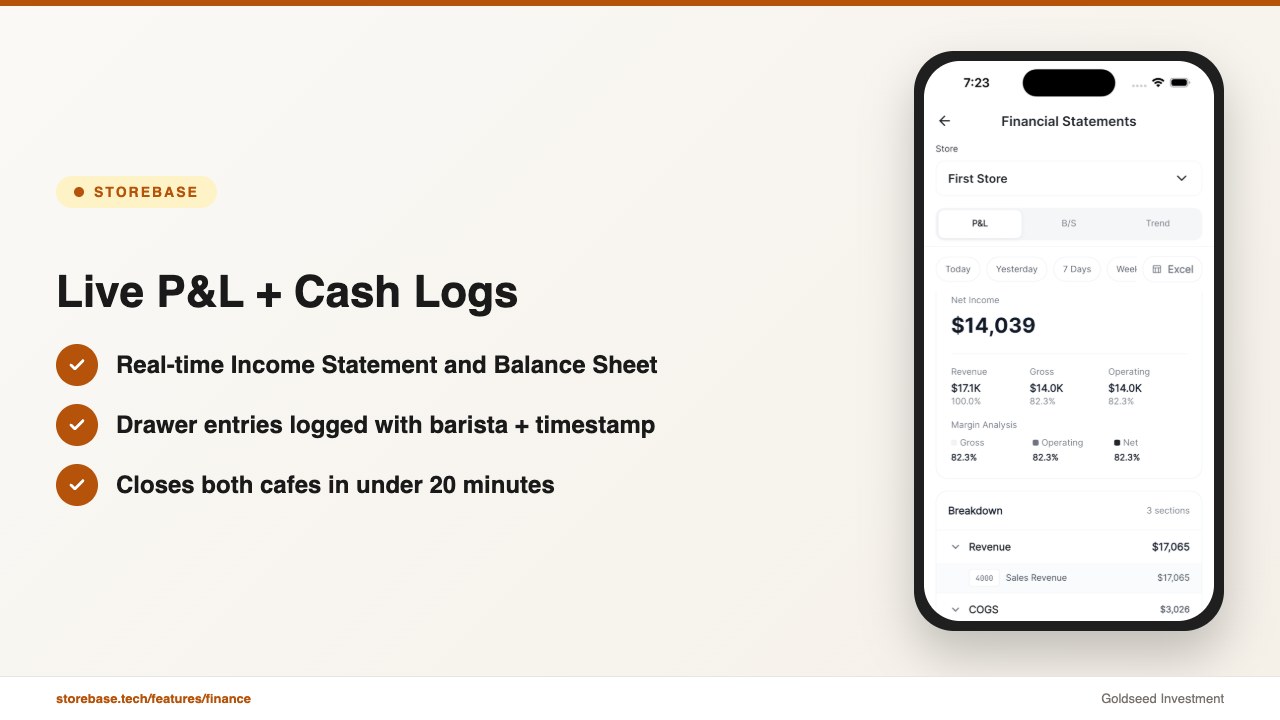
Sofia Marin runs two specialty cafes in Austin. Combined: 11 baristas, about 320 drinks per location per weekday. She picked Square for Restaurants for the bar — modifier handling was the deciding factor — and that POS still handles every sale. The change that pulled her nightly close from 120 minutes to 18 minutes was adding the back-office layer underneath.
Here’s the actual stack she runs and what each module does:
1. Sales & Finance — the real P&L. The POS told her gross sales. It didn’t tell her if she made money after milk, rent, beans, payroll, and the new grinder she financed in March. Sales & Finance pulls the POS sales data, lets her log expenses from a phone (snap a milk-delivery receipt, the app reads it), and produces a live Income Statement and Balance Sheet. She checks the per-cafe net margin every Monday morning instead of waiting for her bookkeeper’s quarterly file.
2. Cash Management — drawer accountability. Her old workflow: a notebook by the register where the closing barista wrote a number. When the count was off, nobody could trace it. The Cash Management module logs every cash event — open, mid-shift drop, close — with the barista’s name and timestamp. When Cafe #2’s drawer was $42 short on a Saturday in March, she opened the log on her phone, saw which shift the gap appeared in, and resolved it in three minutes. Over six months, drawer variance recovery saved roughly $1,800 per location.
3. Team & Payroll — tips and hours done automatically. Baristas clock in by QR at the register. The app captures location and time, calculates regular hours, overtime, and tip-pool splits per shift. Payroll used to be Sofia’s entire Monday morning (about 3 hours). Now she opens the app, sees the proposed payroll, approves it, and pays out — usually in under 12 minutes.
The back-office app doesn’t replace the POS. The POS keeps doing what it’s good at. It fills in what the POS doesn’t do.
For Sofia, the math on the bundle is straightforward. She runs the Growth plan at $48/month because she has two cafes (the plan covers up to five). That replaces a $39/month payroll add-on, a $29/month inventory app, and roughly 8 hours of bookkeeper time per month. Net monthly savings: around $260 — and that’s before counting the cash variance she stopped writing off as “shrinkage.”
If you’re a single-cafe owner, the Starter plan is $18/month and covers one location with up to five baristas. For owners running three or more cafes who need consolidated dashboards across all of them, Business is $149/month for up to 10 locations.
Closing CTA. If nightly close still takes more than 30 minutes — or if you can’t trace last weekend’s drawer shortage to a specific shift — this is exactly what the back-office layer is built for. Most cafe owners complete setup in under 10 minutes and are running payroll, drawer logs, and a live P&L by day two. No credit card required. Start free at the main site or via the iOS app.
Cafe POS + Back-Office ROI — What It Saves Over 12 Months
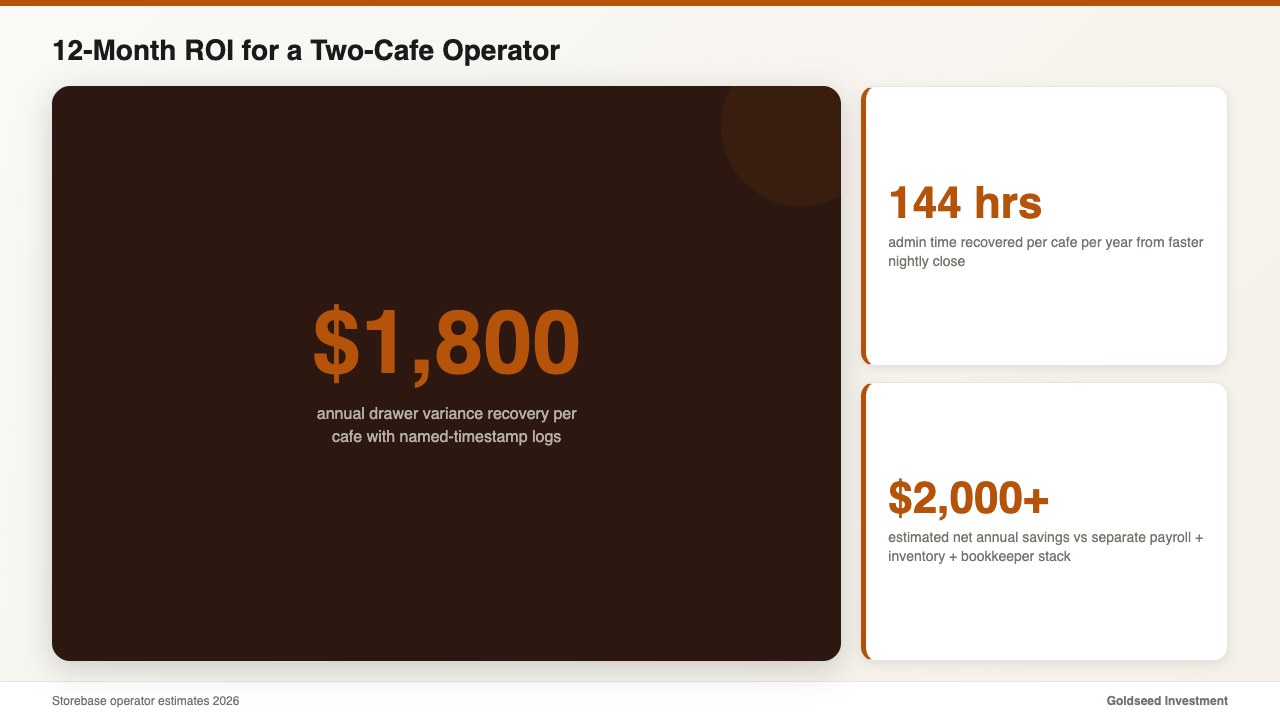
Pairing a cafe POS with a real back-office layer changes the numbers in four places. Here’s what a typical two-cafe operator tends to see in the first year:
- Admin time recovered: about 144 hours/year per cafe. Nightly close drops from ~60 minutes to ~10. That’s roughly 50 minutes × 6 nights × 52 weeks, or around 260 hours/year saved across two cafes. At the operator’s effective hourly value, that’s not a soft number.
- Cash variance recovery: $1,500–$2,000/year per cafe. Drawer logs with named timestamps don’t prevent every short, but they catch most of them within 48 hours instead of the typical quarter-end discovery.
- Payroll dispute prevention: 6–12 hours/year per cafe. When baristas can see their own clock-in records and tip splits in the app, “I think I worked more than that” conversations tend to end fast.
- Cost of the back-office bundle: $216/year (Starter) or $576/year (Growth, up to 5 cafes). Compared with stacking a separate payroll app (~$468/year), inventory tool (~$348/year), and additional bookkeeper hours, most two-cafe operators come out at least $2,000/year ahead.
The point isn’t that any of these line items are huge by themselves. It’s that they compound — and a cafe running 9–12% margins can’t really afford to leave $4,000+ on the table every year because a POS report is the only number that exists.
FAQ
Q: What’s the best cafe POS system in 2026? A: For most small cafes, Square for Restaurants, Toast, and Clover are the leading picks because of modifier handling, contactless payment, and offline mode. According to NerdWallet’s 2025 best-of list, those three rank top for specialty cafes. The right answer depends less on the POS and more on what back-office layer you pair with it. Many cafe owners keep their existing POS and add a separate back-office app for payroll, drawer reconciliation, and P&L — so they don’t have to switch POS just to get a real back office.
Q: Do I need a separate POS for a cafe versus a restaurant? A: Most modern POS platforms (Square, Toast, Clover, Lightspeed) sell cafe-tuned and restaurant-tuned tiers. The cafe tier prioritizes modifier speed and pickup flow. The restaurant tier prioritizes table management and course firing. For a single cafe, the cafe tier is usually the right pick.
Q: How much does a cafe POS system cost? A: Hardware ranges from $0 (BYO tablet) to about $1,200 (full station with printer and drawer). Software typically runs $0–$165/month for the POS, plus card-processing fees of 2.3%–2.9% + $0.10 per transaction. A back-office layer adds roughly $18–$149/month depending on cafe count, and tends to replace several point tools.
Q: Can I use a back-office app if I already have a cafe POS? A: Yes — that’s the point. A proper back-office app is not a POS and doesn’t try to be. It sits on top of any POS you already use (Square for Restaurants, Toast, Clover, Lightspeed) and handles the back-office work the POS isn’t built for: payroll, cash drawer logs, real-time P&L, and multi-cafe dashboards.
Q: What’s the cheapest way to run two cafes with one stack? A: Keep the POS you already use and add a back-office layer at the Growth tier ($48/month), which covers up to five cafes. That works out to roughly $24/cafe/month — typically cheaper than per-location POS add-on bundles. You also avoid the cost of switching POS for hardware you’ve already bought.
Q: How long does cafe POS migration take? A: A POS migration alone — moving menu, modifiers, and payment processing — typically takes 1–3 weeks including barista training. Adding a back-office layer on top of an existing POS is usually faster: most operators set up modules in under 10 minutes each and are running live payroll and drawer logs within 48 hours.
The cafe POS system you choose handles the sale. What you put underneath it tends to decide whether the business is actually profitable, traceable, and ready to scale. For most small cafe owners in 2026, the right answer isn’t a more expensive POS — it’s the right back-office layer on the POS you already trust. Try Storebase free → or Download on the App Store →.