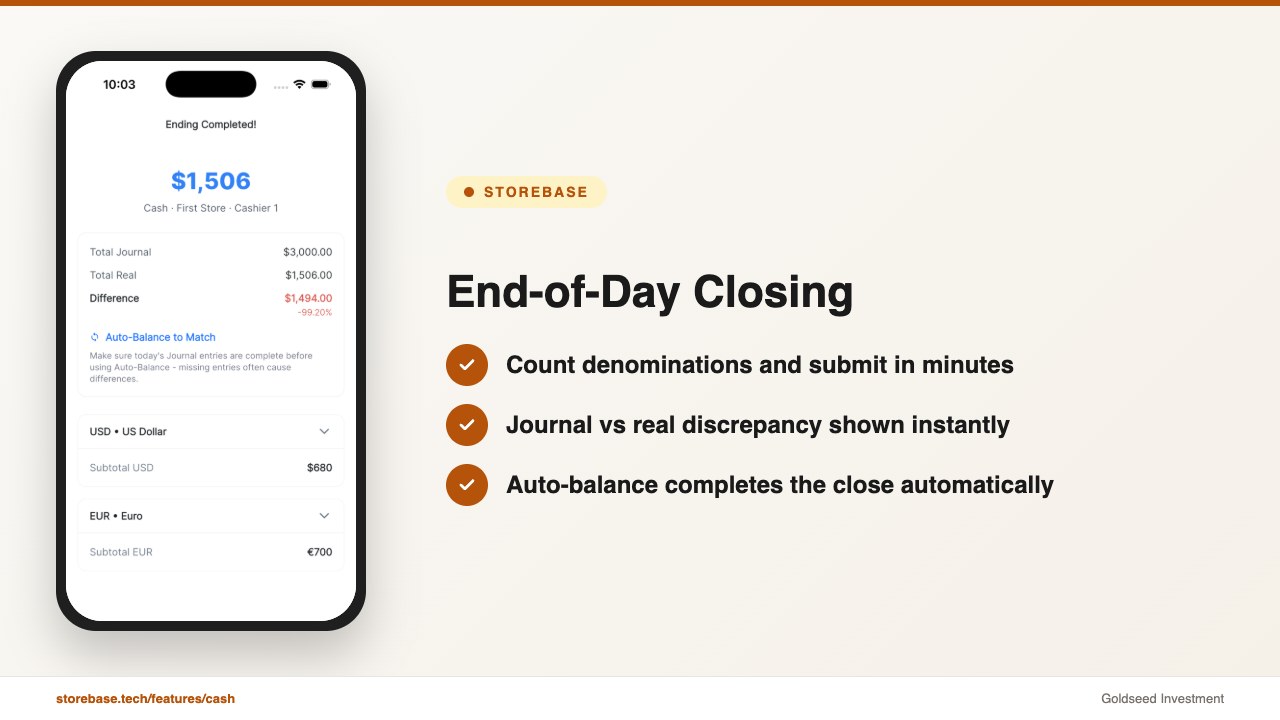
C-store owners using Storebase cut end-of-day closing from 90 minutes to 15, resolve cash discrepancies the same day they happen instead of never, and eliminate half a day of payroll work every month — from a single mobile app.
Maria Chen owns two convenience stores in Houston. This morning, she checked cash balances for both locations before her first coffee — without calling anyone, without driving in, and without opening a spreadsheet. She saw who closed last night, what the journal balance showed versus the physical count, and whether the system had flagged anything unusual.
Eighteen months ago, closing two stores took ninety minutes of her evening. Cash was short three times in a single month — a combined $620 she could never trace. Her spreadsheets recorded totals. They didn’t log who entered what, or when.
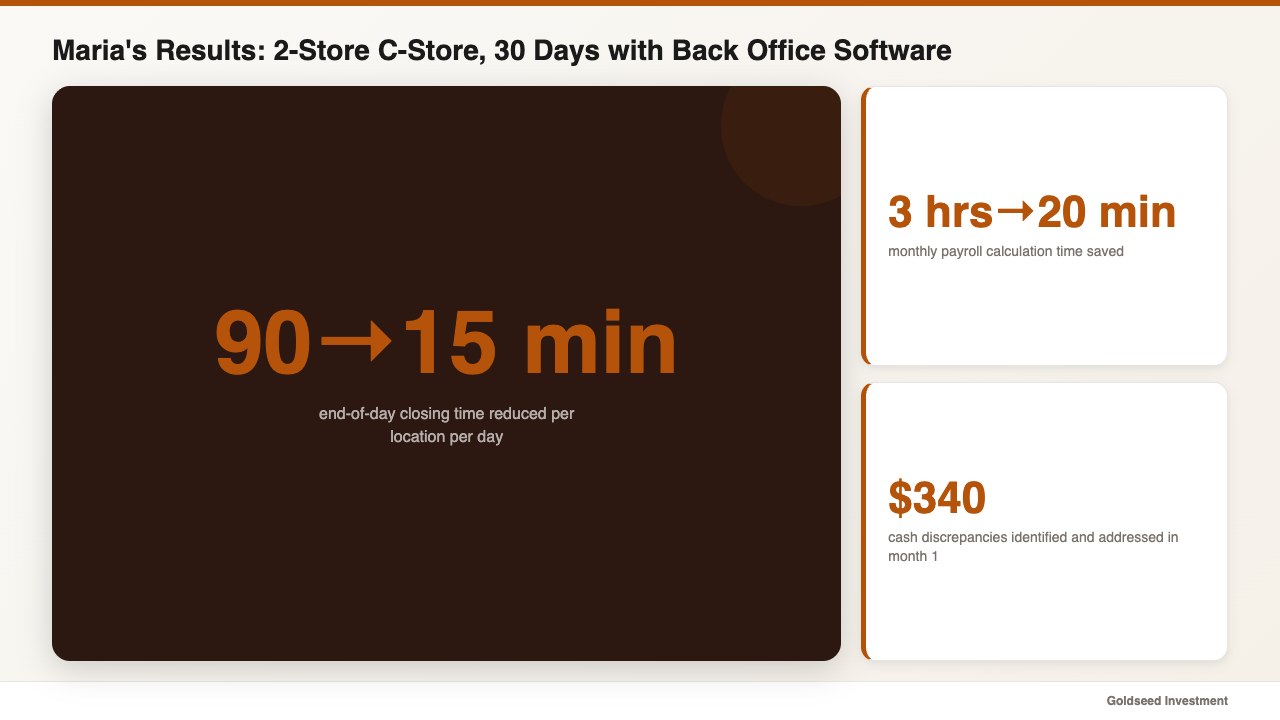
Then she switched to Storebase. Within thirty days, three things changed with specific numbers attached:
- End-of-day closing time went from 90 minutes to 15 minutes per location per day
- Monthly payroll calculation dropped from 3 hours to under 20 minutes
- Cash discrepancy investigation reduced from weeks unresolved to same-shift identification
That $620 problem stopped. The first discrepancy was caught within the week — traced to a miscounted denomination during the 10 PM close. She didn’t change her staff. She changed the system.
This is what the right back office management software does for a convenience store — not just faster admin, but a fundamentally different level of accountability. Here’s how to evaluate your options in 2026.
Why Do Convenience Store Owners Still Lose Money on Cash Every Month?
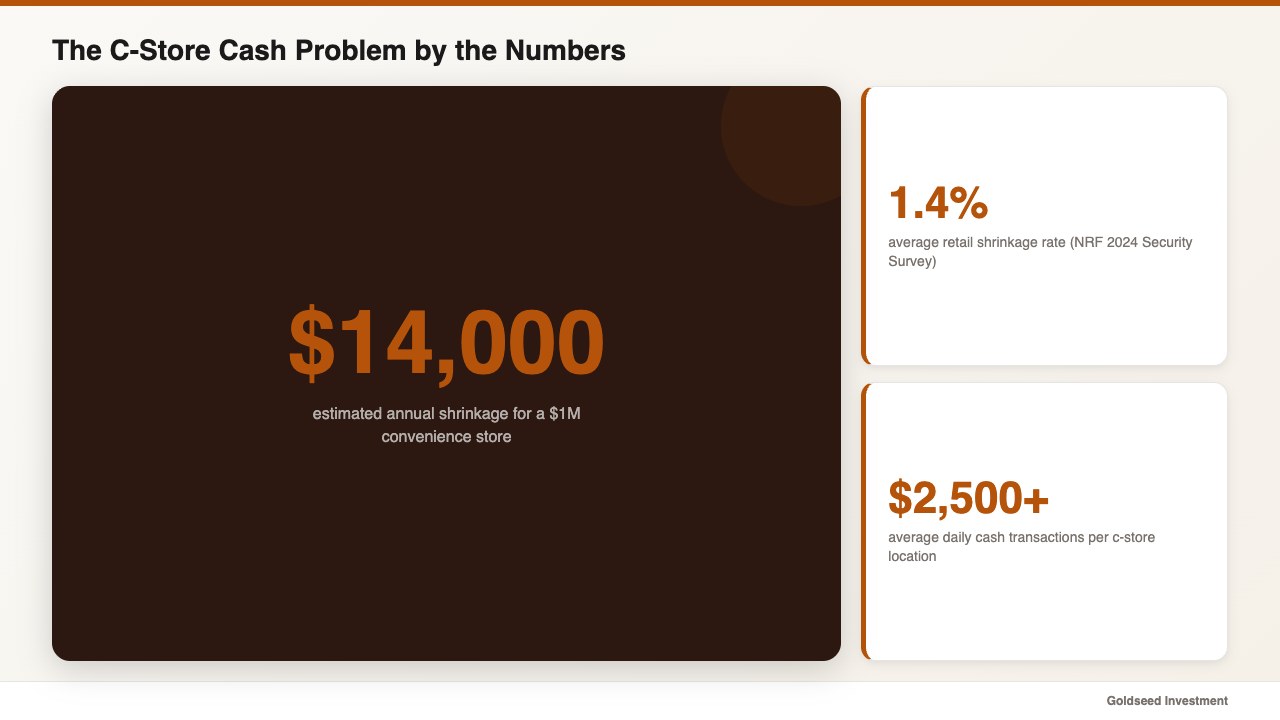
The average convenience store handles over $2,500 in cash transactions every day. With three to four staff members rotating through the register across different shifts, pinning down a discrepancy without a staff ID log is nearly impossible.
According to the NRF’s 2024 Retail Security Survey, retail shrinkage averages 1.4% of annual sales. For a c-store doing $1 million a year, that’s $14,000 disappearing annually — some to theft, some to miscounting, some to honest entry errors that nobody can reconstruct. The NACS reports that U.S. convenience stores process over $800 billion in annual sales, with cash still accounting for roughly 30% of transactions.
The deeper problem isn’t the cash loss itself. It’s the inability to investigate. When the drawer is short $80 on a Tuesday night, most owners have no way to determine whether it was a miscalculation during closing, a missed entry mid-shift, or something more deliberate. Without an audit trail, every discrepancy becomes a dead end.
Manual spreadsheets show you the outcome — the final number — but not the process. They don’t show you who touched the cash, in what order, and what each entry was for. That’s where most c-store losses accumulate and stay hidden.
The Hidden Cost of Running Your C-Store Back Office Manually
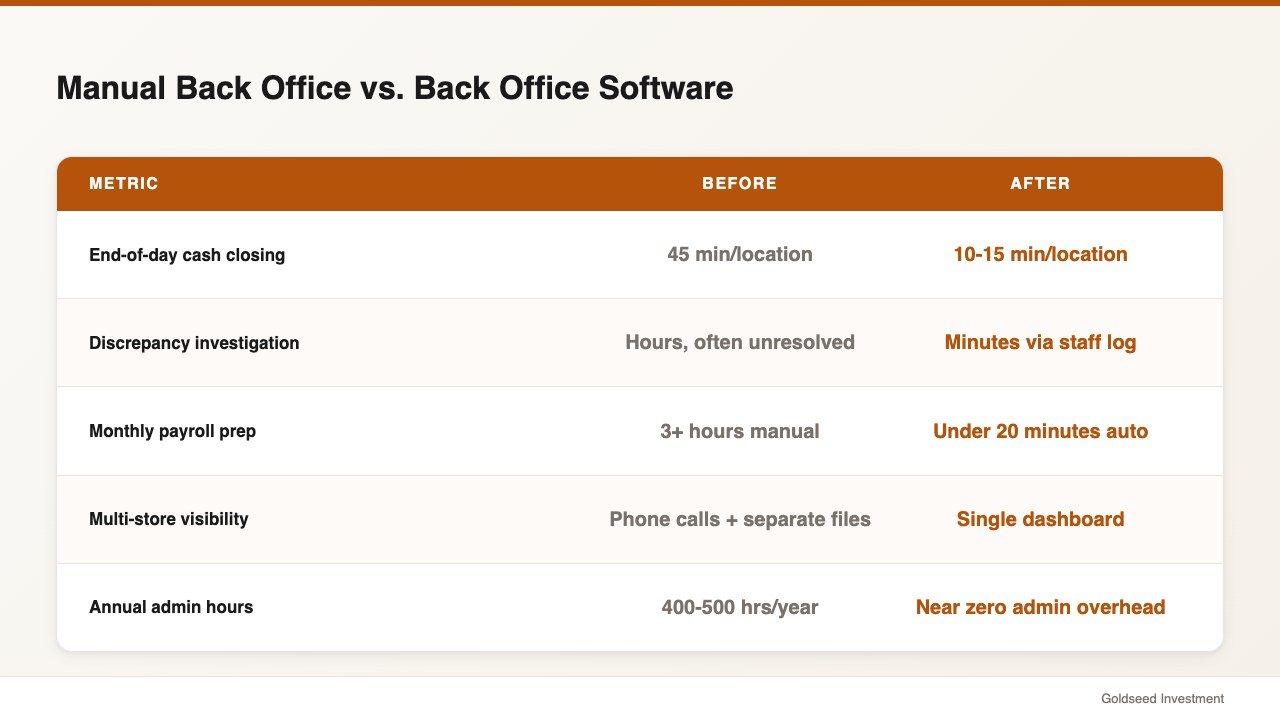
Cash visibility is only one piece. The full cost of running convenience store operations on spreadsheets shows up across three areas.
Time. An owner managing two locations manually typically spends 45–60 minutes per store per day on closing routines, inventory updates, and payroll prep. That’s 400–500 hours per year on administrative tasks that back office software handles automatically.
Errors. McKinsey’s 2024 retail digitization research found that retailers using integrated back-office systems reduce administrative errors by up to 40%. In a c-store, payroll errors create direct employee friction. Inventory errors mean either overordering — cash tied up in stock — or stockouts that cost you sales.
Blind spots. The most expensive cost is what you don’t see. A manager who lets tardiness go unrecorded. A cashier whose entries don’t add up across three months. A product category with shrinking margins that nobody spotted until the annual count. Manual systems surface these problems late — usually after the damage is done.
As one multi-location c-store operator put it: “The data was always there. The problem was nobody had time to reconstruct it. By the time anyone figured out a discrepancy, the cash had been sitting there for months.”
Looking at your convenience store profit and loss statement at month-end and finding unexplained variance? The issue usually isn’t your accounting — it’s operational data that never got captured in the first place.
| Task | Manual Approach | With Back Office Software |
|---|---|---|
| End-of-day cash closing | 45 min/location | 10–15 min/location |
| Cash discrepancy investigation | Hours, often unresolved | Minutes via staff log |
| Payroll calculation | Half-day manual work | Auto from clock-in data |
| Inventory reorder check | Weekly manual count | Real-time alerts |
| Multi-store visibility | Phone calls + separate files | Single dashboard |
What Does Convenience Store Back Office Software Actually Do?
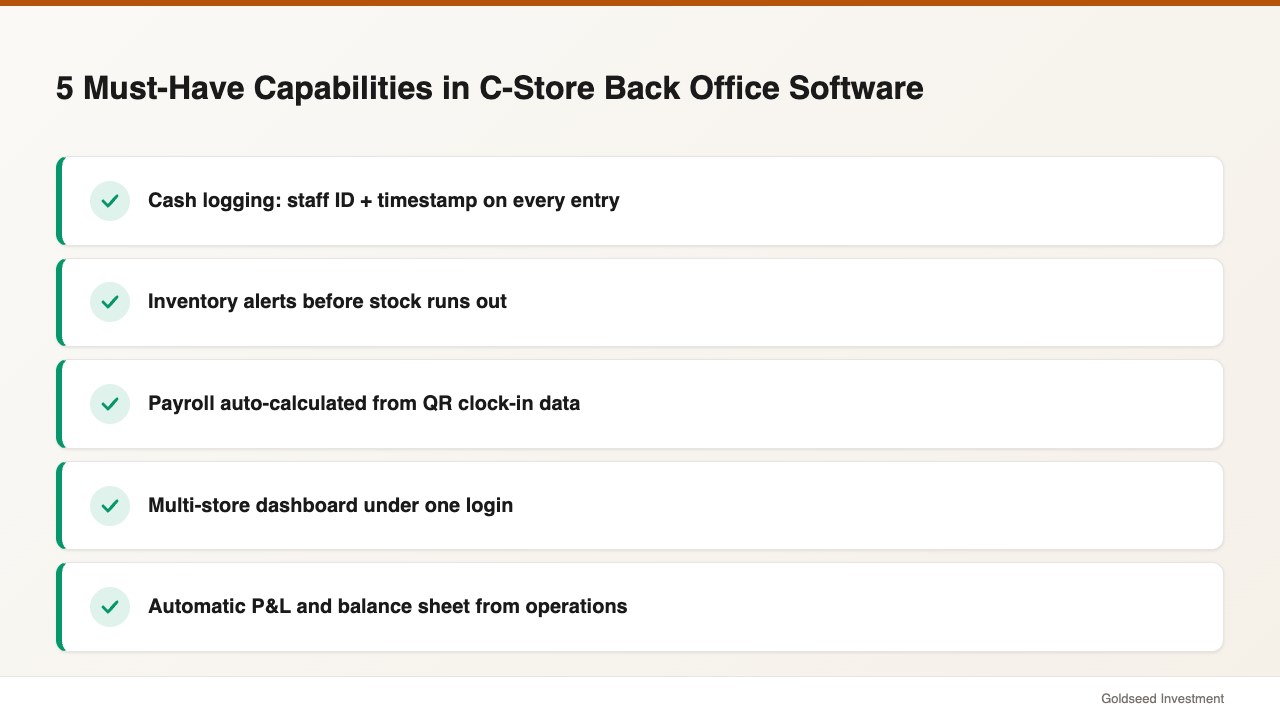
The term “back office” covers everything after the sale — cash reconciliation, inventory tracking, employee hours, payroll, and financial reporting. Good convenience store management software ties these together so data flows automatically instead of requiring manual re-entry at each step.
For a c-store specifically, the highest-impact capabilities are:
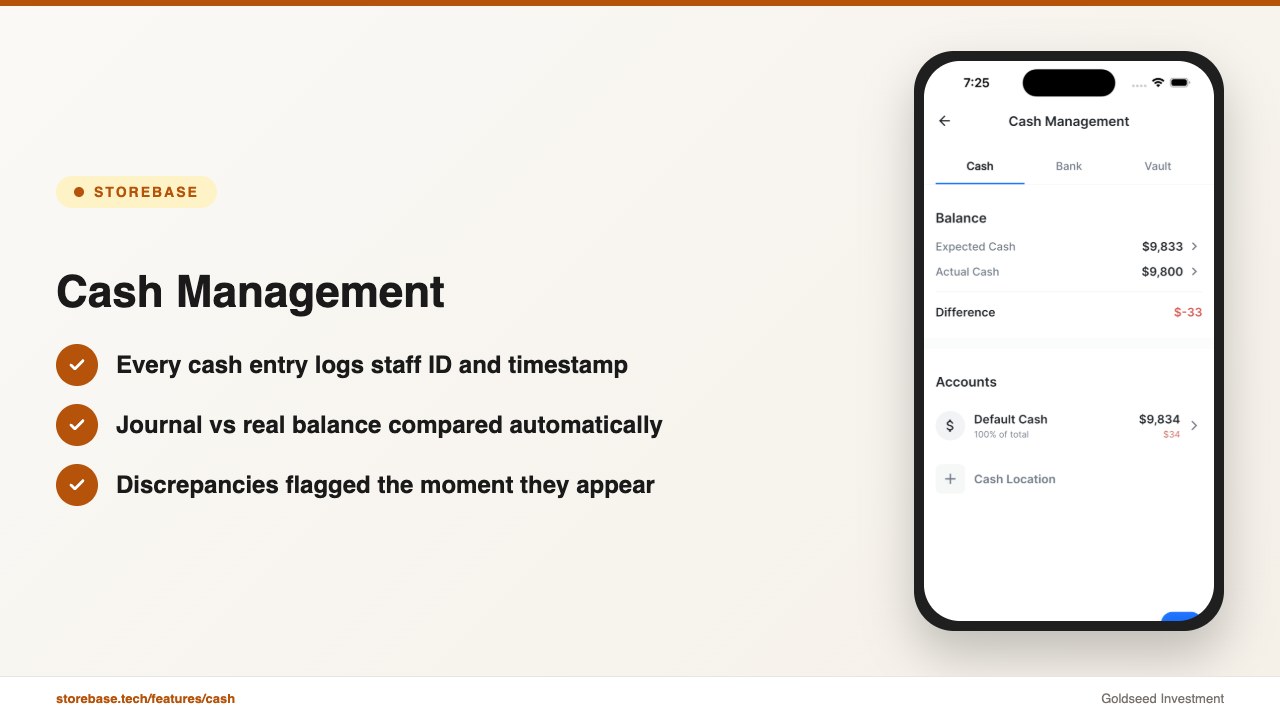
- Cash accountability with staff ID logging — every deposit, withdrawal, and vault transfer records the staff member’s name and timestamp. When the journal balance doesn’t match the physical count, you see the full entry history for that shift immediately.
- Inventory management — products tracked against sales data, with alerts before stock hits zero. For high-turnover items like beverages, snacks, and tobacco, this prevents both stockouts and over-purchasing.
- Payroll from real clock-in data — QR-based clock-in records actual arrival and departure. Overtime is calculated automatically. No manual timesheet review required before payroll runs.
- Multi-store dashboard — for owners with more than one location, a unified view of cash, inventory, and team status across all stores from a single login.
- Automatic financial reporting — income statement and balance sheet generated from operational data, without needing to re-enter anything into separate accounting software. This connects your daily operations directly to your broader retail financial management view.
This is also what separates back office software from a POS: the POS records the sale. Back office software records everything that happens before and after it — inventory received, cash moved, staff scheduled, wages calculated.
How Do Convenience Store Back Office Tools Compare in 2026?
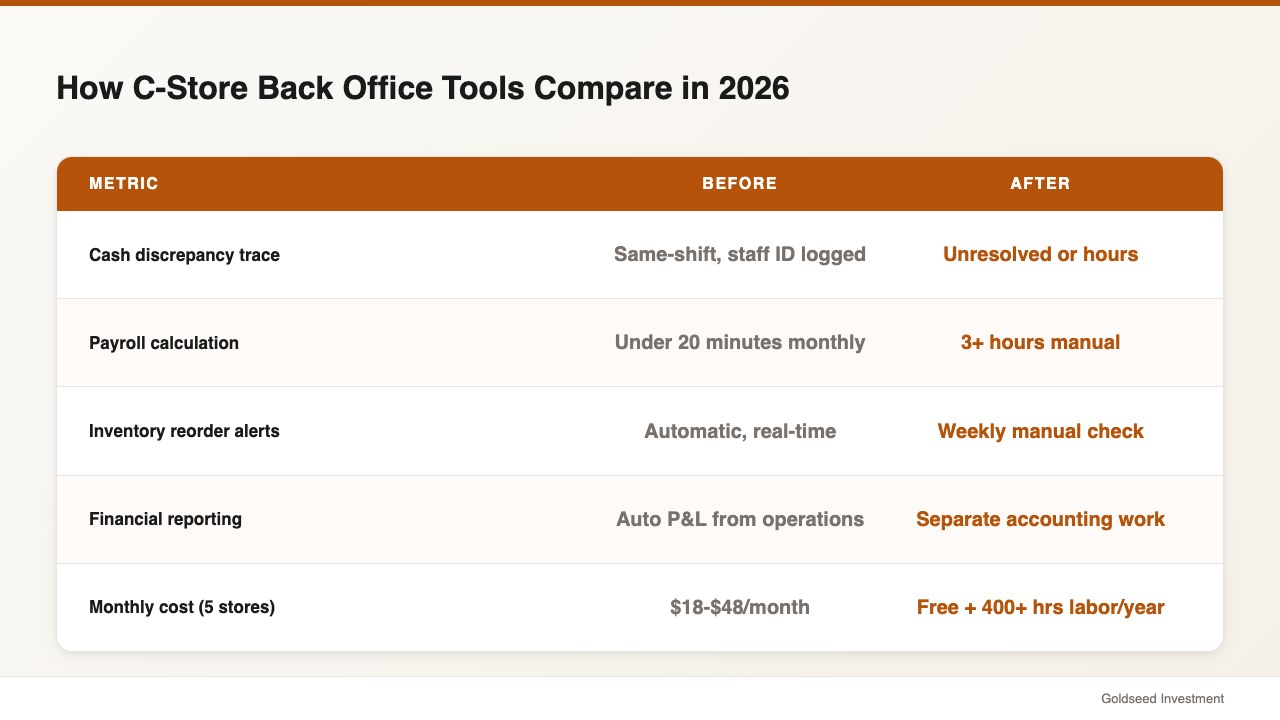
Most c-store owners start with a POS system and a spreadsheet. The POS records sales. The spreadsheet tracks everything else — or tries to. The gap between what the POS captures and what manually gets entered into the spreadsheet is where most operational losses accumulate.
| Feature | Storebase | QuickBooks | Spreadsheets |
|---|---|---|---|
| Cash entry with staff ID log | ✅ Built-in | ❌ Not available | ❌ Not possible |
| Real-time discrepancy alerts | ✅ Automatic | ❌ Not available | ❌ Not possible |
| QR clock-in payroll | ✅ Built-in | ⚠️ Add-on required | ❌ Manual |
| Inventory tracking | ✅ Built-in | ⚠️ Limited | ❌ Manual |
| Multi-store dashboard | ✅ Unified view | ⚠️ Per-entity login | ❌ Separate files |
| Income statement auto-gen | ✅ Real-time | ✅ Entry required | ❌ Manual |
| Monthly cost (up to 5 stores) | $48/mo | $80+/mo | Free (400+ hrs/yr labor) |
| Works alongside any POS | ✅ Yes | ⚠️ Varies | ✅ Yes |
One critical point: this back office software is not a replacement for your POS system. It’s the accountability layer that works alongside whatever POS you already use — Square, Clover, Toast, Lightspeed, or any other. Your POS handles the transaction. The app handles cash reconciliation, inventory, payroll, and financial reporting.
QuickBooks handles formal accounting well but has no cash accountability trail, no c-store inventory system, and no payroll-from-clock-in integration. You end up entering data twice. Spreadsheets are free but require hundreds of hours annually and offer zero accountability.
Your retail store profit margin data is only as reliable as the operational records feeding into it.
How Maria Uses Storebase to Run Two C-Stores Without the Cash Chaos
After switching to the app, Maria’s daily routine changed in three specific ways.
Cash Management: every entry carries a log. The cash journal shows her — in real time — the balance across the drawer, vault, and bank account for each location. Every entry carries a staff ID and timestamp. When the balance doesn’t match the physical count, the system flags it immediately with the full entry history for that shift. She no longer spends the first hour of her morning on the phone asking what happened.
In her first month using the Cash Management module, she traced two previously-unresolvable discrepancies — one a denomination miscounting error, one a data entry omission. Total: $340 identified and addressed. Previously, that money would simply have been written off.
Sales & Finance: the P&L runs itself. Her income statement used to take two hours and her accountant’s involvement at month-end. Now it updates continuously from operational data — every cash transaction, expense, and inventory movement feeds into a running P&L. She checks net margin on either store in under a minute.
Payroll: from 3 hours to under 20 minutes. Clock-in data feeds payroll calculations automatically. Overtime is calculated without manual review. She approves the final numbers rather than building them from scratch.
> “I used to spend Sunday evenings rebuilding the numbers from the week. Now I look at the app for ten minutes and I already know what happened. The shift that was short, the manager who didn’t log a transfer. I know before I even ask.” — c-store owner, 2 locations, Houston
If cash discrepancies at your store take hours to investigate — or never get resolved — the Cash Management module logs every entry with staff ID and timestamp. Setup takes under ten minutes, no credit card required. Start free → or Download on the App Store →
What to Look for When Choosing C-Store Back Office Software?
Convenience store operations software varies widely in what it actually covers. When evaluating tools, prioritize:
- Cash entry logging with staff ID — the single highest-impact feature for c-stores. No staff ID log means no ability to investigate discrepancies after the fact.
- POS agnostic — the app should work alongside your existing POS, not require you to switch it.
- Mobile-first — c-store owners aren’t at a desk. The app needs to work from a phone in the store, in transit, or at a second location.
- Multi-store from one login — managing two locations through separate logins creates information gaps. Look for a unified dashboard.
- Payroll from actual clock-in data — manual timesheet entry is where most payroll errors start. QR clock-in systems eliminate this category of mistakes entirely.
- Built-in financial reporting — your operational data should generate your income statement automatically, without requiring a separate accounting tool or manual re-entry.
The right back office software for small retail doesn’t require you to restructure how you run your store. It records what’s already happening — with more accuracy and accountability than a spreadsheet can deliver.
FAQ
Q: Does convenience store back office software replace my POS system? A: No. Back office software works alongside your existing POS — Square, Clover, Toast, or any other. Your POS records the sale. Back office software handles cash reconciliation, inventory tracking, payroll, and financial reporting. You keep your POS. You add accountability for everything that happens around it.
Q: How much does back office software cost for a convenience store? A: Pricing starts at $18/month for a single store (up to 5 employees), $48/month for up to 5 stores (up to 30 employees), and $149/month for up to 10 stores (up to 70 employees). Most owners find that identifying even one unresolved cash discrepancy per month covers the cost.
Q: Is it difficult to set up? A: Most owners are operational within a day. Setup involves entering store details, adding staff profiles, and configuring cash accounts. No complex POS integration is required. The app runs as a separate layer your team uses for everything that happens after the sale.
Q: Can I manage two or more convenience stores with one account? A: Yes. Multi-store management is built into the Growth plan at $48/month for up to 5 stores — one login, one dashboard showing cash, inventory, and team status across all locations simultaneously.
Q: What if I already use QuickBooks? A: Many owners use both. The app handles operational data — cash, payroll, inventory — while QuickBooks handles formal accounting. You can export P&L data into QuickBooks for tax purposes. Over time, as the built-in income statement and balance sheet features cover more needs, some owners reduce their QuickBooks dependency. Either approach works.
If you’re still managing your convenience store’s back office through spreadsheets or disconnected apps, Storebase consolidates cash management, payroll, inventory, and financial reporting into one mobile app — starting at $18/month, no credit card required.