Operators who switch from separate spreadsheets to a unified multi-store platform cut combined monthly admin time by up to 70% and gain real-time visibility into both locations from a single screen.
Eight months after opening his second convenience store in Houston, Marcus Rivera was doing the same thing every Monday morning: calling Store 1, calling Store 2, opening two spreadsheets, then spending an hour trying to figure out which location actually made money last week. “I thought the second store would make everything better,” he said. “It made everything twice as complicated.”
Then he switched to a single platform. His combined monthly close dropped from over five hours to 28 minutes. He stopped making morning phone calls. And for the first time since opening Store 2, he could see both locations on one screen — in real time.
Why Do Most Retail Owners Struggle More After Opening Their Second Store?
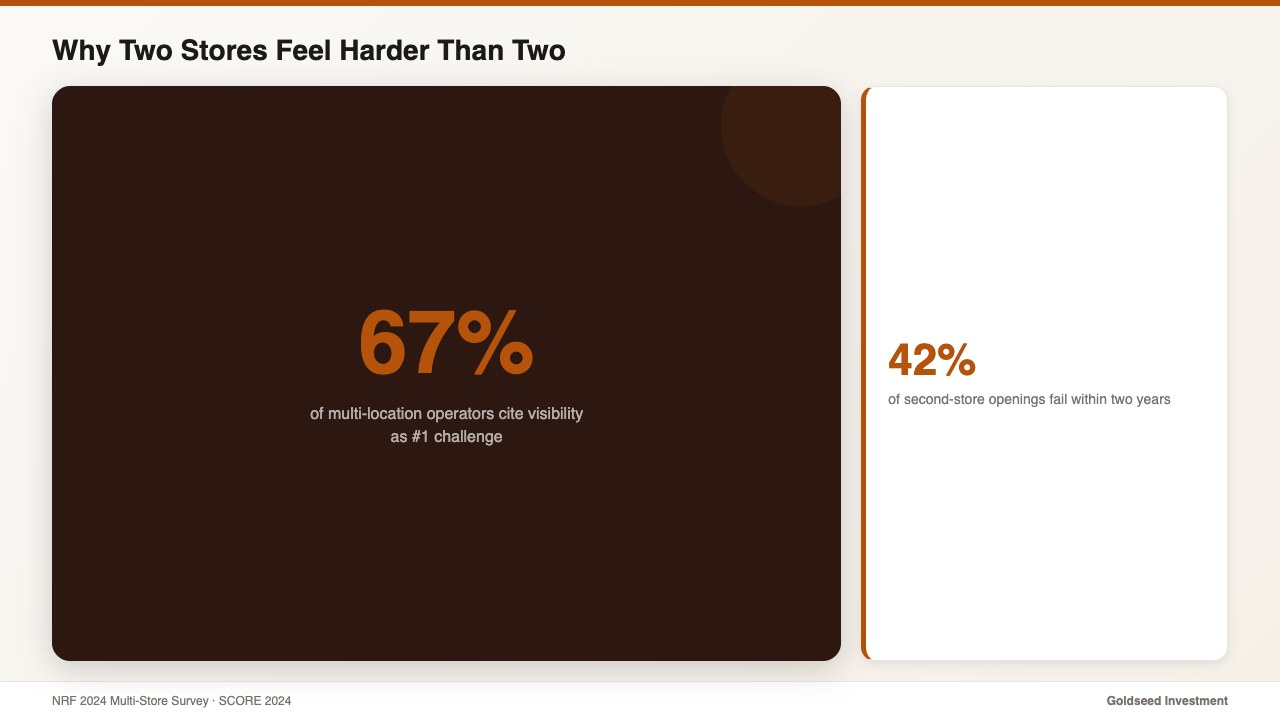
According to a 2024 NRF multi-store retail survey, 67% of multi-location operators cite operational visibility as their #1 management challenge. Not competition. Not inventory costs. Visibility — the basic ability to know what’s happening in both stores without physically being there.
The problem compounds fast. A single-store owner with a spreadsheet system is already stretched. A two-store owner with the same system is doing everything twice: two reconciliations, two monthly closes, two sets of payroll records. The administrative load doesn’t double — it triples, because now the owner also has to mentally merge the two pictures into one coherent view of the business.
SCORE’s 2024 small business research found that 42% of second-store openings fail within two years — and inability to monitor operations remotely is consistently cited as a contributing factor. The product is fine. The location is viable. The owner simply can’t stay ahead of what’s happening in two places at once.
This isn’t a discipline problem. It’s a tools problem. For context on what a healthy multi-store P&L should look like, convenience store profit benchmarks by category provides a useful baseline before evaluating any management approach.
What Does Running Two Stores Really Cost in Extra Admin Time?
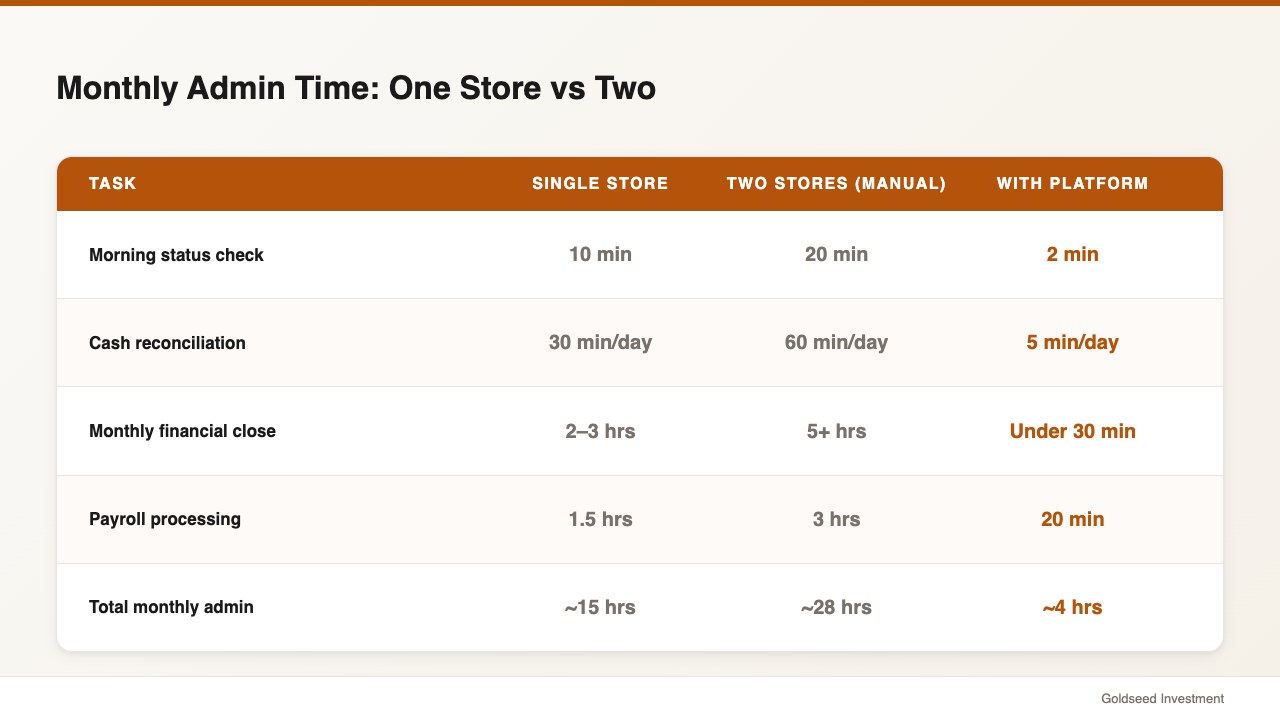
Before Marcus switched platforms, here’s what his weekly routine looked like: two morning check-in calls averaging 20 minutes each, manual cash log reconciliation at both locations every evening, and a monthly close that required exporting POS data from both stores, importing into separate spreadsheets, and manually combining the numbers.
The hidden cost isn’t just the hours — it’s the decision lag. When inventory at Store 2 ran low, Marcus found out when his manager called him. When there was a $180 cash discrepancy at Store 1 on a Tuesday, he found out three days later when he visited. By then, tracing it was impossible.
| Task | Single Store (Before) | Two Stores (Before) | Two Stores (With Platform) |
|---|---|---|---|
| Morning status check | 1 call / 10 min | 2 calls / 20 min | 1 dashboard / 2 min |
| Cash reconciliation | 30 min/day | 60 min/day | 5 min/day |
| Monthly financial close | 2–3 hours | 5+ hours | Under 30 minutes |
| Payroll processing | 1.5 hours | 3 hours | 20 minutes |
| Total monthly admin | ~15 hours | ~28 hours | ~4 hours |
Deloitte’s 2025 SME Digital report found that operators consolidating to integrated platforms reduced administrative overhead by an average of 26% in year one — with multi-location operators seeing disproportionately larger gains.
How Do Successful Multi-Store Operators Stay in Control?
There are three common approaches to managing two retail locations. Each has different costs and trade-offs:
Option 1: Hire a store manager you fully trust — The traditional approach. Works when the manager is excellent. Fails when trust breaks down or the manager leaves. Average cost: $40,000–$60,000/year, plus the ongoing risk of information asymmetry.
Option 2: Fragmented tools (scheduling app + accounting + manual cash logs) — Most common for small operators. Cheap to start, expensive in time. Most operators in this setup spend 25–35 hours/month on admin across two locations.
Option 3: Integrated multi-store platform — Single login, unified data, real-time visibility. Higher setup cost in time, lower ongoing cost in hours. Typical admin load: 3–5 hours/month for two locations.
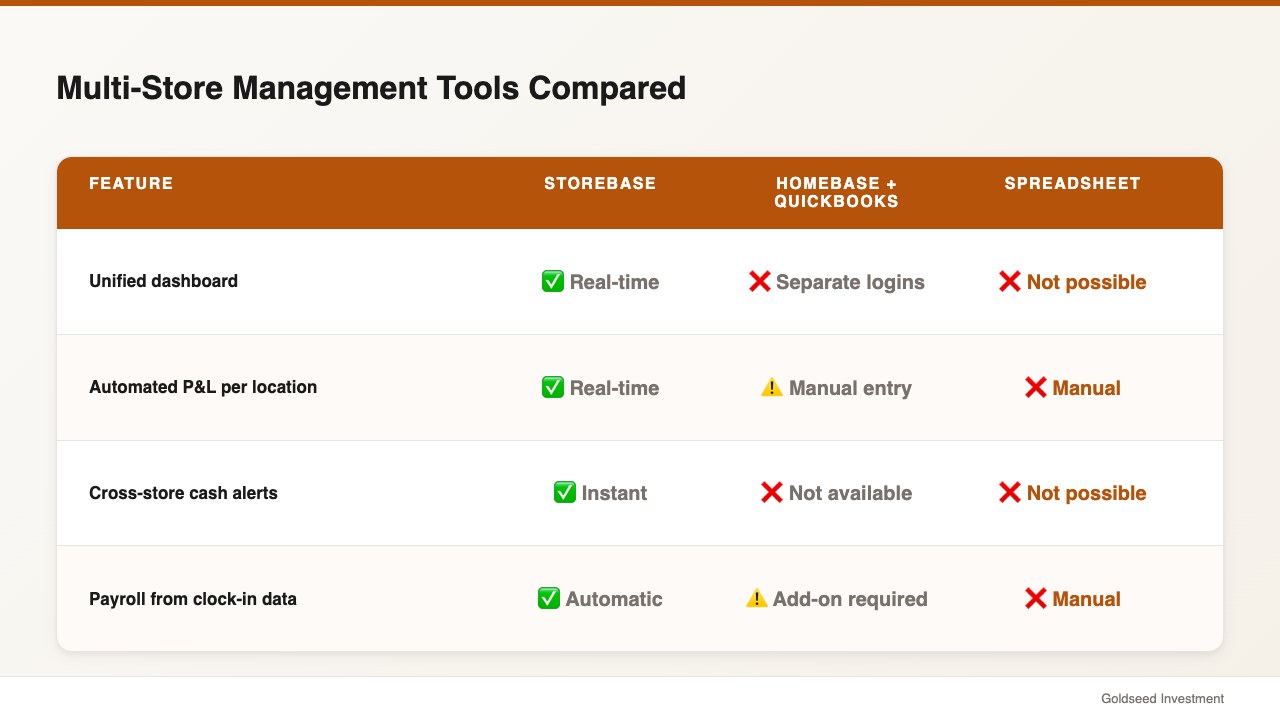
Here’s how the tools in Option 2 vs Option 3 compare:
| Feature | Storebase | Homebase + QuickBooks | Spreadsheet + Manual |
|---|---|---|---|
| Unified dashboard (all stores, one login) | ✅ Real-time | ❌ Separate logins | ❌ Not possible |
| Automated P&L per location | ✅ Real-time | ⚠️ Manual entry required | ❌ Manual |
| Cross-store cash discrepancy alerts | ✅ Instant | ❌ Not available | ❌ Not possible |
| Payroll from actual clock-in data | ✅ Automatic | ⚠️ Requires Homebase add-on | ❌ Manual |
| Inventory tracking with accountability logs | ✅ Built-in | ❌ Separate tool needed | ❌ Manual |
| Monthly cost (2 locations) | $48/mo (Growth — up to 5 stores) | $120–$200+ | Free (but 28 hrs/mo labor) |
The cost of Option 2 isn’t the subscription fees — it’s the 25–35 hours per month that can’t be reinvested in the business. Managing retail store profitability covers the financial benchmarks that make this calculation concrete.
How Marcus Runs Two Stores From One Dashboard (And Closed in Under 30 Minutes)
Marcus’s shift started when he realized that his problem wasn’t the stores — it was the information gap between them. Neither location was underperforming. He just couldn’t see either of them clearly.
After switching to Storebase, three changes transformed his operation:
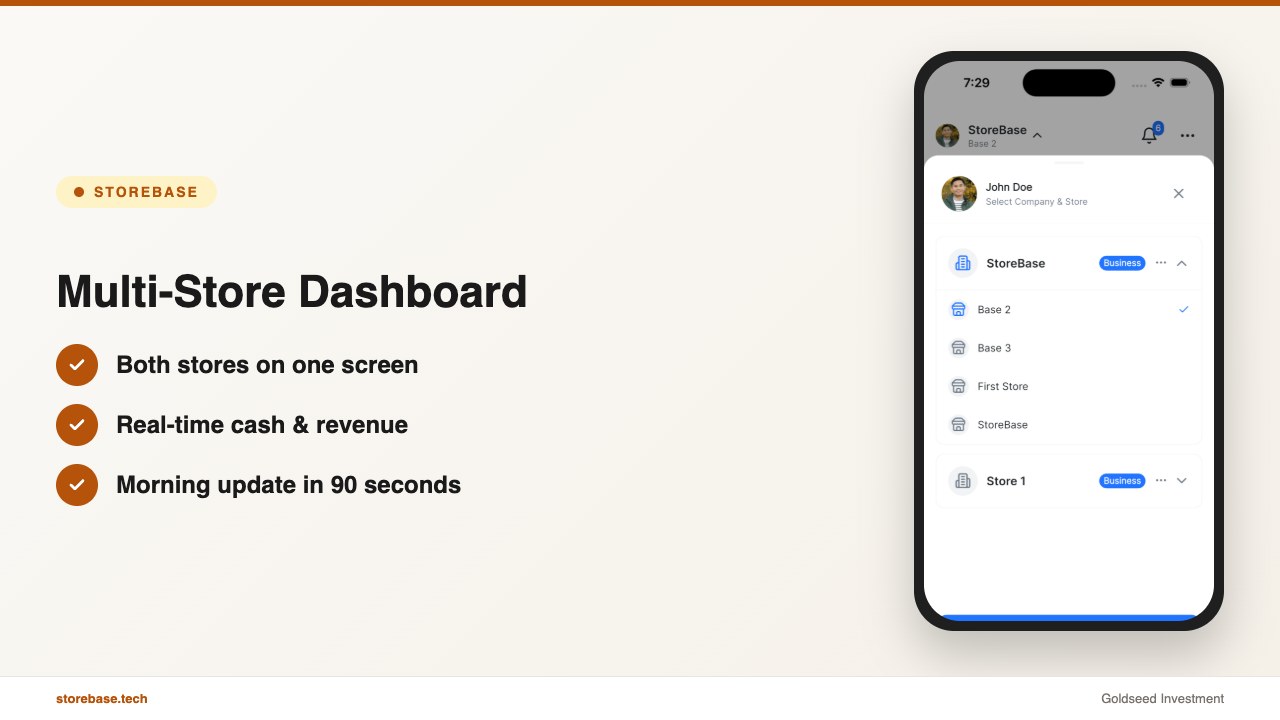
1. The Multi-Store Dashboard replaced his morning calls. Both Houston locations now appear side by side on a single screen: yesterday’s revenue, current inventory levels, cash status, and any open scheduling gaps. Marcus checks it over breakfast. What used to take 20 minutes of phone calls now takes 90 seconds.
2. Automated per-location Income Statements closed his monthly blind spot. Marcus’s biggest time drain had been month-end: exporting POS data, reconciling into spreadsheets, and manually calculating which store actually generated more profit after labor and COGS. Storebase’s Sales & Finance module generates a real-time Income Statement for each location automatically — updated as transactions come in. His combined monthly close dropped from 5+ hours to 28 minutes.
3. Cross-store alerts caught problems before they became patterns. Three weeks after switching, an alert flagged an unusual cash variance at Store 2 — $145 short across three consecutive evenings. The accountability log traced it to the same shift, same employee. It turned out to be a counting error, not theft. But having a log at all changed how staff at both locations approached closing procedures.
The accountability layer also helped with inventory. Storebase’s Inventory module tracks every stock adjustment with a staff ID and timestamp. When shrinkage at Store 1 ticked up in February, Marcus had a clear audit trail within minutes. The issue was caught in week three — not month three.
If your second store is still running on separate spreadsheets and morning phone calls, Storebase was built for exactly this transition. Most two-store operators are fully set up within a day, see their first automated monthly close within 30 days — no credit card required. Start with the Multi-Store Dashboard → or Download on the App Store →
Is a Multi-Store Dashboard Worth It for Just Two Locations?
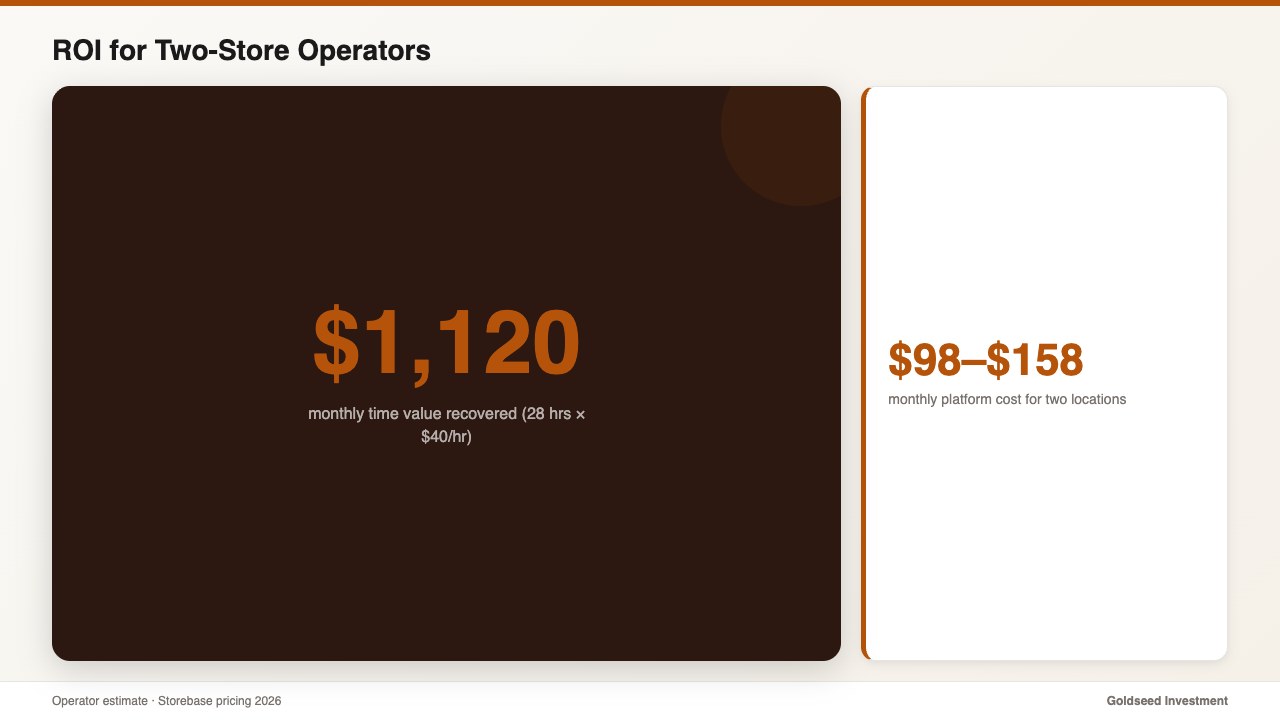
The honest answer for two-location operators: the ROI is clearest in time savings, not features. For Marcus, the math was straightforward — 28 hours of admin per month at a conservative personal time value of $40/hour equals $1,120/month in recovered time. The platform cost for two locations is just $48/month (Storebase Growth plan covers up to 5 stores — no per-location fees). Payback in the first month.
But the harder-to-quantify value is decision quality. When you can see both stores on one screen, you make decisions based on current data — not last week’s phone call or last month’s spreadsheet. Operators consistently report that the visibility shift is more valuable than the time savings.
There’s also a compounding benefit: the habits you build with two stores transfer directly to three, four, or five. The operators who scale successfully typically have unified visibility before they need it for a third location — not after.
For comparison, retail financial management software that generates Income Statements automatically shows the financial reporting side of what this looks like in practice.
FAQ
Q: Do I need to use the same POS at both store locations to connect them? A: No. Storebase works alongside any POS — Square, Clover, Toast, Lightspeed, or any other — and doesn’t require them to match across locations. Your POS handles transactions; Storebase handles payroll, inventory accountability, cash management, and financial reporting across both stores from a single platform.
Q: How long does it take to set up a multi-store management platform for two locations? A: Most two-location operators complete initial setup in 4–8 hours total — typically spread across two evenings. The first full monthly close on the new system usually takes under 30 minutes, compared to 5+ hours manually.
Q: What’s the most common mistake owners make when opening their second retail store? A: Running both stores with the same tools that barely worked for one. The administrative load at two locations doesn’t double — it triples, because you’re also mentally reconciling two data streams into one picture of the business. The operators who scale successfully upgrade their visibility tools before or immediately after opening the second location.
Q: Can I manage staff scheduling and payroll across both stores in one place? A: Yes. Storebase covers scheduling, QR-based clock-in, and automated payroll calculation across all locations from a single login. Staff at each location clock in independently; the owner sees both stores’ attendance and runs combined payroll in one step.
Q: How do I know if a cash discrepancy happened at Store 1 or Store 2? A: Storebase Cash Management logs every cash entry with the staff ID, timestamp, and location. Discrepancies surface as alerts in real time, with a full audit trail showing exactly who entered what and when — at whichever location the variance occurred.