Salon owners who pair a POS like Square or Vagaro with Storebase cut payroll from 5 hours to 25 minutes per cycle, run P&L in real time instead of waiting 11 weeks, and drop drawer-discrepancy events from 4 in 6 weeks to effectively 0.
Today, Lauren Park manages 3 hair-and-nail salons in Austin, Texas with 18 stylists, and she can tell you — from her phone, before the first appointment of the day — exactly which front-desk associate opened the drawer, whether the previous night closed at zero variance, and which location ran above its labor target last week. Eighteen months ago, that took her 5 hours every other Friday and a quarterly visit from her accountant.
What changed wasn’t her POS. She still uses Square Appointments for booking and checkout, the same one she had in 2024. What changed is that she stopped trying to make the POS do things it was never built for. She added Storebase on top — the back-office layer that handles payroll, cash accountability, and automatic financial statements while the POS keeps doing what salon POS systems do best: bookings and sales.
This guide is for owners about to buy or replace a salon POS system in 2025 or 2026, and want to know what the POS actually solves — and what it leaves on your plate.
Why Is Picking a Salon POS System Actually About the Back Office?
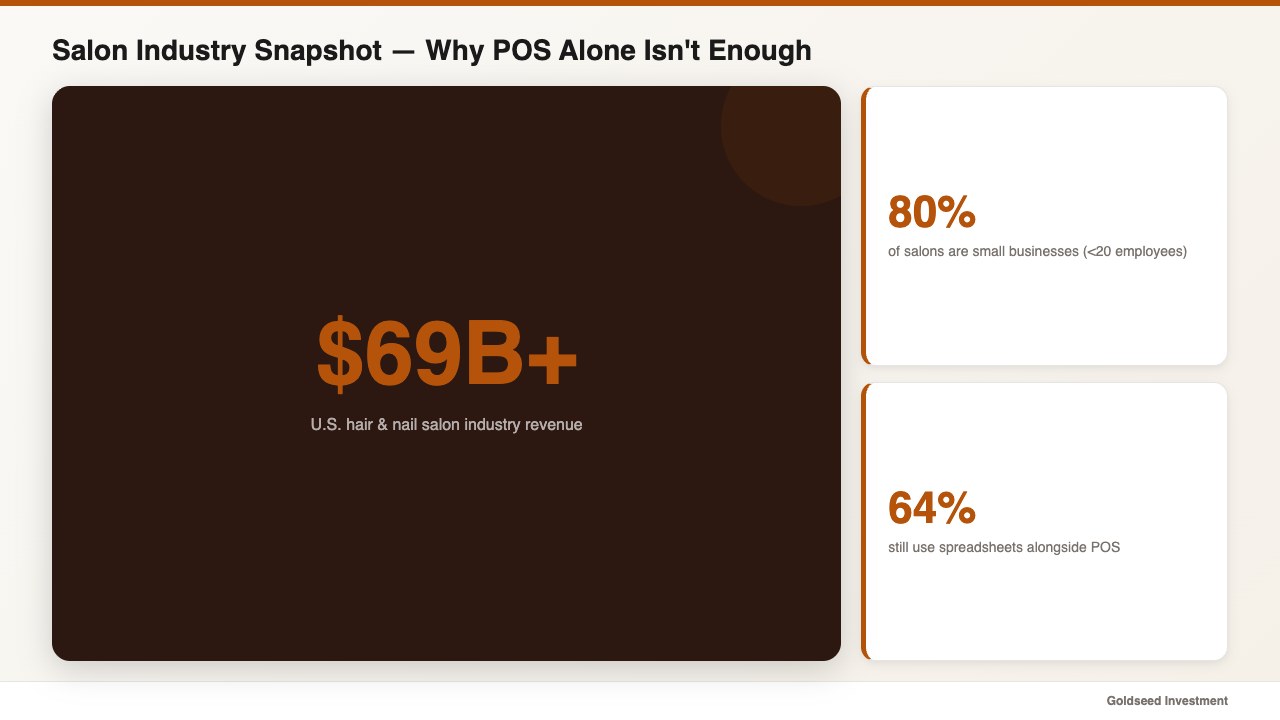
The U.S. hair and nail salon industry sits above $69 billion in annual revenue, and roughly 80% of operators are small businesses with under 20 employees, according to IBISWorld. Mindbody’s industry data shows that around 64% of salons still use a separate accounting tool or spreadsheet alongside their POS — a clear signal that the salon point of sale software layer alone doesn’t cover daily operations.
The salon POS system you choose covers about 30% of your operational work: booking, checkout, the receipt, the tip prompt, maybe a client history screen. The other 70% — booth-rent vs commission payroll, IRS tip reporting, cash drawer reconciliation, multi-location performance, and the monthly P&L — sits outside the POS in spreadsheets, in your accountant’s inbox, and on Friday afternoons.
That’s the buyer-side gap most “best POS for salon” articles skip. We won’t.
What Should a Salon POS System Actually Do in 2026?
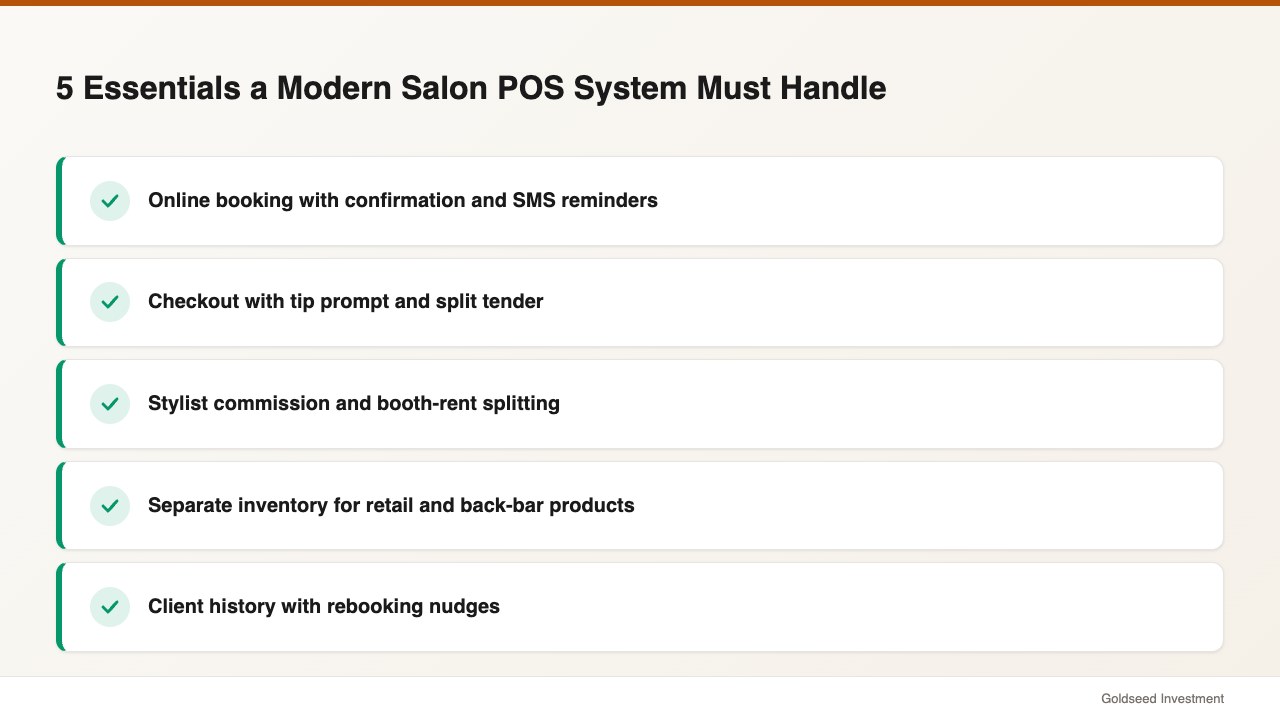
A modern salon POS system should handle five concrete tasks. If a vendor’s demo doesn’t show all five smoothly, keep shopping.
The five essentials:
- Online booking with a confirmation flow. Clients book without calling. The system blocks double bookings and sends SMS reminders.
- Checkout with tip prompt and split tender. Card + cash + gift card in one transaction. Tip prompt before card insertion.
- Stylist assignment with commission or booth-rent splitting. Each ticket attributed to the correct stylist with the correct pay structure.
- Inventory for retail and back-bar. Two separate cost pools that most salon POS systems treat as one and that quietly distort your margin numbers.
- Client history with rebooking nudges. Last visit, last service, last product purchased, days since last visit.
What a small salon POS should not be expected to do — and what most do badly when they try — is everything in your back office. Payroll for mixed booth-rent + commission staff, drawer-level cash accountability, automatic P&L and balance sheet generation, and a true multi-location dashboard are jobs that need a separate back-office layer. We’ll come back to that.
If you also operate a retail counter inside your salon — selling shampoo, conditioner, tools — read our companion piece on the broader retail POS system landscape for cross-industry comparisons.
Which 5 Salon POS Systems Are Worth Comparing in 2026?
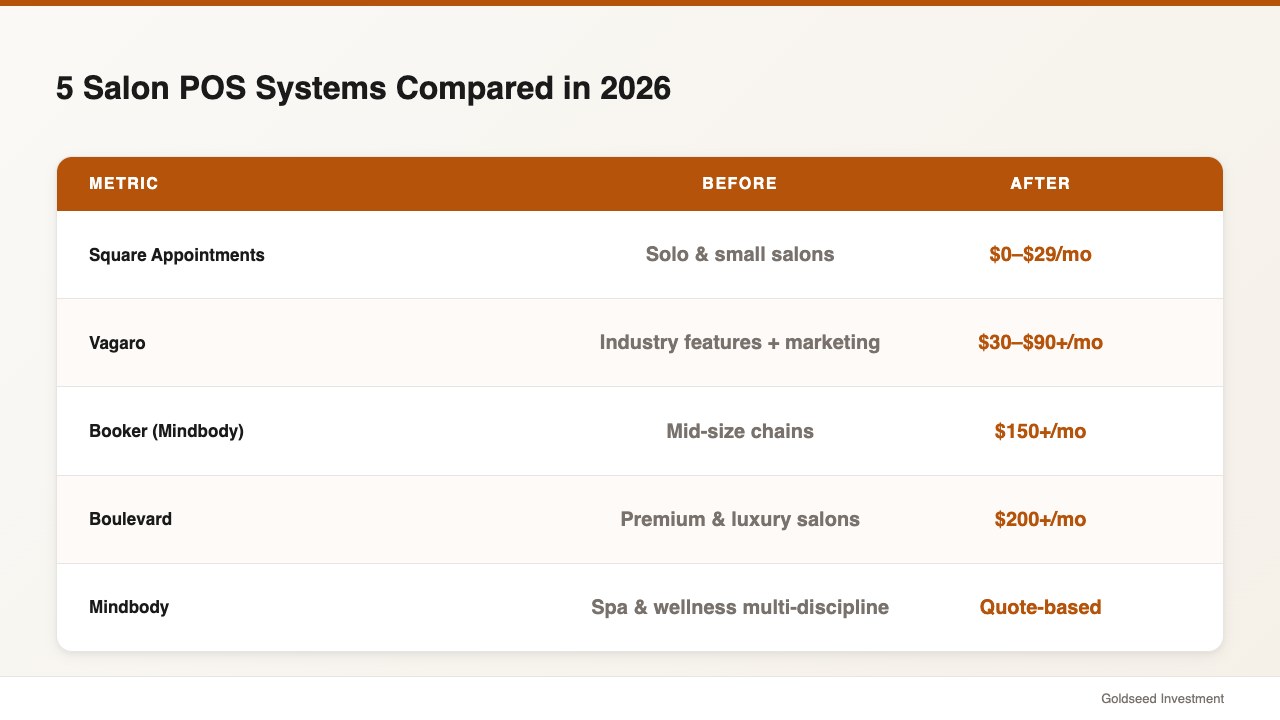
Below are the five most-used hair salon POS platforms in 2026, ranked by what they’re strongest at — and where they leave gaps. Pricing reflects publicly listed plans at the time of writing; check current vendor pages before committing.
1. Square Appointments — best for solo and small salons under $20K/mo revenue. Free plan exists; paid plans start around $29/mo per location. Easy setup, well-known card-processing rates (around 2.6% + $0.10 in-person). Weakest at multi-location reporting, mixed-payroll structures, and cash-drawer audit trails. Many owners pair Square with a separate accounting tool — exactly the gap a back-office layer fills.
2. Vagaro — best for industry-specific features. Around $30–$90+/mo depending on add-ons. Strong client marketing tools, gift cards, and online booking flows tailored to salon, spa, and fitness. Weakest at financial reports beyond basic sales summaries.
3. Booker (Mindbody) — best for mid-size salons under one chain. Quote-based pricing, typically above $150/mo. Strong appointment engine, enterprise reporting. Weakest at price transparency and at giving owner-operators a fast mobile back office for daily decisions.
4. Boulevard — best for premium and luxury salons. Premium pricing (often $200+/mo per location). Beautiful UX, strong client communications. Weakest at supporting smaller operators on tighter margins.
5. Mindbody — best for spa, wellness, and multi-discipline salons. Quote-based pricing. Strongest at scheduling complexity. Weakest at quick-glance financials for the owner-operator and at handling the long tail of back-office tasks that aren’t appointments.
Every one of these tools stops at the sale. None of them generate your monthly Income Statement automatically. None of them log which staff member made which cash drawer entry. None of them calculate commission + booth-rent + hourly + overtime payroll in one cycle. That’s not a flaw — it’s positioning. They’re POS systems for salon and spa businesses, not back-office systems.
If you’re still narrowing down the POS itself, our step-by-step guide on how to choose a POS system walks through the decision framework before you sign a contract.
The Hidden Cost of “POS-Only” Salon Operations — What It’s Really Taking From You
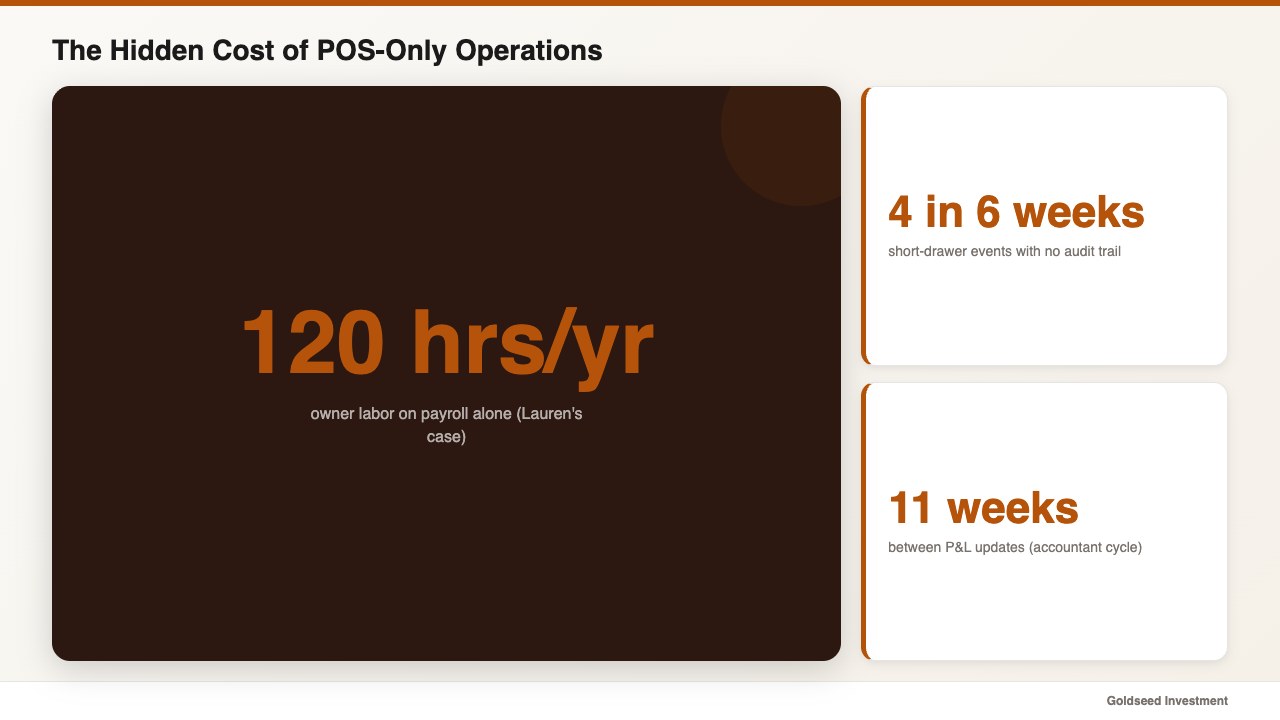
Here are the numbers operators rarely add up when they’re shopping for a salon POS system.
Lauren, before she added a back-office layer, was running on Square Appointments alone. The POS was fine. The Friday-night closing was not. Every other Friday, she sat down at her dining-room table at 7 p.m. with three browser tabs open — Square dashboard, her commission spreadsheet, and a tip-reconciliation sheet — and worked until midnight. That’s roughly 120 hours per year of owner labor just on payroll, before she even touched the books.
The cash drawer was worse. Industry surveys from the Professional Beauty Association put salon labor cost between 35% and 50% of revenue, which means even tiny cash discrepancies multiply quickly across a year. Lauren had 4 short-drawer events in 6 weeks. In each case, she had no way to trace which stylist took which payment, who counted the cash, or whether the front-desk handoff went bad at lunch swap. The POS recorded the transaction. It did not record the human chain of custody.
And then there was the P&L. IBISWorld’s data on small salons shows that fewer than 1 in 5 owner-operators can produce a current-month profit-and-loss statement on demand. Lauren couldn’t. Her accountant produced one every quarter. So for 11 weeks at a time, she ran a 3-location, 18-staff business by feel — and the feeling sometimes wasn’t accurate. Net profit margin, gross margin by service category, cost of goods sold on back-bar inventory — none of it was visible until the quarter closed.
The problem isn’t her. No salon POS was ever designed to fix that specific stack of back-office decisions. That’s a different category of software.
How Do Top Salon Owners Solve This in 2026?
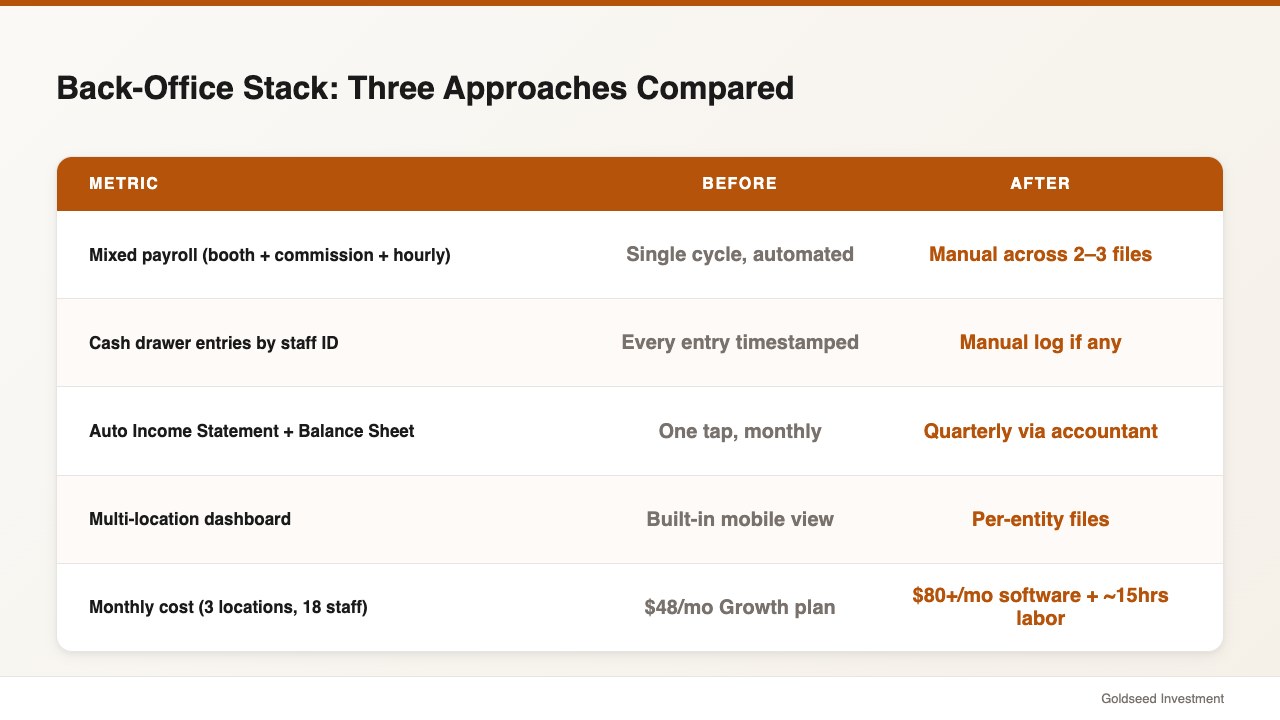
The pattern from operators running 2–10 salon locations is consistent. They keep their salon POS for what it’s good at — booking, checkout, tips, client history — and they layer a back-office tool on top that takes the POS data and turns it into payroll, cash accountability, and financial statements automatically. NRF’s multi-location operator survey reports that owners running 2–10 locations spend an average of 12 hours per week on back-office reconciliation, most of it duplicate work that a properly connected back-office layer eliminates.
Storebase is one back-office layer built for exactly this pattern. It works alongside any salon point of sale software — Square Appointments, Vagaro, Booker, Boulevard, Mindbody — without replacing it. Here is how a layered approach stacks up against the spreadsheet + accountant combination most salons currently use:
| Back-Office Task | Storebase | QuickBooks + Spreadsheets | Square (POS alone) |
|---|---|---|---|
| Payroll for booth rent + commission + hourly in one cycle | ✅ Single cycle, QR clock-in feeds the math | ⚠️ Manual reconciliation across 2–3 files | ❌ Not supported |
| Cash drawer entries logged with staff ID + timestamp | ✅ Every entry stamped | ❌ Manual log if any | ⚠️ Sales logged, drawer events not attributed |
| Auto Income Statement + Balance Sheet | ✅ One tap, monthly or quarterly | ⚠️ Accountant prepares quarterly | ❌ Sales summary only |
| Multi-location dashboard (compare salons side-by-side) | ✅ Built-in, mobile | ⚠️ Per-entity files | ⚠️ Add-on, location-by-location |
| Monthly cost | $18/mo Starter (1 location) / $48/mo Growth (up to 5 locations) | $80+/mo QuickBooks + ~15 hrs/mo labor | $0–$29/mo per location |
| Setup time | Under 10 minutes | Weeks (and an accountant) | Same-day |
The point of this comparison isn’t that one tool wins everything. It’s that the POS, the accounting software, and the back-office layer are three different jobs — and a salon owner who tries to make one of them do all three is the one stuck at the dining room table on Friday night.
How Lauren Uses Storebase to Run 3 Salon Locations From Her Phone
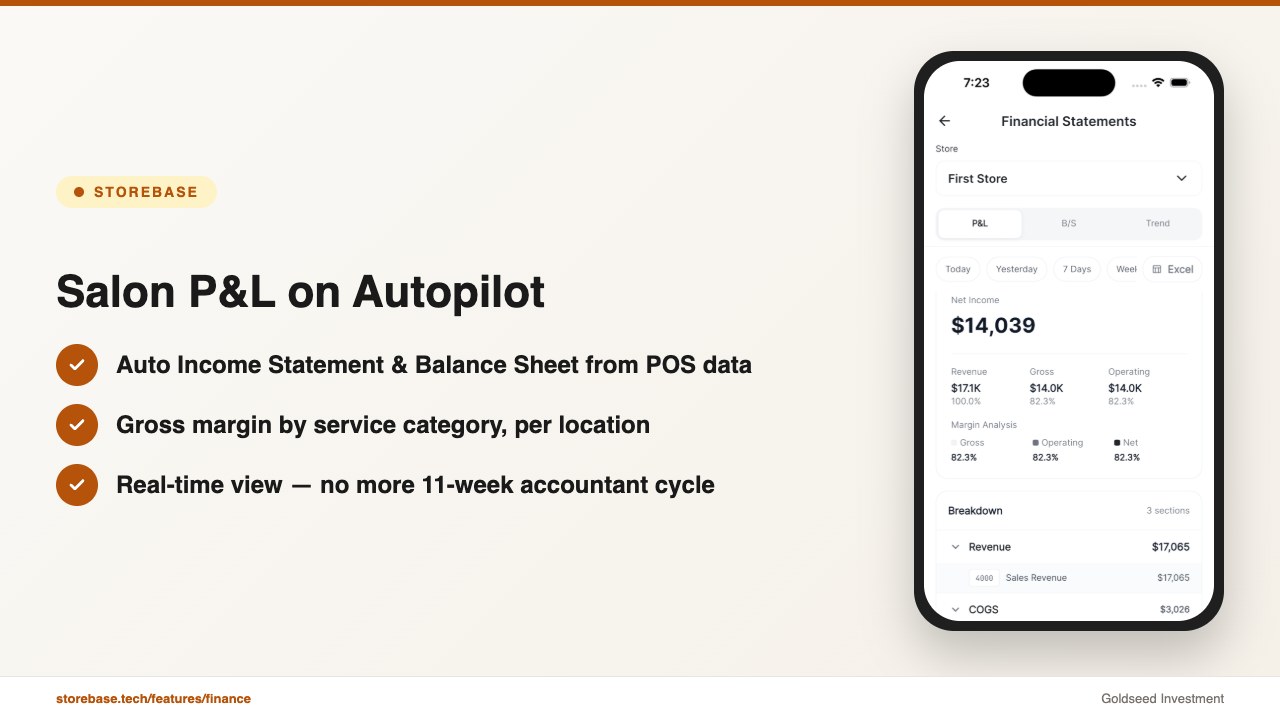
Lauren kept Square Appointments. She didn’t switch POS systems. She just added a back-office layer on top — and her week looks different now.
Feature 1 — Team & Payroll with QR clock-in for mixed pay structures. Lauren’s 18 stylists are a mix: 6 are booth-rent, 9 are commission, and 3 are hourly with overtime eligibility. Before, every cycle was a custom spreadsheet because Square Appointments doesn’t understand the difference. With the Team & Payroll module, each stylist clocks in by QR — location, time, and shift ID are stamped automatically. The math runs in the background. Lauren reviews and approves; she doesn’t recalculate. Cycle time went from 5 hours → 25 minutes. Annualized: 120 hours/year → roughly 10 hours/year. One operator told us, “Payroll used to eat every other Friday. Now I do it on the way home.”
Feature 2 — Cash Management with staff-level entry logs. Every cash drawer event — deposit, payout, change order, end-of-day count — is stamped with the staff member’s ID and a timestamp. When the closing drawer didn’t add up at one location, Lauren opened the log and saw that the 5:42 p.m. tip-out entry was missing a counter-signature. Whoever closed the drawer at lunch swap got it right; whoever closed at 9 p.m. didn’t reconcile against the printed tip-out sheet. Result: drawer-discrepancy events dropped from 4 in 6 weeks → 0 over the next two months.
Feature 3 — Sales & Finance with automatic Income Statement + Balance Sheet. The Sales & Finance module pulls sales from the POS and combines them with expenses logged in the app to produce an Income Statement and Balance Sheet automatically. Lauren no longer waits until quarter-end. P&L visibility went from once every 11 weeks → real-time. When one location’s product margin dipped 4 points two months running, she traced it to a back-bar over-ordering pattern and corrected it in the next supply cycle.
The fourth feature she didn’t expect to use as much: the Multi-Store Dashboard. Comparing the three salons side-by-side surfaced things she would have caught months too late on spreadsheets — a slow downward drift at one location’s Tuesday-Thursday productivity, for example, which turned out to be a recurring stylist no-show pattern that her manager hadn’t escalated.
If payroll for booth rent and commission stylists still takes you an entire evening, or if you can’t trace a short drawer to a specific staff entry, this back-office layer was built for exactly that. Most salon owners complete setup in under 10 minutes and run their first payroll cycle the same week — no credit card required. Start with Sales & Finance → or Download on the App Store →.
What Does a Salon POS System Really Cost Once You Add It All Up?
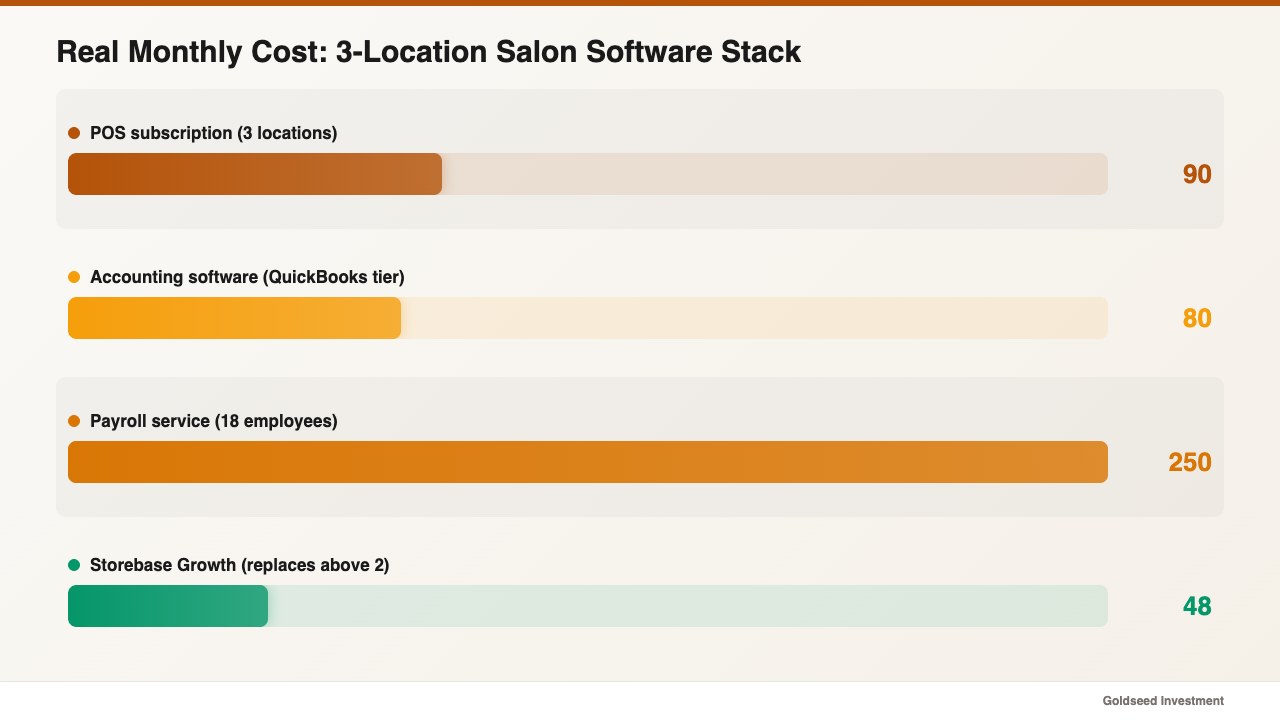
Sticker price is the smallest part of the total cost of running a salon POS system.
A typical small salon stack looks like this:
- POS subscription: $0–$200/mo per location depending on vendor.
- Card processing: roughly 2.6% + $0.10 per in-person transaction, sometimes higher on integrated processors.
- Accounting software (QuickBooks Online or similar): $30–$200/mo depending on tier.
- Payroll service (Gusto, ADP, or similar): $40–$80/mo base + roughly $6–$12 per active employee.
- Owner labor reconciling all three: 8–15 hours per location per month, conservatively.
Run the math for Lauren’s 3 locations. The POS layer is about $90/mo combined. Accounting is $80. Payroll for 18 employees is roughly $250. That’s about $420/mo in software — before her own time. At her implicit hourly rate, the 15 hours/mo of reconciliation labor is another $750–$1,500 in opportunity cost.
By comparison, the Growth plan on a unified back-office layer is $48/mo for up to 5 stores and absorbs the payroll math, the cash accountability log, and the financial reporting into the same layer. The Starter plan at $18/mo is for single-location salons. The Business plan at $149/mo extends to up to 10 stores for growing chains. None of those plans replace the POS — they replace the spreadsheets, the separate payroll service, and parts of the accounting subscription that exist only because the POS can’t reach into payroll or cash accountability.
The honest read: a single-location salon doing under 40 transactions a day may not need a back-office layer yet. A salon doing 80+ transactions a day, or any owner running more than one location, almost certainly does — and the back-office layer pays for itself within the first two payroll cycles.
If you want to see the equivalent comparison for tablet-based POS hardware setups, we cover that in our iPad POS system buyer’s guide.
How Do You Choose the Right Salon POS System? A 7-Step Buyer’s Checklist
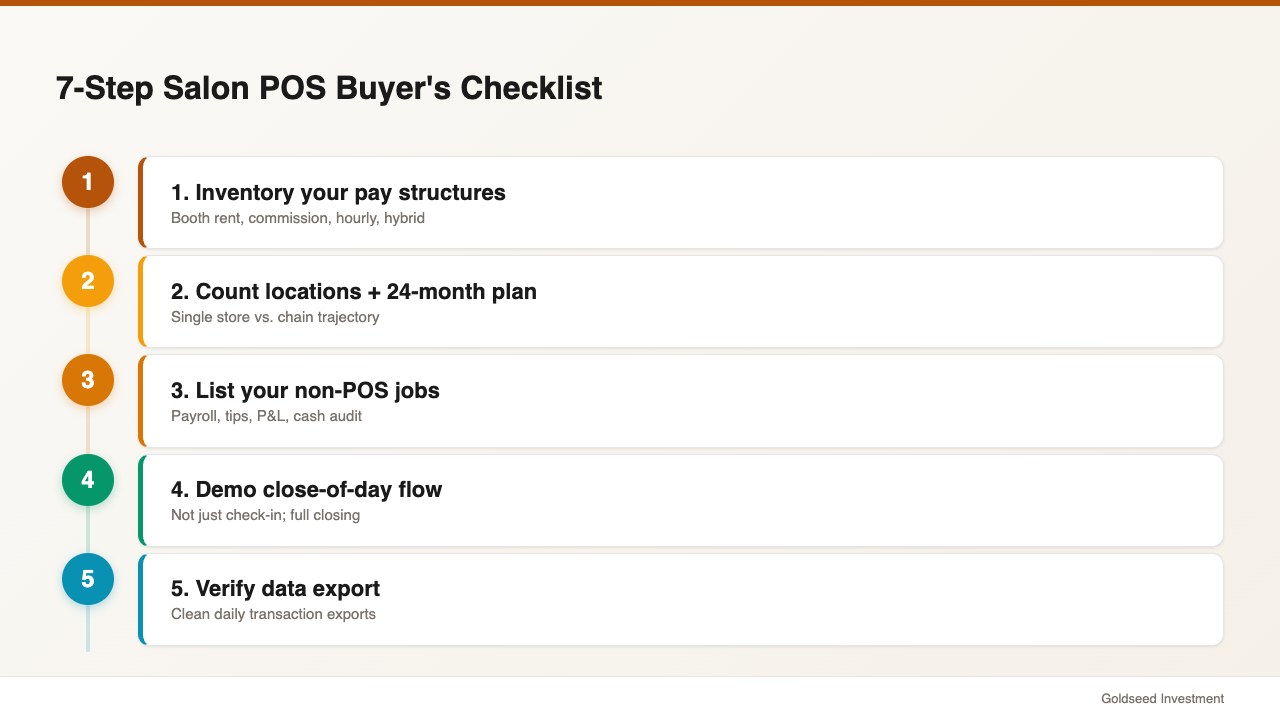
Use this in order. Skipping steps is the most common reason owners end up replacing their POS within 18 months.
- Inventory your pay structures. Booth rent, commission, hourly, salary, hybrid. Write down the count for each. Any POS that can’t model your mix without spreadsheets is a no.
- Count your locations — and your 24-month plan. A single-location salon has different needs than a 2-to-5-location chain. Don’t buy POS software that doesn’t scale into your plan.
- List your non-POS jobs. Payroll, tip reconciliation, IRS reporting, P&L, balance sheet, cash drawer audit. Decide which the POS will handle and which need a back-office layer.
- Demo the close-of-day flow, not just the check-in. Most vendor demos focus on booking. Ask to see a full closing, including cash count, tip-out, and drawer reconciliation.
- Verify the export. Whatever POS you choose, confirm it exports clean transaction data daily. Your back-office layer will need it.
- Add up the real monthly stack. POS + processing + accounting + payroll + your labor. Compare that against POS + a back-office layer. The cheaper one isn’t always the cheaper stack.
- Trial both layers in parallel for 30 days. Run them side-by-side on one location before rolling out. Both the POS and the back-office layer should be on a no-credit-card trial — if either isn’t, that’s a red flag.
If you do this checklist in order, you will not buy the wrong salon POS system. You will buy the right one, plus the right back-office layer to sit on top of it — and your Friday nights will get a lot shorter.
FAQ
Q: How much does a salon POS system cost in 2026? A: Expect $0–$200/month per location for the POS itself, plus card processing fees of roughly 2.6% + $0.10 per in-person transaction. The bigger number most owners miss is the back-office stack — accounting, payroll, and reconciliation labor — which typically runs another $300–$600/month for a multi-location salon. A unified back-office layer like Storebase Growth ($48/mo for up to 5 locations) consolidates most of that.
Q: Can I use Square Appointments as my salon POS system? A: Yes, especially for single-location salons under about $20K/month in revenue. Square is cheap, well-known, and easy to set up. Its main gaps for salons are mixed-payroll handling (booth-rent + commission + hourly in one cycle), drawer-level cash accountability, and automatic P&L. Most Square salon users add a separate back-office tool to cover those gaps.
Q: Do I need a separate accounting tool if I have a salon POS? A: Almost always yes — unless your back-office layer generates Income Statements and Balance Sheets directly. A POS alone gives you sales summaries, not financial statements. Either run accounting software (QuickBooks or similar) in parallel, or use a back-office layer that produces both reports automatically from your POS and expense data.
Q: How do salon POS systems handle tip reporting for the IRS? A: Most salon POS systems record credit-card tips at the transaction level, but cash tips are reported by the employee. IRS Publication 531 requires all tip income above $20/month per employee to be reported. Salons that mix card and cash tips often need a separate payroll layer to consolidate both into the W-2 and 941 filings — your POS alone usually won’t do this end-to-end.
Q: What’s the difference between a salon POS and a salon back-office system? A: A salon POS handles the booking and the sale: appointment calendar, checkout, tip prompt, client history. A back-office system handles everything after the sale: payroll for mixed pay structures, cash drawer audit logs, financial statements, and multi-location performance dashboards. Most modern salons in 2025 and 2026 use both — the POS for the front of house, the back-office layer for the rest.
Q: Can one salon POS system run multiple locations? A: Some can — Booker, Boulevard, and Mindbody are built for multi-location setups, though their pricing reflects it. Square and Vagaro support multi-location with add-ons but get awkward fast when you want a single dashboard view. For owner-operators running 2 or more salons, the most common pattern is a per-location POS plus one back-office layer that aggregates all locations into one mobile view. If that pattern fits, get started with the Storebase Growth plan — it’s $48/mo for up to 5 salon locations, no credit card required to trial, and the App Store download is here.