Retailers who put a real accountability system in place with Storebase go from finding payroll and cash problems six months late to catching them the same day — and cut unexplained cash and stock losses by 30% to 45% in a year.
Today, Marcus Delgado runs four convenience stores around Cleveland and knows by 9 a.m. who clocked in late, which drawer came up short overnight, and which manager has an open staff issue sitting untouched. He checks it from his phone before his first coffee. Eighteen months ago he knew none of that — and the gap had been costing him for half a year without his knowledge. The fix was not a stricter manager. It was a system. After moving his stores onto Storebase, his manager review went from daily firefighting to a monthly sign-off, and his blind spot closed from six months to same-day. This retail employee accountability systems guide walks through what changed, why the problem is so common, and how the pieces of an accountability system actually fit together.
Why Do Multi-Store Retailers Lose Control of Employee Accountability?
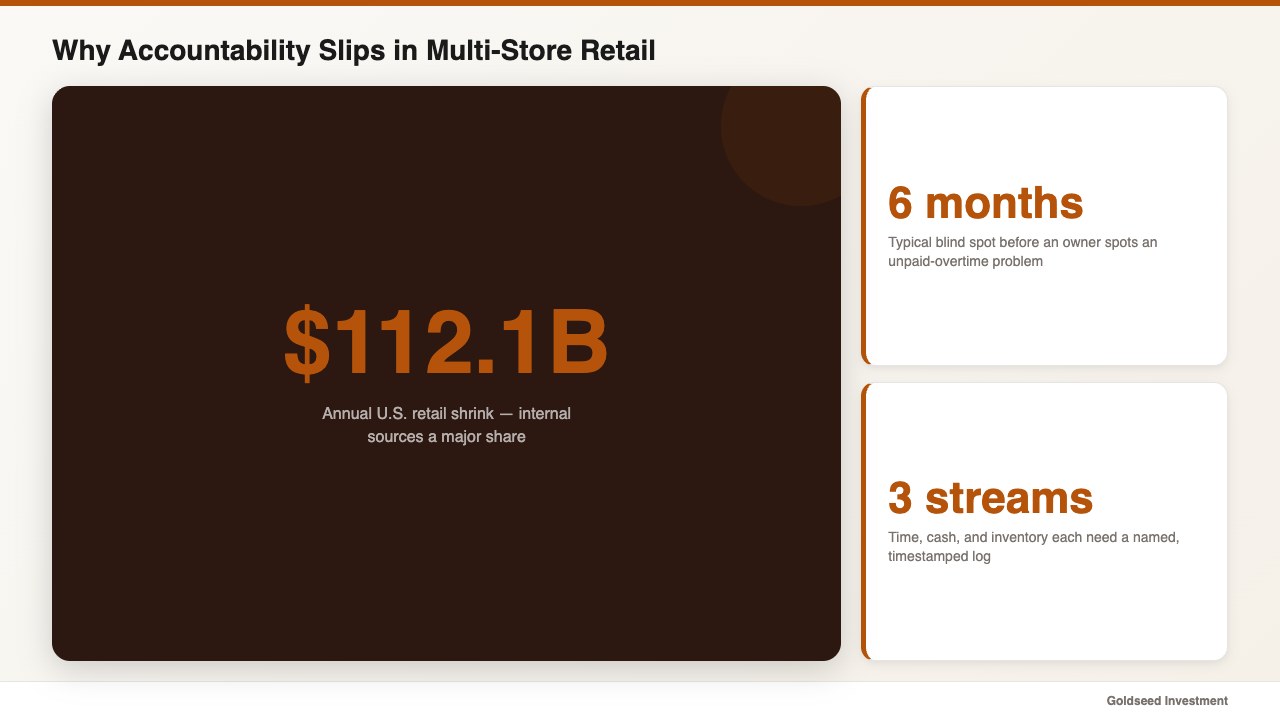
Most owners lose accountability not because staff are dishonest, but because no record connects who did what to when they did it. In a single store you can watch the floor. Across three or four locations, that visibility tends to disappear the moment you drive away.
The numbers behind this are real. The U.S. Bureau of Labor Statistics reports that retail turnover runs well above the private-sector average, so each location often has a rotating cast of newer staff who have not yet earned trust. At the same time, the National Retail Federation’s National Retail Security Survey puts annual retail shrink at $112.1 billion, with internal sources a major share. When clock-ins, cash entries, and stock changes live in separate notebooks or three different apps, an employee accountability system simply does not exist — and gaps go unseen for months. A high turnover rate makes this worse, and the leakage shows up everywhere from shrinkage to a quietly shrinking gross margin as untracked overtime and COGS errors pile up.
This is not a discipline problem. It is a record-keeping problem, and most owners face it because no tool was ever built to tie those records together. For the financial side of where these losses surface, our walkthrough on how to analyze retail store profitability shows how leakage hides inside ordinary-looking margins.
The Hidden Cost of a Six-Month Accountability Blind Spot
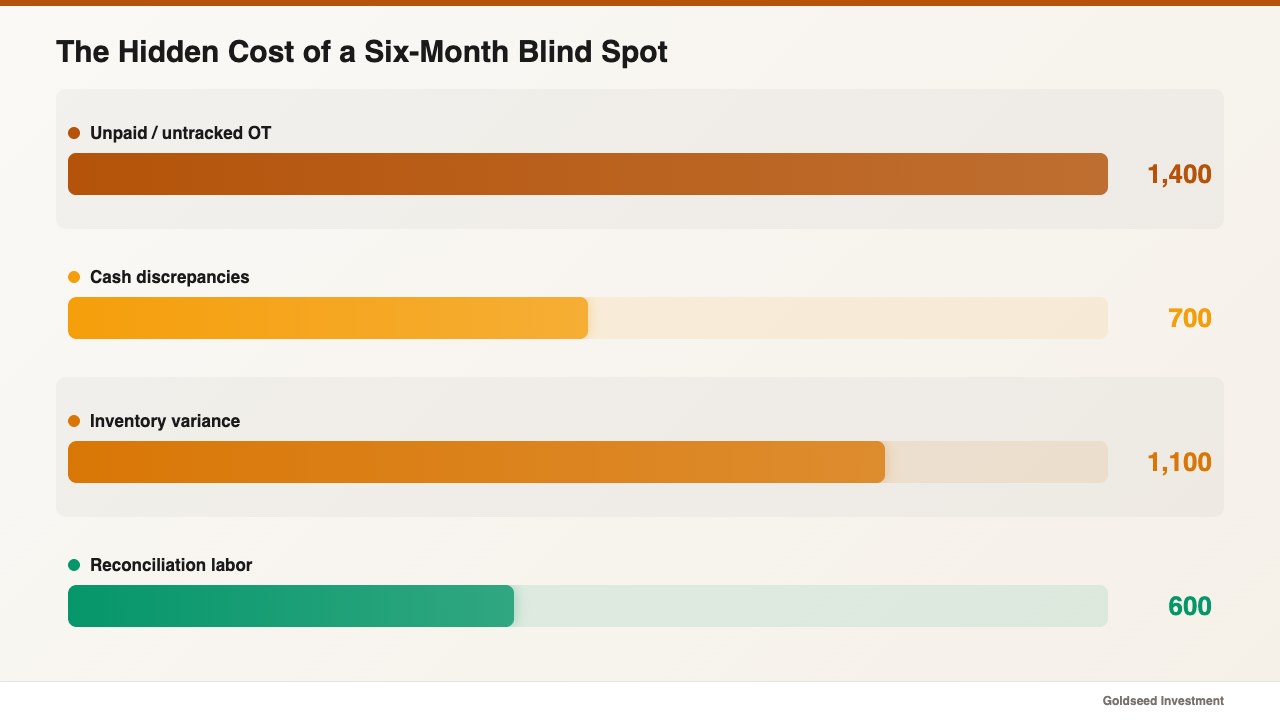
The hidden cost of weak accountability is time and trust, and it compounds quietly. Marcus discovered that one manager had been letting tardiness slide and leaving overtime unpaid for six months. By the time he found out, the unchecked hours had added up to thousands of dollars in payroll leakage and a team that no longer believed the rules applied evenly.
One retail operator described the same trap plainly:
> “I found out six months later that my manager had been letting tardiness slide and letting overtime go unpaid. I never had a way to know.”
Cash told a similar story. The drawer at one store was short again — about $40 — and nobody could say why. Was it a miscount, a refund logged wrong, or something deliberate? Without an entry-by-entry log showing who touched the cash and when, every shortfall stayed a mystery. Reconciling it by hand ate close to two days a month and still produced no answer. Ask your manager how they would prove a $40 discrepancy was an honest mistake; in many cases, they cannot. That uncertainty, repeated across four stores, is what a six-month blind spot actually costs.
What Does a Real Retail Employee Accountability System Track?
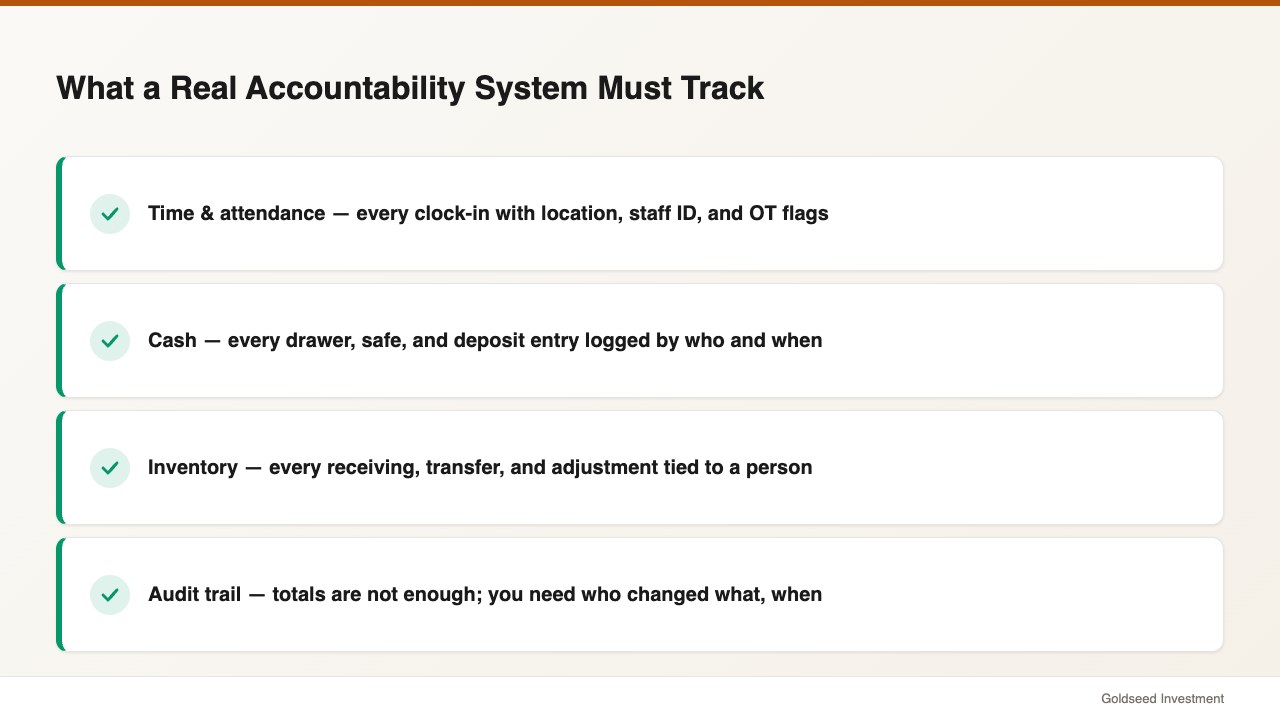
A real accountability system tracks three record streams and ties each one to a named person and a timestamp. Miss any one stream and the gaps move there.
- Time and attendance. Every clock-in and clock-out, with location and staff ID, plus automatic flags for tardiness, absence, and overtime against your OT threshold.
- Cash accountability. Every drawer, safe, and deposit entry logged with who entered it and when, so system balance and actual balance can be compared daily.
- Inventory changes. Every receiving, transfer, and adjustment recorded with the staff member who made it, so a stock discrepancy has a trail instead of a shrug.
Strong time tracking is the backbone, because labor compliance and payroll both depend on it. Pull your last three months of clock-in data and check how much you can actually verify; if the answer is “not much,” the system has a hole. Owners who want the cash side in depth can also see our guide to building an inventory accountability tracking system.
How Do Top Retailers Build Staff Accountability Today?
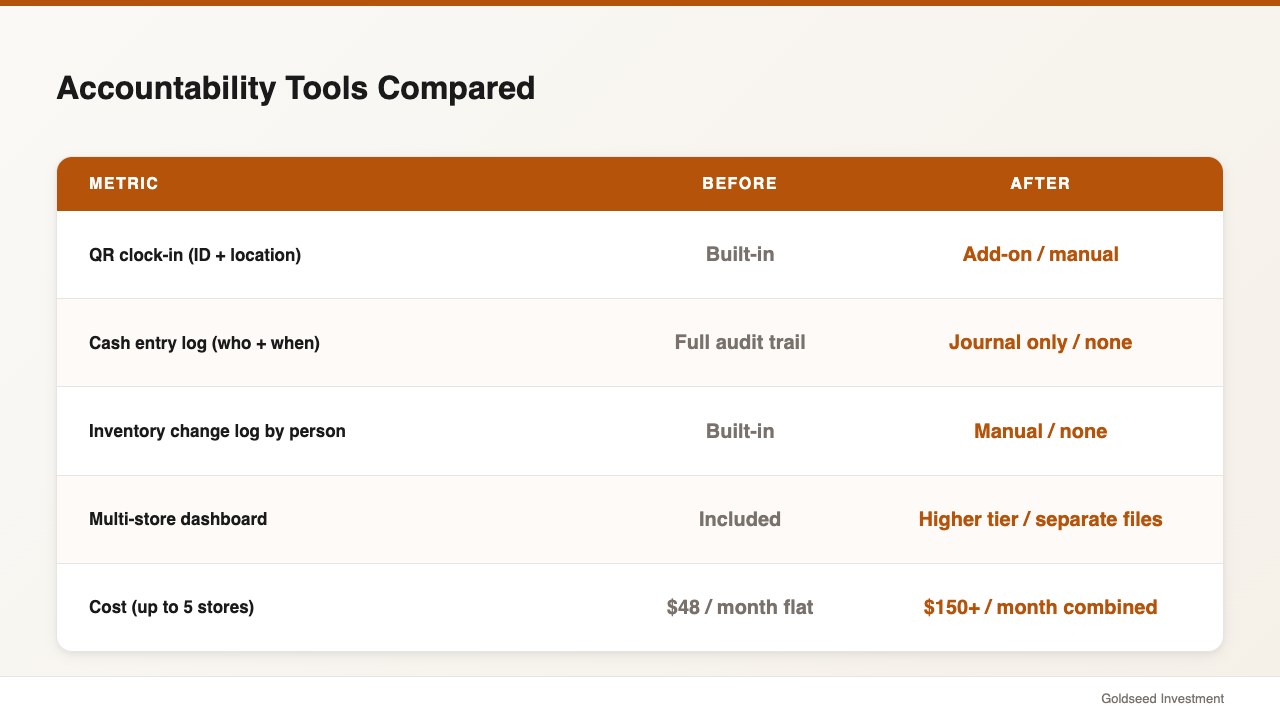
Top retailers tend to consolidate these records into one back-office platform rather than stitching together a scheduling app, a payroll service, and a spreadsheet. The patchwork approach often leaves the exact seams where accountability fails — the handoff between the schedule and the timesheet, or between the POS and the cash count.
Here is how a unified back-office layer compares with the common alternatives store owners reach for:
| Feature | Storebase | Homebase | QuickBooks | Excel |
|---|---|---|---|---|
| QR clock-in with staff ID + location | ✅ Built-in | ⚠️ Add-on | ❌ No | ❌ Manual |
| Cash entry log (who + when) | ✅ Full audit trail | ❌ No | ⚠️ Journal only | ❌ Manual |
| Inventory change log by person | ✅ Built-in | ❌ No | ❌ No | ❌ Manual |
| Multi-store dashboard | ✅ Included | ⚠️ Higher tier | ⚠️ Per-entity | ❌ Separate files |
| Monthly cost | $18 (Starter, 1 store) / $48 (Growth, up to 5 stores) | $40+/location | $80+/mo | Free (20+ hrs/mo labor) |
Source: vendor pricing pages, 2025–2026.
The difference that matters is the audit trail. A scheduling tool tells you the plan; a payroll tool calculates pay; a spreadsheet stores numbers. None of them, on their own, tells you who changed what and when — which is the whole point of accountability.
How Marcus Uses Storebase to Close the Accountability Gap
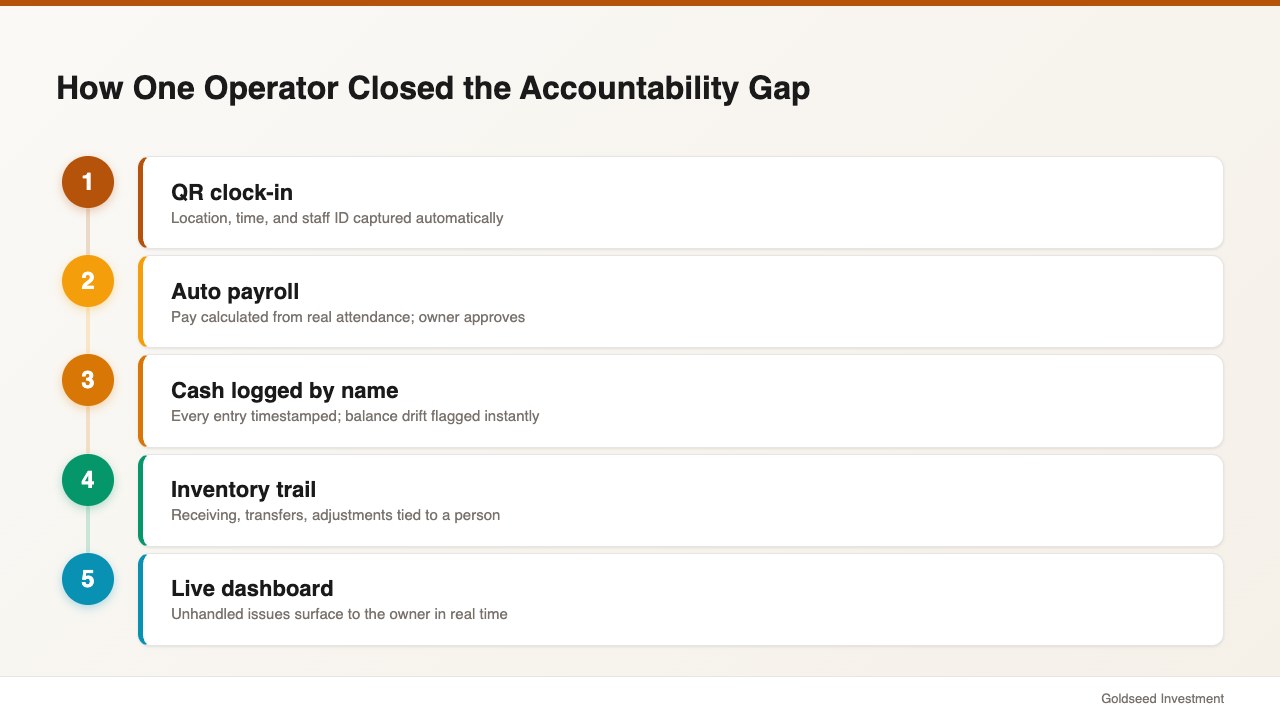
Marcus rebuilt accountability across his four stores using three connected parts, and the change showed up within the first month.
First, QR-based time and payroll. Staff clock in by scanning a code, which records location, time, and staff ID automatically. Tardiness, absence, and overtime are tracked and logged without anyone policing the floor. Through the Team & Payroll module, the app calculates pay from real attendance data, and Marcus only approves. His manager review dropped from a daily scramble to a monthly sign-off, and disputed hours fell to near zero because the log settles them.
Second, cash with a name on every entry. Using the Cash Management module, every drawer and safe movement is stored with the staff ID and timestamp, and the system flags the moment recorded balance and actual balance drift apart. The $40 mystery that once took two days to chase now resolves in minutes, because the entry trail points straight to the source.
Third, inventory changes that leave a trail. Every receiving, transfer, and adjustment is logged against the person who made it, so a stock discrepancy becomes a question with an answer instead of a standing suspicion. Across the four stores, unexplained cash-and-stock variance fell from roughly 2.3% to 1.2% of sales over three quarters.
Tying it together, the multi-store dashboard surfaces any unhandled issue — a late clock-in, a cash flag, a stalled staff report — to Marcus in real time, so he knows before anyone calls. The accountability no longer depends on a manager remembering to mention a problem; it depends on a log that records the problem the moment it happens.
What Should You Look for in an Accountability System?
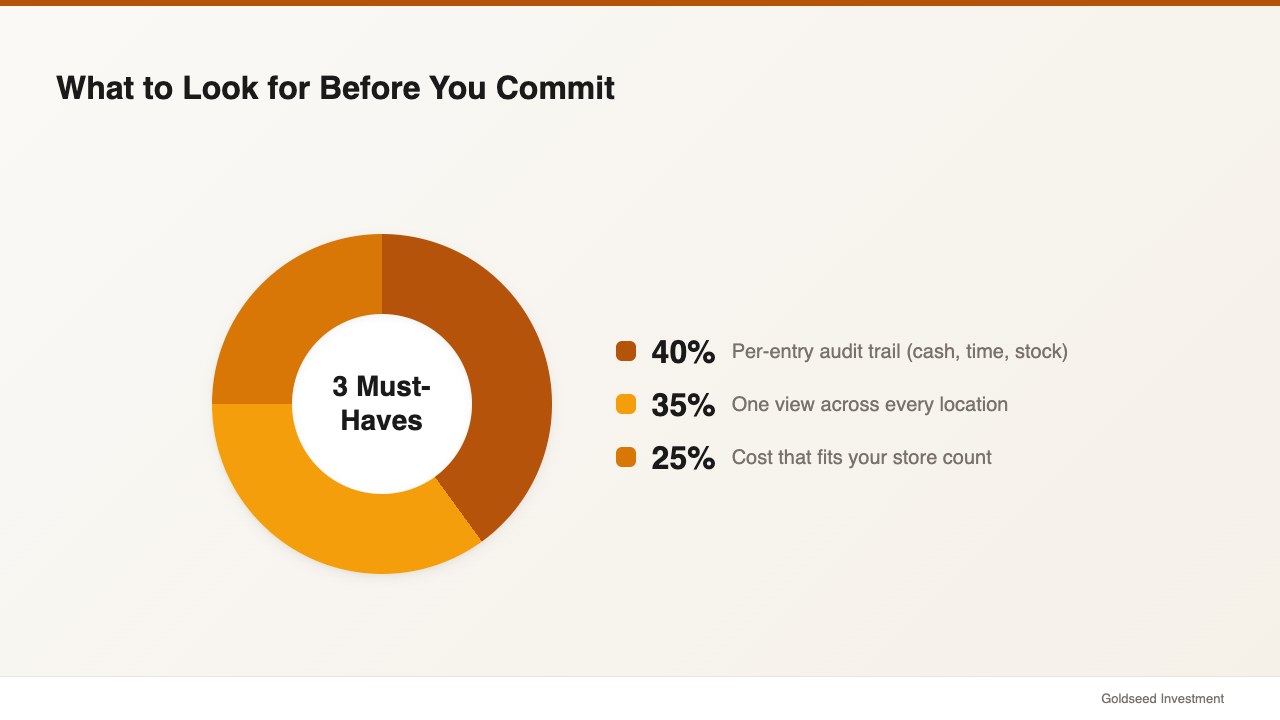
Look for three things before you commit to any system, because they separate real accountability from a prettier spreadsheet.
First, demand a per-entry audit trail on cash, time, and stock — not just totals. Second, confirm it works across every location in one view, since gaps tend to hide between stores. Third, check that it fits your budget at the store count you actually run; paying $40 or more per location often makes accountability the first thing owners cut. A plan that covers up to five stores for a flat $48 a month changes that math. For the reporting layer that turns these logs into clean financials, see our guide to retail financial management software.
FAQ
Q: What is a retail employee accountability system? A: It is a system that records who did what and when across time and attendance, cash handling, and inventory changes. The core feature is an audit trail — every clock-in, drawer entry, and stock adjustment is tied to a named staff member and a timestamp, so discrepancies can be traced rather than guessed at.
Q: How much does an employee accountability system cost for a small retail store? A: It varies by tool and store count. Standalone scheduling apps often start near $40 per location per month, and add-on payroll services run higher. An all-in-one back-office app starts around $18 a month for one store on a starter plan and $48 a month for up to five stores on a growth plan, which tends to undercut stitching three separate tools together.
Q: How do you hold employees accountable across multiple stores? A: Use one system that logs activity at every location and rolls it into a single dashboard. Trying to compare separate spreadsheets or apps per store is where most owners lose visibility. A unified log with QR clock-in, cash entry tracking, and inventory change history lets you spot a problem at any store the same day it happens.
Q: Does an accountability system replace my POS? A: No. A back-office accountability layer works alongside any POS — Square, Clover, Toast, or Lightspeed. Your POS handles the sale; the accountability system handles everything after it: payroll, cash logs, stock changes, and the audit trail your POS does not keep.
The Bottom Line
Accountability is not about trusting people less; it is about building a record so the honest majority is never under suspicion and the rare problem surfaces fast. Start by tracking clock-ins, cash entries, and stock changes against named staff and timestamps, then pull those records into one view across your stores. If your current setup would not let you trace a $40 shortfall to a single entry, that is the gap to close first. Storebase puts the three streams in one place — most owners are live in under 10 minutes with no credit card required. Start free with Team & Payroll → or Download on the App Store →