Convenience store owners who move to all-in-one software like Storebase replace 5 spreadsheets and 3 separate apps with one system — monthly close dropped from 3 hours to under 20 minutes and all stores in a single view.
Today, Priya Nair runs three convenience stores around Dallas and closes her monthly books in under 20 minutes from her phone. Sales, cash, payroll, and inventory for all three stores sit in one place, and she can see which location is up or down before anyone calls her. A year ago, none of that was true. She ran five spreadsheets and three different apps, closed the books near midnight, and never had a single view across her stores. The change came from switching to all-in-one convenience store management software — in her case, Storebase — that works on top of the POS she already had. This guide walks through why c-store owners end up with so many tools, what all-in-one software should actually do, and how the pieces fit for a small chain.
Why Do Convenience Store Owners End Up With So Many Apps?
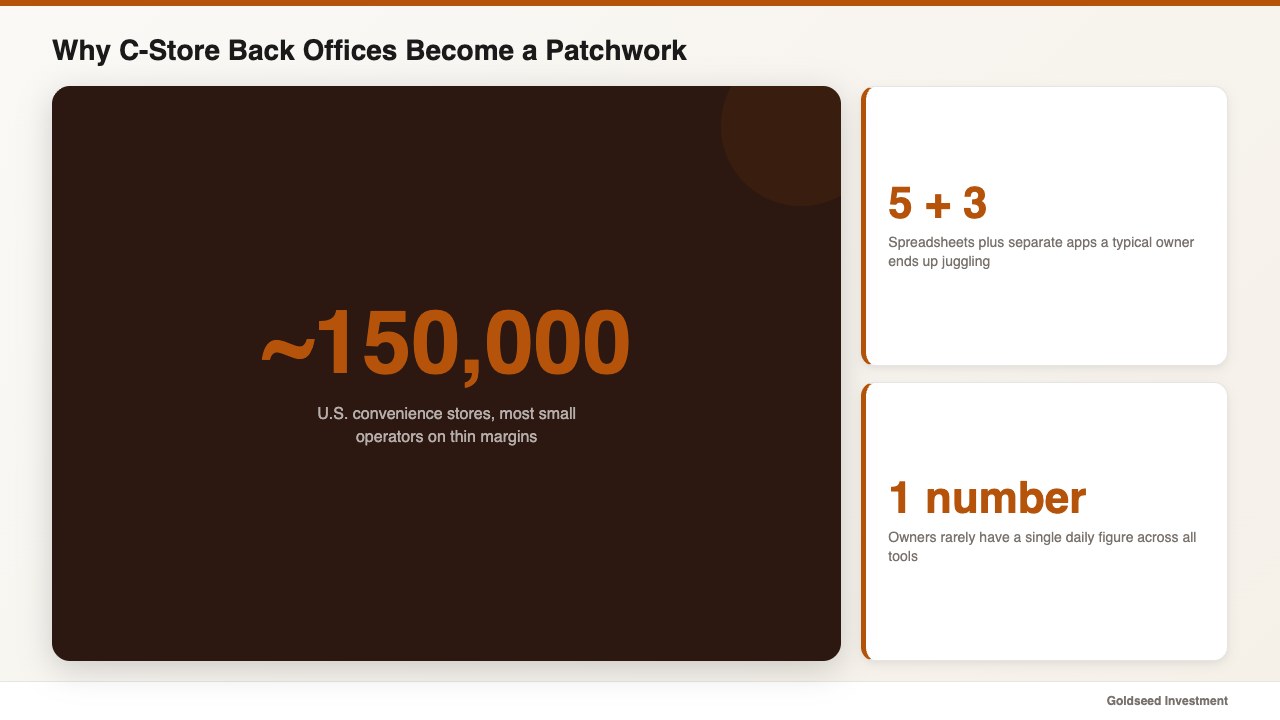
Most owners collect apps one problem at a time, not by choice. A scheduling app gets added the month a manager quits, a payroll service the month a paycheck is wrong, an inventory spreadsheet after a stockout — and within two years the back office is a patchwork of tools that do not talk to each other.
The convenience channel makes this worse. The National Association of Convenience Stores counts roughly 150,000 c-stores in the United States, most of them small operators running on thin margins where every hour of admin matters. When sales live in the POS, expenses in a spreadsheet, and payroll in a third app, nobody has a single number for the day. Reconciling them by hand tends to eat evenings that should belong to the family or to growing the business.
This is not a discipline problem; it is a tooling problem. No single app was built to tie the streams together, so owners stitch their own — and the seams are exactly where errors hide. For the financial side of where that patchwork leaks, our walkthrough on how to analyze retail store profitability shows how costs slip through the cracks between tools.
The Hidden Cost of Running Your Store on 5 Spreadsheets
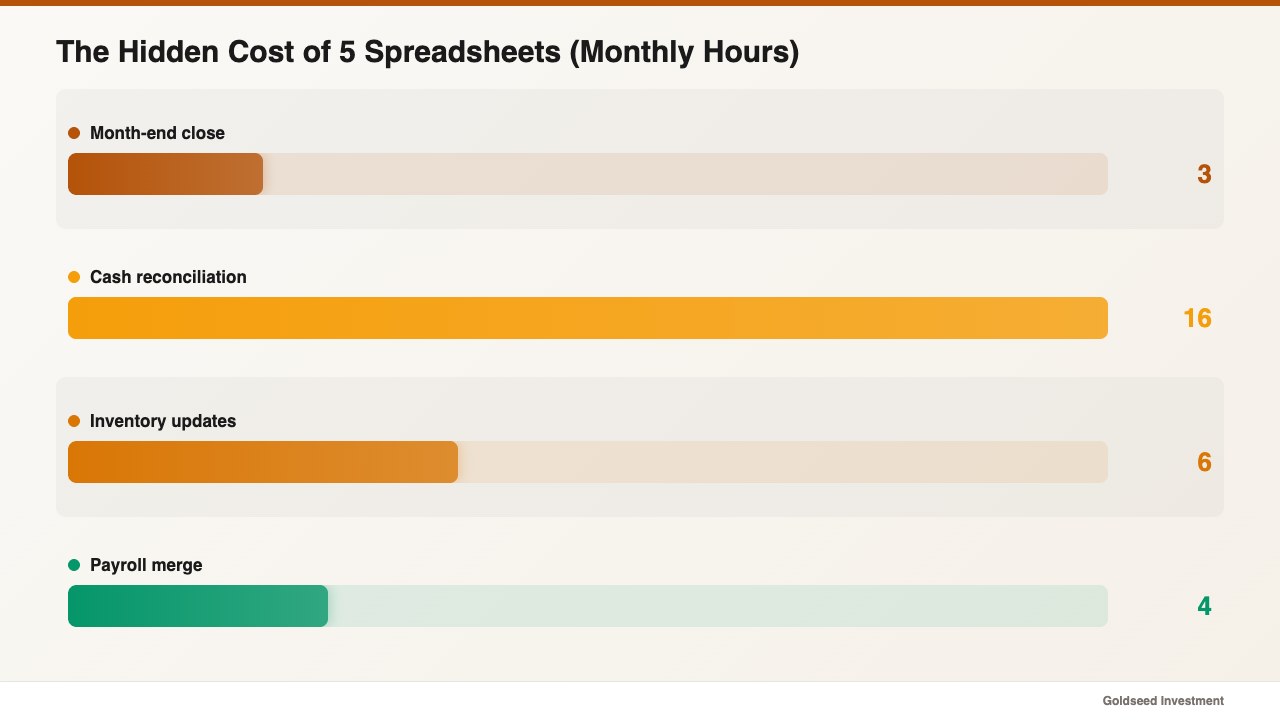
The hidden cost of a spreadsheet-and-apps setup is time, and it adds up faster than most owners expect. Priya was spending close to three hours every month-end merging POS exports with expense sheets, then another two days a month chasing cash drawers that came up short with no entry log to explain them.
One operator who managed several locations described the daily reality this way:
> “Every evening I pulled data from all these programs into Excel, refined it, drew out the insights, and made decisions. The refining step alone took so long that there was no energy left to actually decide.”
The math is unforgiving. Three hours of monthly close plus two days of cash reconciliation, across a slow season, is the kind of payroll leakage and owner-time drain that quietly caps how many stores you can run. A high turnover rate adds to it, and the untracked gaps eat into gross margin as small COGS and labor errors pile up unnoticed. Industry loss data backs the risk: the National Retail Federation puts annual retail shrink at $112.1 billion, roughly 1.6% of sales, and a back office that cannot trace a discrepancy tends to absorb that loss instead of catching it. Pull your own month-end routine and add up the hours; in many cases the total surprises people.
What Should All-in-One Convenience Store Software Actually Do?
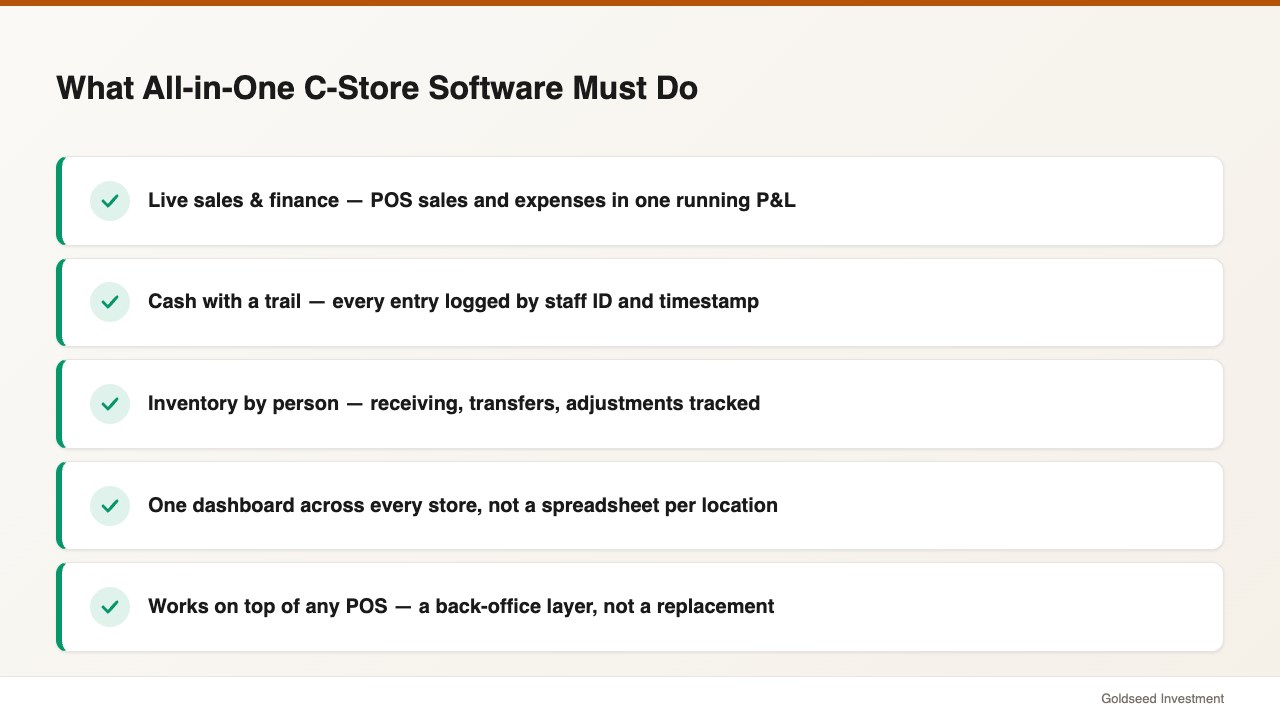
All-in-one convenience store software should put sales, cash, inventory, and payroll under one login and tie every entry to a person and a time. Anything less is just a prettier spreadsheet.
- Live sales and finance. Pull POS sales and logged expenses into a running profit-and-loss view, so monthly close is a glance, not a night.
- Cash with a trail. Log every drawer, safe, and deposit entry with staff ID and timestamp, and flag the moment recorded balance and actual balance drift apart.
- Inventory by person. Record every receiving, transfer, and adjustment against the staff member who made it, so a stock gap has an answer.
- One view across stores. Roll every location into a single dashboard instead of one spreadsheet per store.
A key point for c-store owners: good all-in-one software is a back-office layer, not a POS replacement. It should work alongside Square, Clover, Toast, or Lightspeed — your POS handles the sale, and the back office handles everything after it. Ask any vendor whether their tool replaces or sits on top of your POS before you commit.
How Do All-in-One Tools Compare for a C-Store Today?
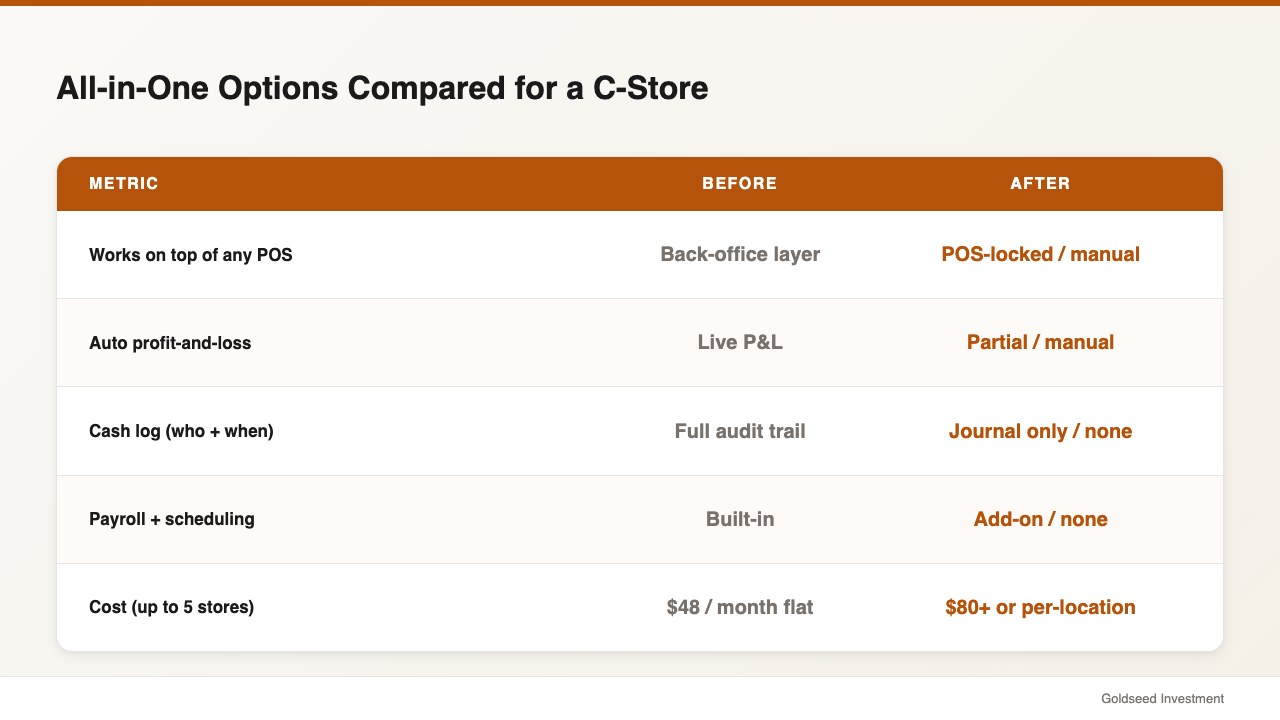
Owners usually weigh a unified back-office app against the patchwork they already run. The honest comparison is not feature-by-feature glamour; it is whether the streams connect and what it costs at your store count.
| Feature | Storebase | Square | QuickBooks | Spreadsheets |
|---|---|---|---|---|
| Works on top of any POS | ✅ Back-office layer | ⚠️ Square POS only | ⚠️ Limited sync | ❌ Manual export |
| Auto profit-and-loss | ✅ Live P&L | ❌ No | ✅ Yes | ❌ Manual |
| Cash log (who + when) | ✅ Full audit trail | ❌ No | ⚠️ Journal only | ❌ Manual |
| Payroll + scheduling | ✅ Built-in | ❌ Add-on | ❌ No | ❌ Manual |
| Multi-store dashboard | ✅ Included | ⚠️ Higher tier | ⚠️ Per-entity | ❌ Separate files |
| Monthly cost | $18 (Starter, 1 store) / $48 (Growth, up to 5 stores) | $0 + add-ons | $80+/mo | Free (20+ hrs/mo labor) |
Source: vendor pricing pages, 2025–2026.
The pattern is clear: POS tools sell well and inventory or accounting tools each do one job, but none of them connect sales, cash, payroll, and stock into a single view the way a dedicated back-office layer does. That gap is the whole reason all-in-one software exists.
How Priya Uses Storebase to Run Three Stores From One App
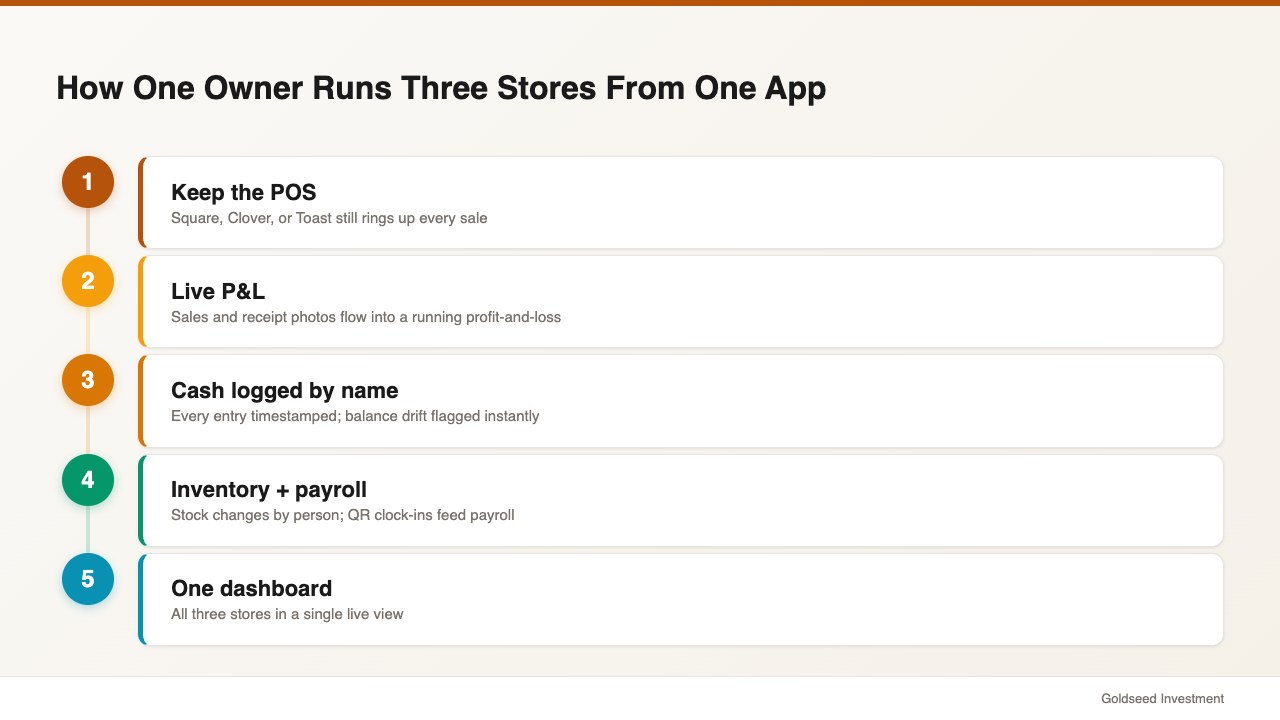
Priya rebuilt her back office on three connected parts, and the payoff showed up in the first close.
First, a live profit-and-loss. Through the Sales & Finance module, POS sales and logged expenses flow into a running P&L; her month-end close went from 3 hours to under 20 minutes. Staff snap a photo of a receipt and the expense is captured — no end-of-month pile to sort.
Second, cash with a name on every entry. With the Cash Management module, every drawer and safe movement is stored with staff ID and timestamp, and the system flags when recorded and actual balances diverge. Cash reconciliation dropped from two days a month to a few minutes, because the trail points straight to the entry.
Third, inventory and payroll in the same place. Stock changes are logged by person, and QR clock-ins feed payroll automatically, so the apps Priya used to juggle collapse into one. Across her three stores, month-end admin reduced from roughly 12 hours to under 2, and she finally has a single view of every location.
Because it sits on top of her existing POS rather than replacing it, the switch did not disrupt the front counter at all. The five spreadsheets and three apps that used to define her evenings folded into one login, and the time she got back went straight into planning a fourth location.
What Should You Check Before You Switch Systems?
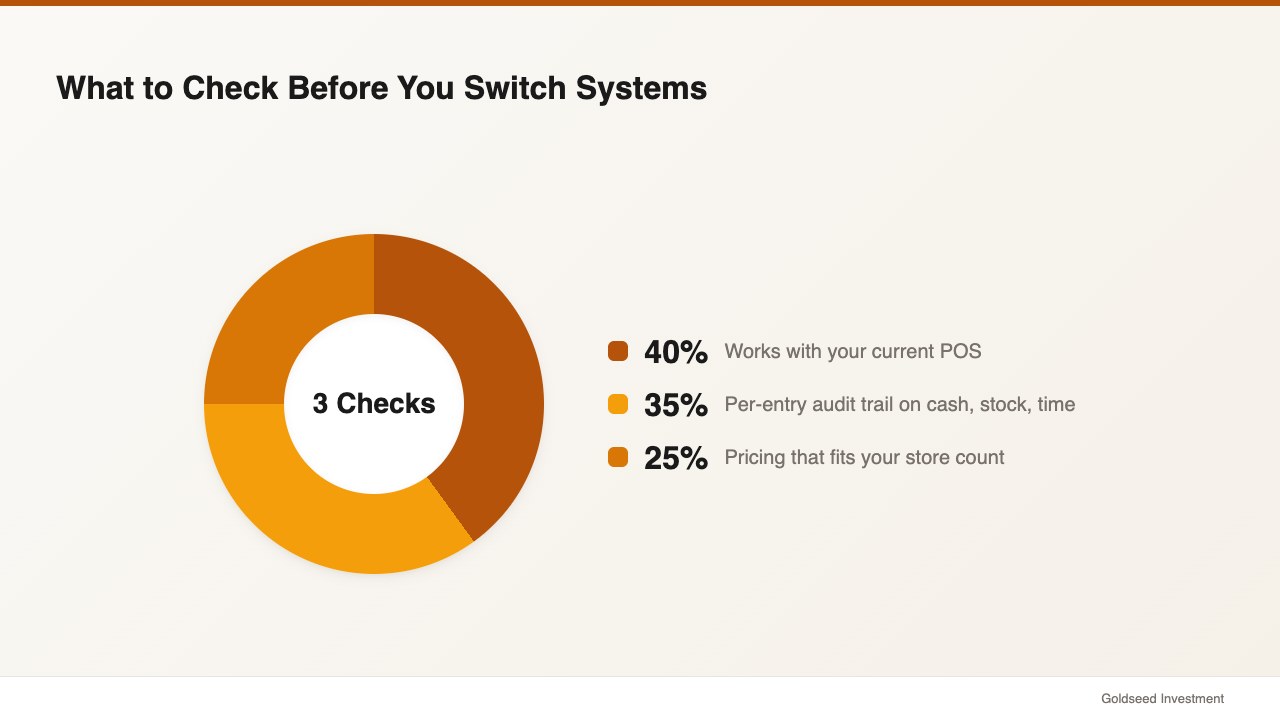
Check three things before you move your stores onto any all-in-one system. First, confirm it works with your current POS so you are not forced into a costly counter migration. Second, demand a per-entry audit trail on cash, inventory, and time — totals alone do not create accountability. Third, price it at the number of stores you actually run; a tool that charges per location can make a three-store chain far more expensive than a flat plan covering up to five stores for $48 a month.
Start by listing every spreadsheet and app you touch in a normal week, then map each one to a single system. For the reporting end of that consolidation, see our guide to retail financial management software, and for the stock-accountability side, our walkthrough on building an inventory accountability tracking system.
FAQ
Q: What is the best all-in-one convenience store management software? A: The best fit depends on store count and whether you want to keep your POS. An all-in-one back-office app that layers on top of any POS — handling sales, cash, inventory, and payroll in one place — tends to suit small c-store chains better than a single-purpose POS or accounting tool, because it connects streams that would otherwise live in separate apps.
Q: How much does convenience store management software cost? A: Pricing ranges widely. Single-purpose tools often run $40 or more per location, and accounting software starts near $80 a month. An all-in-one back-office option starts around $18 a month for one store and $48 a month for up to five stores, which usually undercuts stitching three separate tools together.
Q: Does all-in-one software replace my POS? A: No. A back-office layer works alongside your POS — Square, Clover, Toast, or Lightspeed — rather than replacing it. The POS rings up sales; the back-office software handles payroll, cash logs, inventory, and your profit-and-loss after the sale.
Q: Can one system really manage multiple convenience stores? A: Yes. The point of a multi-store dashboard is to roll every location into one live view so you can compare performance and catch cash or inventory issues the same day. Running a separate spreadsheet per store is exactly the patchwork all-in-one software is meant to retire.
The Bottom Line
All-in-one convenience store management software earns its place by ending the nightly data-merge and giving you one honest view of every store. Map your spreadsheets and apps to a single system, insist on a per-entry audit trail, and make sure it fits both your POS and your store count. If your month-end still ends near midnight, Storebase folds sales, cash, inventory, and payroll into one app — most owners are live in under 10 minutes, no credit card required. Start free with Sales & Finance → or Download on the App Store →